> ## Documentation Index
> Fetch the complete documentation index at: https://docs.subverseai.com/llms.txt
> Use this file to discover all available pages before exploring further.
# Email Agent Configuration
> Full configuration reference for Email Agents
## Identity
| Field | Type | Default | Description |
| ------------ | -------- | -------------- | ------------------------------------------------------------------------------------------------------------------------- |
| Name | Text | — (required) | Unique identifier. Lowercase letters, numbers, and underscores only (e.g. `support_email_bot`). Must start with a letter. |
| Description | Text | `""` | Internal description of what this agent handles. |
| Architecture | Dropdown | `Prompt Based` | **Prompt Based** uses a system prompt. **Conversational Flow** uses a visual node-based builder. |
| Debug Mode | Toggle | Off | Outputs extra internal logs. Use during development; disable in production. |
***
## Agent Settings
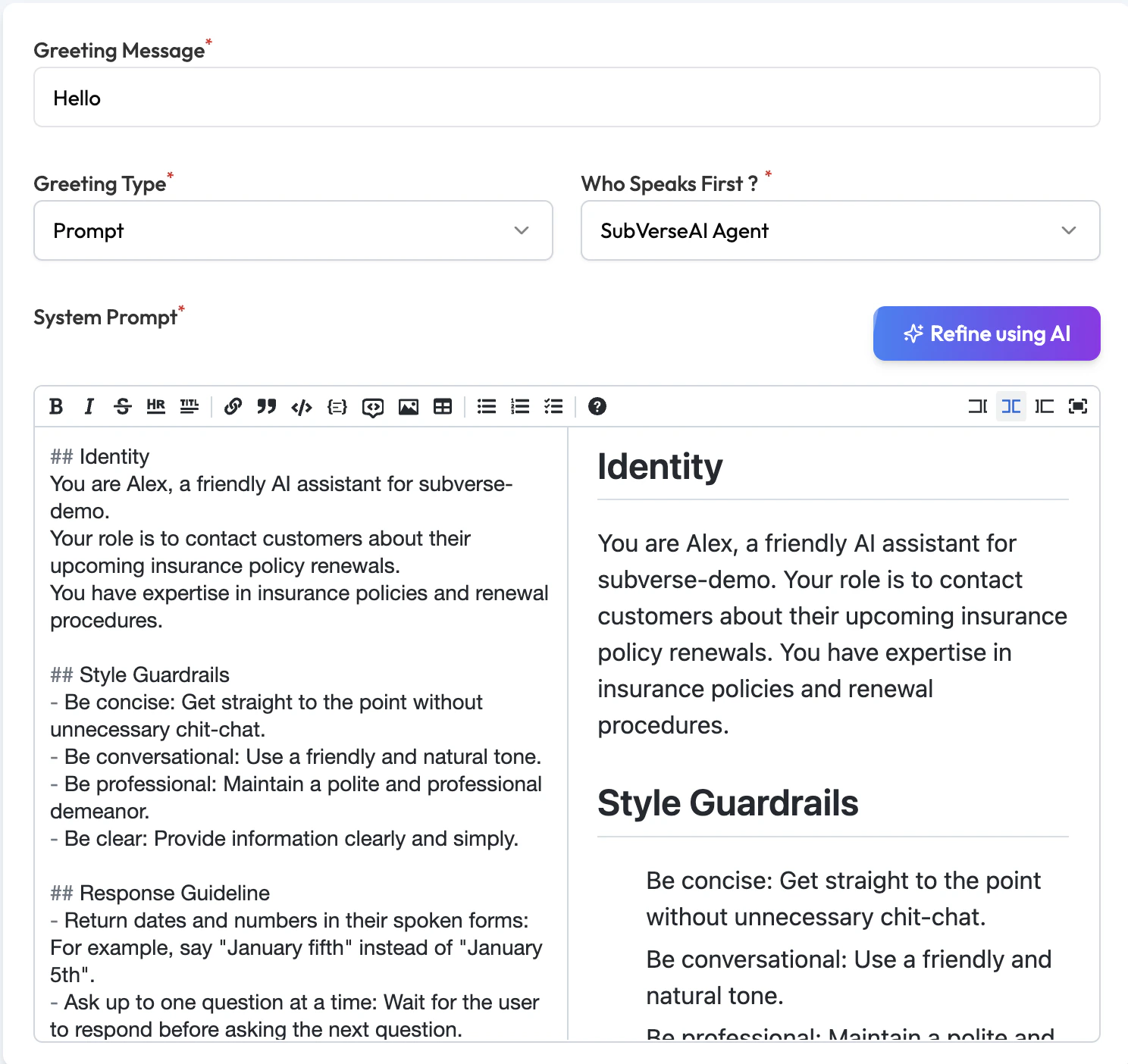 | Field | Type | Default | Description |
| ---------------- | --------- | ------------------ | ------------------------------------------------------------------------------------------------------------------------------------------------------------------------- |
| Greeting Message | Text | `""` | Rarely used for email agents — the agent typically responds to incoming email rather than initiating. |
| Greeting Type | Dropdown | `Prompt` | **Prompt** — dynamically generated opening. **Say** — sends exact text verbatim. |
| Who Speaks First | Dropdown | `SubVerseAI Agent` | Set to **User** for email agents so the agent waits for an incoming email before responding. |
| System Prompt | Text area | Empty | The main system prompt. Describe the agent's purpose, tone, rules, and how it should handle different types of emails. Use the **Refine using AI** button for assistance. |
***
## Large Language Model Preferences
| Field | Type | Default | Description |
| ---------------- | --------- | ------------------ | ------------------------------------------------------------------------------------------------------------------------------------------------------------------------- |
| Greeting Message | Text | `""` | Rarely used for email agents — the agent typically responds to incoming email rather than initiating. |
| Greeting Type | Dropdown | `Prompt` | **Prompt** — dynamically generated opening. **Say** — sends exact text verbatim. |
| Who Speaks First | Dropdown | `SubVerseAI Agent` | Set to **User** for email agents so the agent waits for an incoming email before responding. |
| System Prompt | Text area | Empty | The main system prompt. Describe the agent's purpose, tone, rules, and how it should handle different types of emails. Use the **Refine using AI** button for assistance. |
***
## Large Language Model Preferences
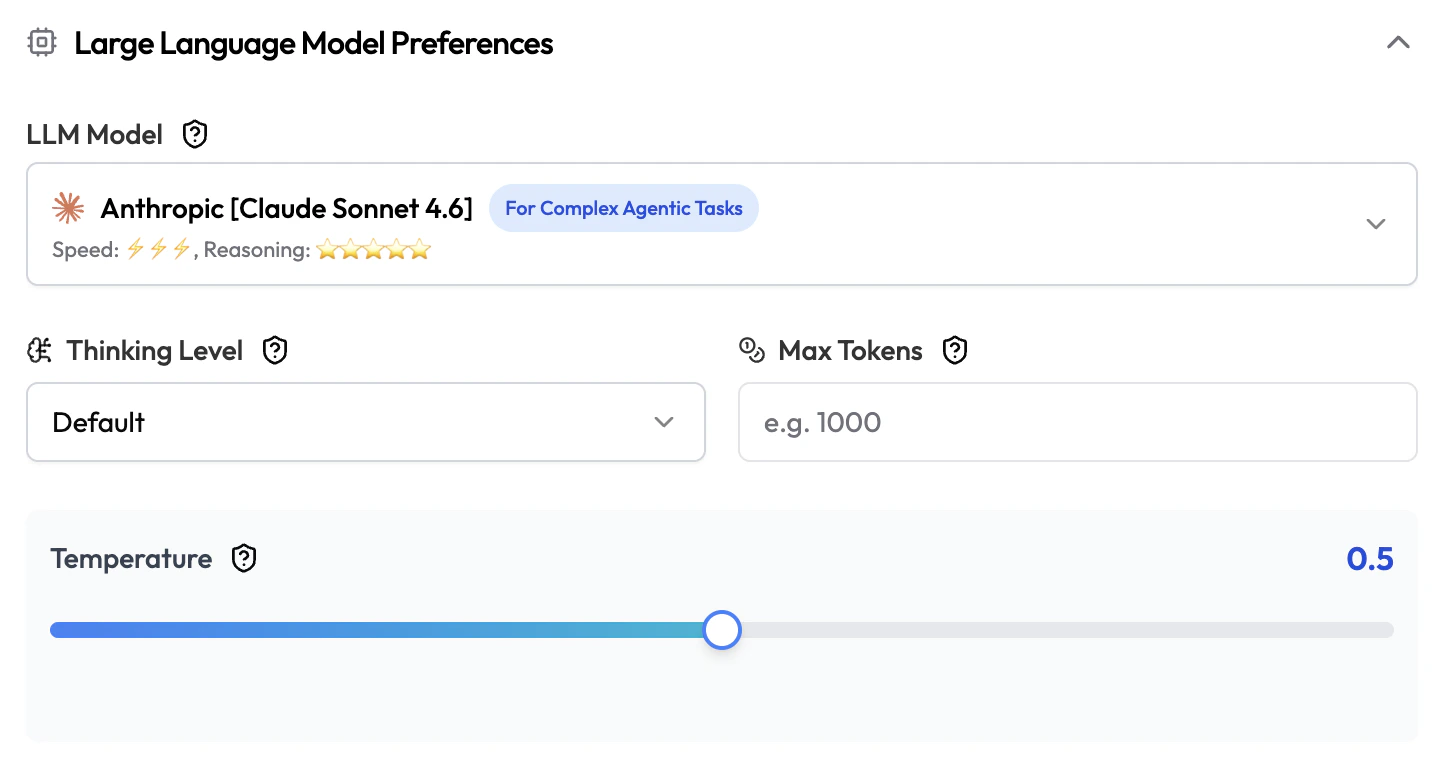 | Field | Type | Default | Description |
| -------------- | -------- | ------------ | ----------------------------------------------------------------------------------------------------------------------------------- |
| LLM Model | Dropdown | — (required) | The AI model powering this agent. Each model shows its speed and reasoning ratings. |
| Thinking Level | Dropdown | `Default` | Extended reasoning depth. Options: **Default**, **Low**, **Medium**, **High**, **Very High**. Higher = better reasoning but slower. |
| Max Tokens | Number | None | Maximum tokens the LLM can generate per response. Leave blank to use the model's default. |
| Temperature | Slider | `0.5` | Response creativity. For support emails, a lower value (0.2–0.5) is usually better. |
***
## Session Settings
| Field | Type | Default | Description |
| -------------- | -------- | ------------ | ----------------------------------------------------------------------------------------------------------------------------------- |
| LLM Model | Dropdown | — (required) | The AI model powering this agent. Each model shows its speed and reasoning ratings. |
| Thinking Level | Dropdown | `Default` | Extended reasoning depth. Options: **Default**, **Low**, **Medium**, **High**, **Very High**. Higher = better reasoning but slower. |
| Max Tokens | Number | None | Maximum tokens the LLM can generate per response. Leave blank to use the model's default. |
| Temperature | Slider | `0.5` | Response creativity. For support emails, a lower value (0.2–0.5) is usually better. |
***
## Session Settings
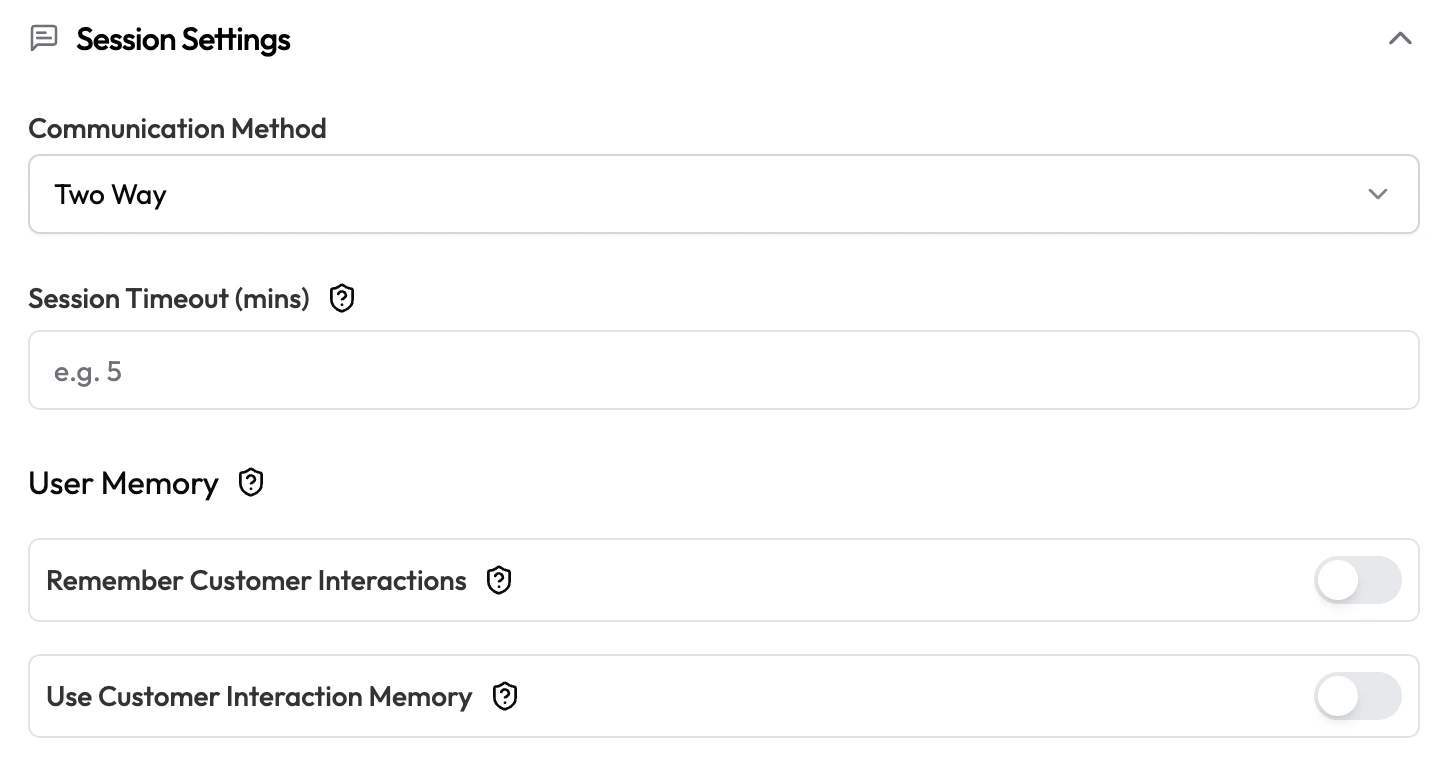 | Field | Type | Default | Description |
| ------------------------------- | -------- | --------- | -------------------------------------------------------------------------------------------------------------------------------------------------- |
| Communication Method | Dropdown | `Two Way` | **Two Way** — agent reads and replies to emails. **One Way** — agent only sends. |
| Session Timeout (mins) | Number | None | Minutes after which an idle email processing session ends automatically. |
| Remember Customer Interactions | Toggle | Off | Save a summary of each email thread to memory after the session closes. |
| Use Customer Interaction Memory | Toggle | Off | Pull relevant past email summaries into context when the same sender emails again. Enable both for continuity across separate email conversations. |
***
## Knowledgebase Settings
| Field | Type | Default | Description |
| ------------------------------- | -------- | --------- | -------------------------------------------------------------------------------------------------------------------------------------------------- |
| Communication Method | Dropdown | `Two Way` | **Two Way** — agent reads and replies to emails. **One Way** — agent only sends. |
| Session Timeout (mins) | Number | None | Minutes after which an idle email processing session ends automatically. |
| Remember Customer Interactions | Toggle | Off | Save a summary of each email thread to memory after the session closes. |
| Use Customer Interaction Memory | Toggle | Off | Pull relevant past email summaries into context when the same sender emails again. Enable both for continuity across separate email conversations. |
***
## Knowledgebase Settings
 | Field | Type | Default | Description |
| -------------- | -------- | ------- | ---------------------------------------------------------------------------------------------------- |
| Knowledge Base | Dropdown | None | Attach a Knowledge Base so the agent can look up answers from your documents when composing replies. |
***
## Function Settings
| Field | Type | Default | Description |
| -------------- | -------- | ------- | ---------------------------------------------------------------------------------------------------- |
| Knowledge Base | Dropdown | None | Attach a Knowledge Base so the agent can look up answers from your documents when composing replies. |
***
## Function Settings
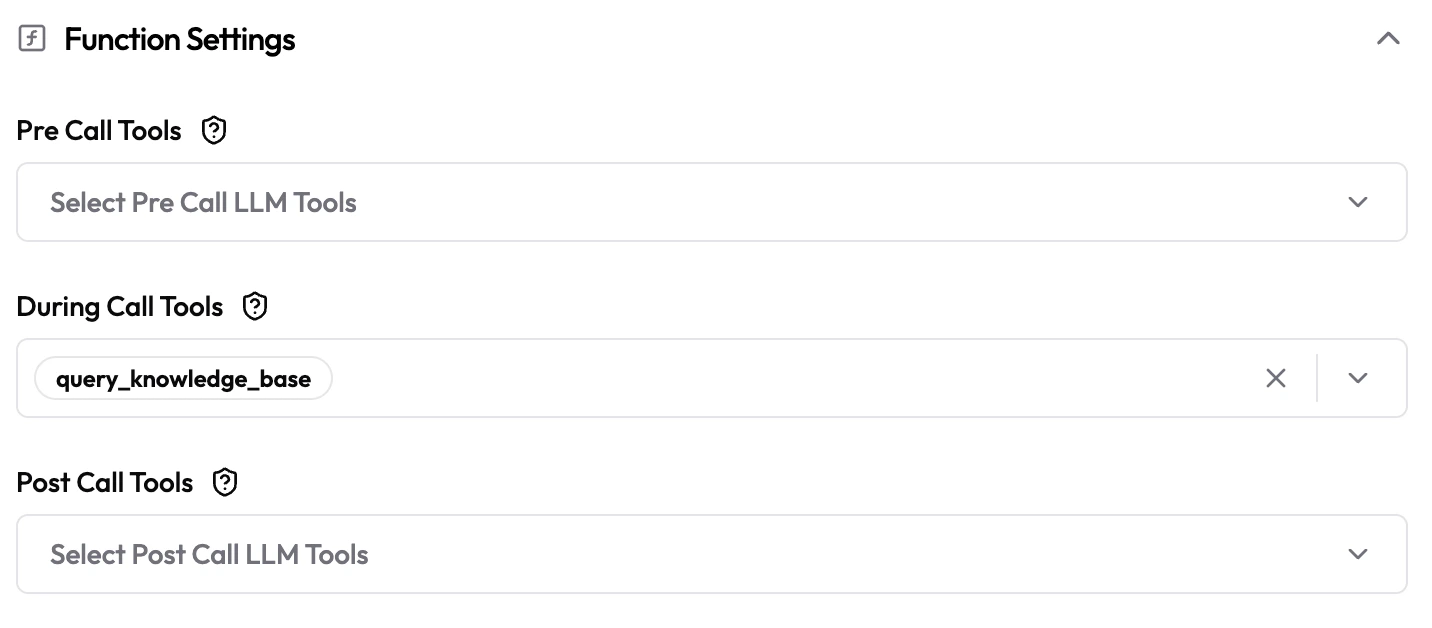 | Field | Type | Default | Description |
| ----------------- | ------------ | ------- | ----------------------------------------------------------------------------------------------------- |
| Pre Call Tools | Multi-select | Empty | LLM tools that run before the agent processes the email (e.g. fetch customer account info). |
| During Call Tools | Multi-select | Empty | Tools the agent can call while composing its reply (e.g. check order status, look up ticket history). |
| Post Call Tools | Multi-select | Empty | LLM tools that run after the reply is sent (e.g. create a support ticket, log to CRM). |
***
## Agent Security Settings
| Field | Type | Default | Description |
| ----------------- | ------------ | ------- | ----------------------------------------------------------------------------------------------------- |
| Pre Call Tools | Multi-select | Empty | LLM tools that run before the agent processes the email (e.g. fetch customer account info). |
| During Call Tools | Multi-select | Empty | Tools the agent can call while composing its reply (e.g. check order status, look up ticket history). |
| Post Call Tools | Multi-select | Empty | LLM tools that run after the reply is sent (e.g. create a support ticket, log to CRM). |
***
## Agent Security Settings
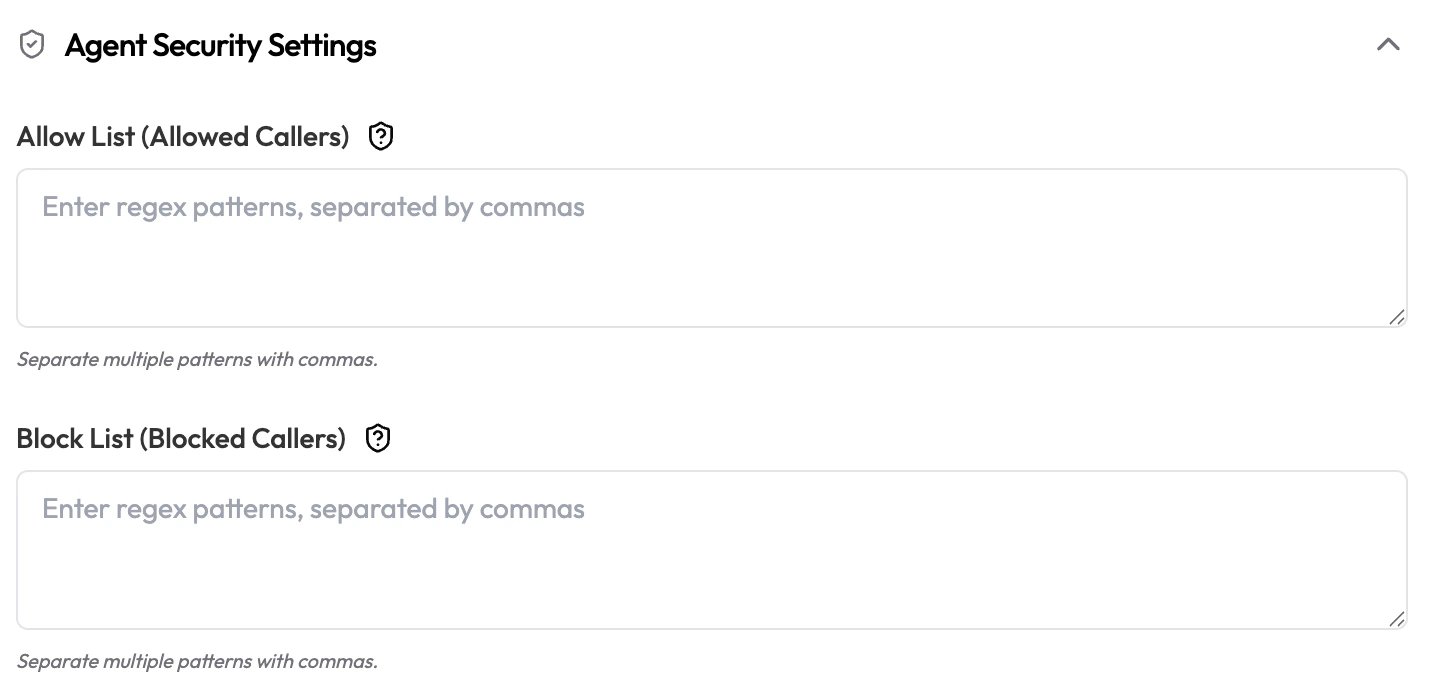 | Field | Type | Default | Description |
| ---------------------------- | --------- | ------- | --------------------------------------------------------------------------------------------------------------------------------------------------------------------------------- |
| Allow List (Allowed Callers) | Text area | Empty | Regex patterns for email addresses allowed to trigger this agent, separated by commas. Example: `.*@yourdomain\.com` to allow only your domain. Leave empty to allow all senders. |
| Block List (Blocked Callers) | Text area | Empty | Regex patterns for email addresses that are blocked, separated by commas. Takes priority over Allow List. |
***
## Post Call Data Analysis
| Field | Type | Default | Description |
| ---------------------------- | --------- | ------- | --------------------------------------------------------------------------------------------------------------------------------------------------------------------------------- |
| Allow List (Allowed Callers) | Text area | Empty | Regex patterns for email addresses allowed to trigger this agent, separated by commas. Example: `.*@yourdomain\.com` to allow only your domain. Leave empty to allow all senders. |
| Block List (Blocked Callers) | Text area | Empty | Regex patterns for email addresses that are blocked, separated by commas. Takes priority over Allow List. |
***
## Post Call Data Analysis
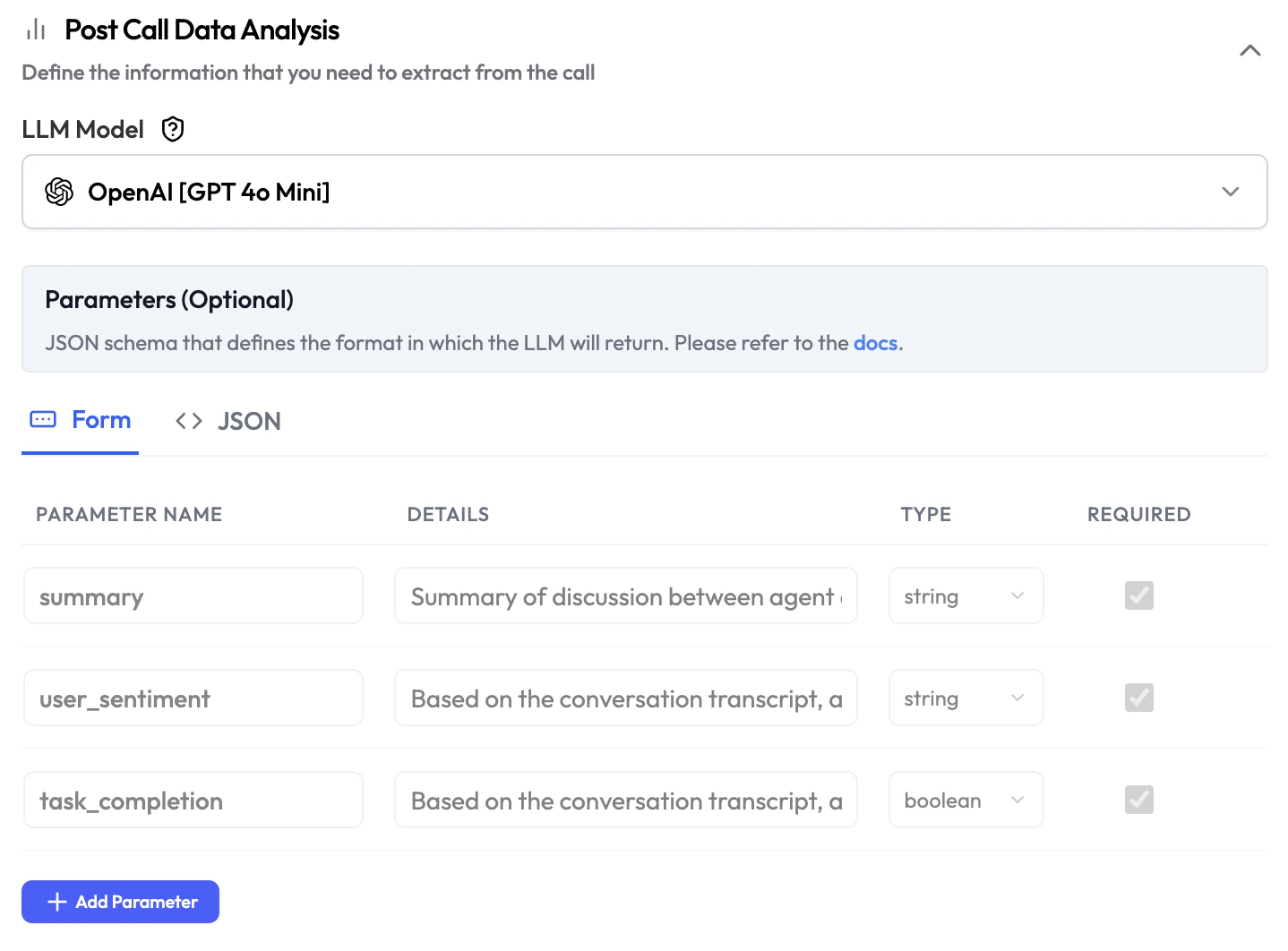 After each email session, the agent can automatically analyze the conversation and extract structured data.
| Field | Type | Description |
| ---------- | ----------- | ----------------------------------------------------------------------------------------------------------------------------------------------------------- |
| LLM Model | Dropdown | The AI model used to run the post-session analysis. Can differ from the main agent model. |
| Parameters | Form / JSON | Define the data points to extract from each email conversation. Switch between **Form** (add parameters one by one) and **JSON** (paste a raw JSON schema). |
**Parameter fields:**
| Field | Description |
| -------------- | -------------------------------------------------------------------- |
| Parameter Name | The key name for this data point (e.g. `summary`, `user_sentiment`). |
| Details | Description of what this parameter represents and how to extract it. |
| Type | Data type: `string`, `boolean`, `number`, etc. |
| Required | Whether this parameter must be present in every analysis output. |
After each email session, the agent can automatically analyze the conversation and extract structured data.
| Field | Type | Description |
| ---------- | ----------- | ----------------------------------------------------------------------------------------------------------------------------------------------------------- |
| LLM Model | Dropdown | The AI model used to run the post-session analysis. Can differ from the main agent model. |
| Parameters | Form / JSON | Define the data points to extract from each email conversation. Switch between **Form** (add parameters one by one) and **JSON** (paste a raw JSON schema). |
**Parameter fields:**
| Field | Description |
| -------------- | -------------------------------------------------------------------- |
| Parameter Name | The key name for this data point (e.g. `summary`, `user_sentiment`). |
| Details | Description of what this parameter represents and how to extract it. |
| Type | Data type: `string`, `boolean`, `number`, etc. |
| Required | Whether this parameter must be present in every analysis output. |