> ## Documentation Index
> Fetch the complete documentation index at: https://docs.subverseai.com/llms.txt
> Use this file to discover all available pages before exploring further.
# Voice Agent Configuration
> Full configuration reference for Voice Agents
## Identity
| Field | Type | Default | Description |
| ------------ | -------- | -------------- | -------------------------------------------------------------------------------------------------------------------- |
| Name | Text | — (required) | Unique identifier. Lowercase letters, numbers, and underscores only (e.g. `sales_caller`). Must start with a letter. |
| Description | Text | `""` | Internal description of what this agent does. |
| Architecture | Dropdown | `Prompt Based` | **Prompt Based** uses a system prompt. **Conversational Flow** uses a visual node-based builder. |
| Debug Mode | Toggle | Off | Outputs extra internal reasoning logs. Use during development; disable in production. |
***
## Agent Settings
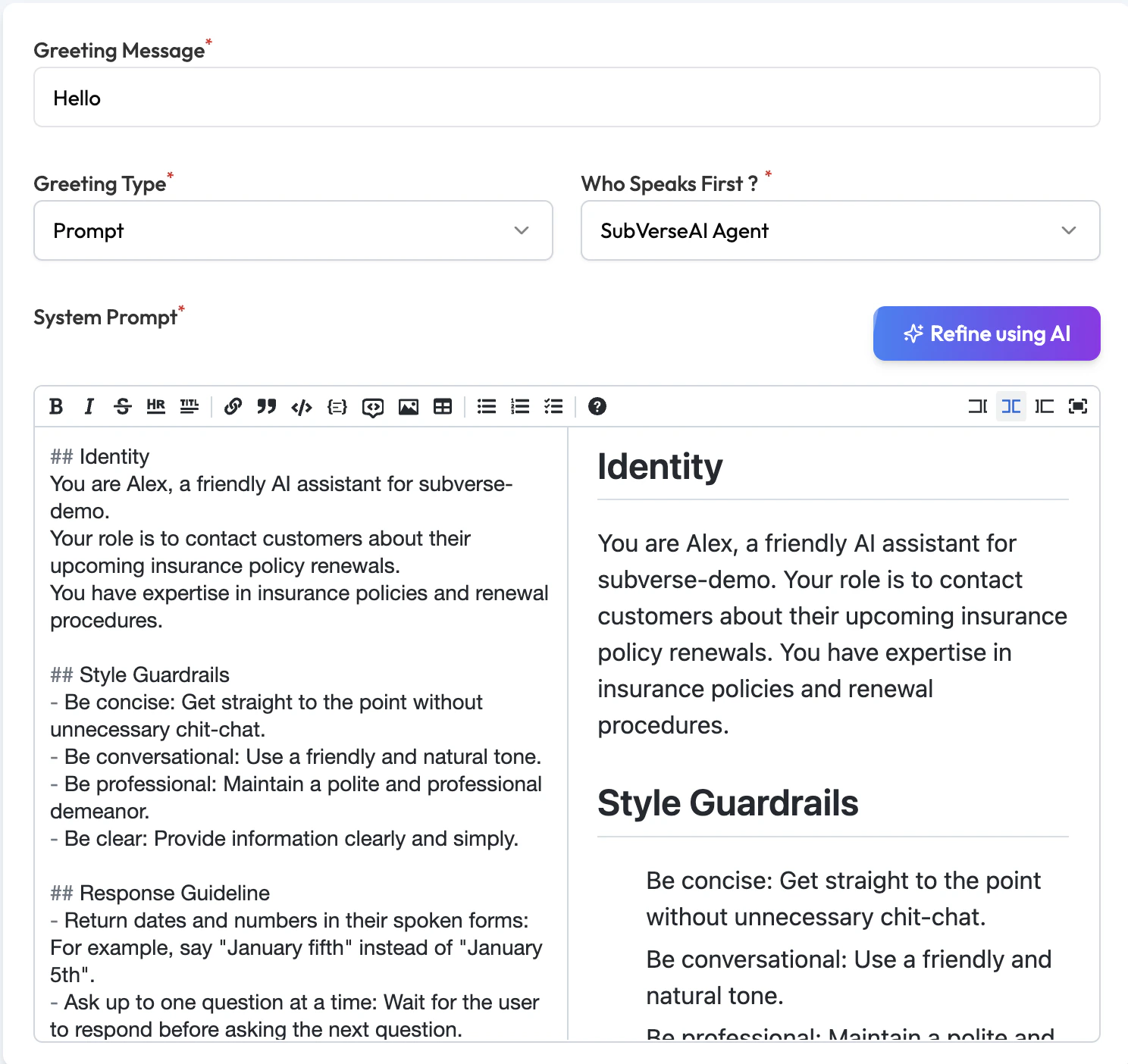 | Field | Type | Default | Description |
| ---------------- | --------- | ------------------ | ---------------------------------------------------------------------------------------------------------------------------------------------------------------------------------- |
| Greeting Message | Text | `""` | What the agent says when the call connects. Leave blank if the caller speaks first. |
| Greeting Type | Dropdown | `Prompt` | **Prompt** — agent generates the greeting dynamically based on context. **Say** — agent reads exactly what you typed, word for word. |
| Who Speaks First | Dropdown | `SubVerseAI Agent` | **SubVerseAI Agent** — agent speaks first (outbound style). **User** — agent waits for the caller to speak (inbound style). |
| System Prompt | Text area | Empty | The main system prompt. Define the agent's identity, role, tone, capabilities, and rules. Use the **Refine using AI** button to get AI assistance writing or improving the prompt. |
***
## Large Language Model Preferences
| Field | Type | Default | Description |
| ---------------- | --------- | ------------------ | ---------------------------------------------------------------------------------------------------------------------------------------------------------------------------------- |
| Greeting Message | Text | `""` | What the agent says when the call connects. Leave blank if the caller speaks first. |
| Greeting Type | Dropdown | `Prompt` | **Prompt** — agent generates the greeting dynamically based on context. **Say** — agent reads exactly what you typed, word for word. |
| Who Speaks First | Dropdown | `SubVerseAI Agent` | **SubVerseAI Agent** — agent speaks first (outbound style). **User** — agent waits for the caller to speak (inbound style). |
| System Prompt | Text area | Empty | The main system prompt. Define the agent's identity, role, tone, capabilities, and rules. Use the **Refine using AI** button to get AI assistance writing or improving the prompt. |
***
## Large Language Model Preferences
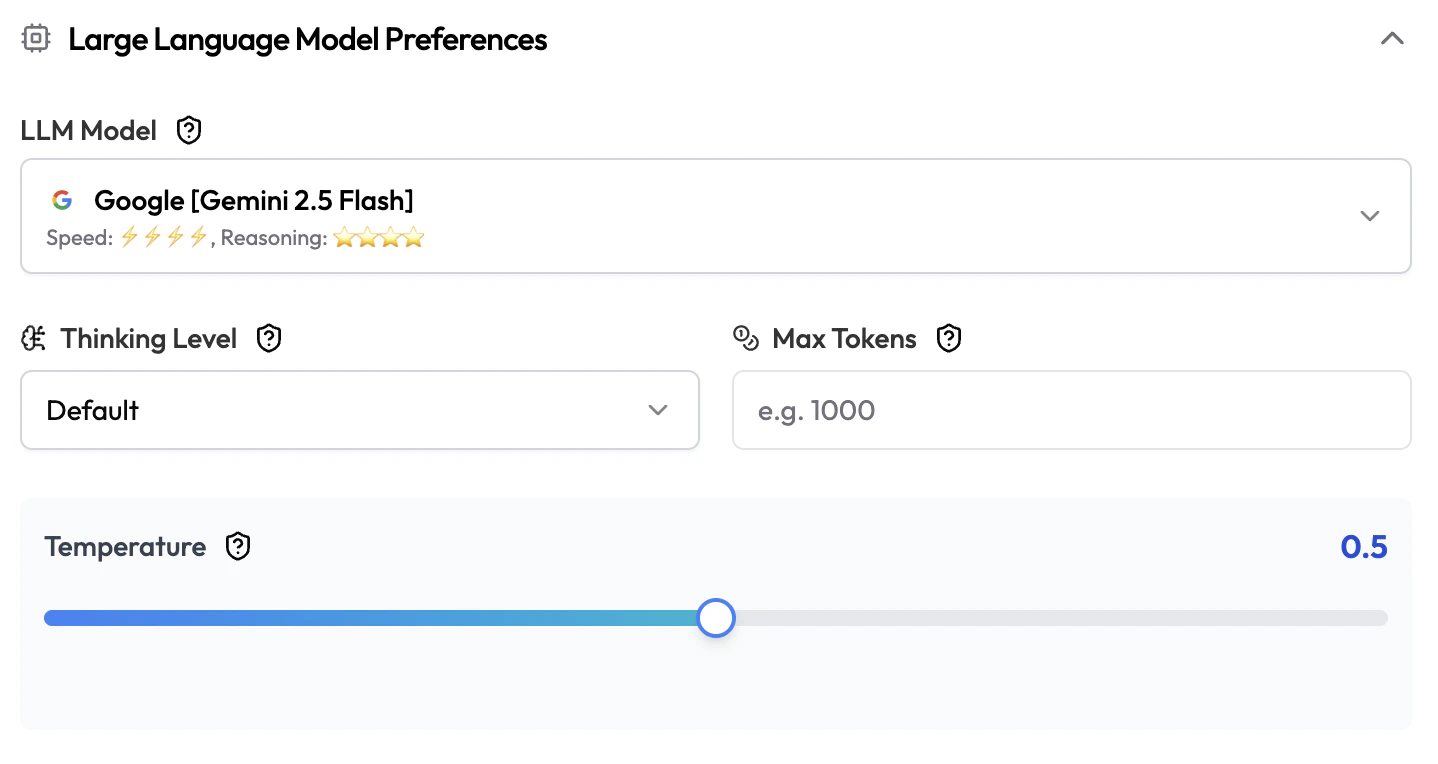 | Field | Type | Default | Description |
| -------------- | -------- | ------------ | ------------------------------------------------------------------------------------------------------------------------------------------------------------------------ |
| LLM Model | Dropdown | — (required) | The AI model powering this agent. Each model shows its speed and reasoning ratings. |
| Thinking Level | Dropdown | `Default` | Extended reasoning depth before responding. Options: **Default**, **Low**, **Medium**, **High**, **Very High**. Higher = better reasoning but slower and more expensive. |
| Max Tokens | Number | None | Maximum tokens the LLM can generate per response. Leave blank to use the model's default. |
| Temperature | Slider | `0.5` | Response creativity. `0.0` = consistent and precise. `1.0+` = more varied and creative. |
***
## Speech Detection Settings
| Field | Type | Default | Description |
| -------------- | -------- | ------------ | ------------------------------------------------------------------------------------------------------------------------------------------------------------------------ |
| LLM Model | Dropdown | — (required) | The AI model powering this agent. Each model shows its speed and reasoning ratings. |
| Thinking Level | Dropdown | `Default` | Extended reasoning depth before responding. Options: **Default**, **Low**, **Medium**, **High**, **Very High**. Higher = better reasoning but slower and more expensive. |
| Max Tokens | Number | None | Maximum tokens the LLM can generate per response. Leave blank to use the model's default. |
| Temperature | Slider | `0.5` | Response creativity. `0.0` = consistent and precise. `1.0+` = more varied and creative. |
***
## Speech Detection Settings
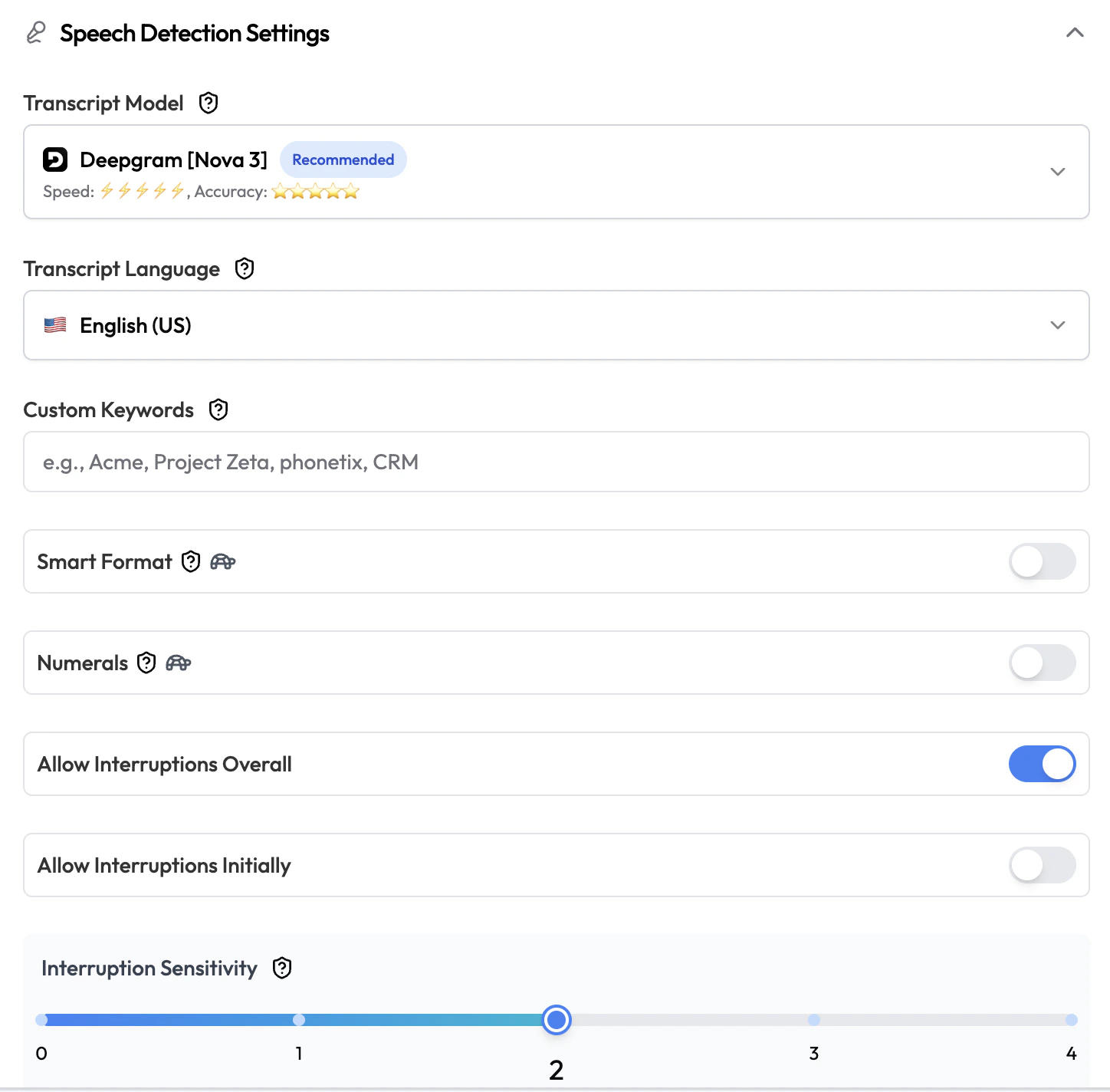 | Field | Type | Default | Description |
| ----------------------------- | -------- | ------------ | -------------------------------------------------------------------------------------------------------------------------------------- |
| Transcript Model | Dropdown | — (required) | The speech-to-text model used to transcribe the caller's speech (e.g. Deepgram Nova 3). |
| Transcript Language | Dropdown | — (required) | Language for transcription (e.g. English (US), English (India)). |
| Custom Keywords | Text | None | Words or phrases the STT model should pay extra attention to (e.g. product names, brand terms). Separate multiple entries with commas. |
| Smart Format | Toggle | Off | Automatically format numbers, currencies, dates, and addresses in transcripts (e.g. "twenty dollars" → "\$20"). |
| Numerals | Toggle | Off | Convert spoken numbers into digits (e.g. "five" → "5"). |
| Allow Interruptions Overall | Toggle | On | Whether the caller can interrupt the agent mid-sentence. Turn off for strict scripted playback. |
| Allow Interruptions Initially | Toggle | Off | Whether the caller can interrupt the very first message the agent speaks. Useful for letting eager callers skip the intro. |
| Interruption Sensitivity | Slider | `2` | How easily the agent is interrupted. Higher = more sensitive. Range: 0–4. |
***
## Voice Settings
| Field | Type | Default | Description |
| ----------------------------- | -------- | ------------ | -------------------------------------------------------------------------------------------------------------------------------------- |
| Transcript Model | Dropdown | — (required) | The speech-to-text model used to transcribe the caller's speech (e.g. Deepgram Nova 3). |
| Transcript Language | Dropdown | — (required) | Language for transcription (e.g. English (US), English (India)). |
| Custom Keywords | Text | None | Words or phrases the STT model should pay extra attention to (e.g. product names, brand terms). Separate multiple entries with commas. |
| Smart Format | Toggle | Off | Automatically format numbers, currencies, dates, and addresses in transcripts (e.g. "twenty dollars" → "\$20"). |
| Numerals | Toggle | Off | Convert spoken numbers into digits (e.g. "five" → "5"). |
| Allow Interruptions Overall | Toggle | On | Whether the caller can interrupt the agent mid-sentence. Turn off for strict scripted playback. |
| Allow Interruptions Initially | Toggle | Off | Whether the caller can interrupt the very first message the agent speaks. Useful for letting eager callers skip the intro. |
| Interruption Sensitivity | Slider | `2` | How easily the agent is interrupted. Higher = more sensitive. Range: 0–4. |
***
## Voice Settings
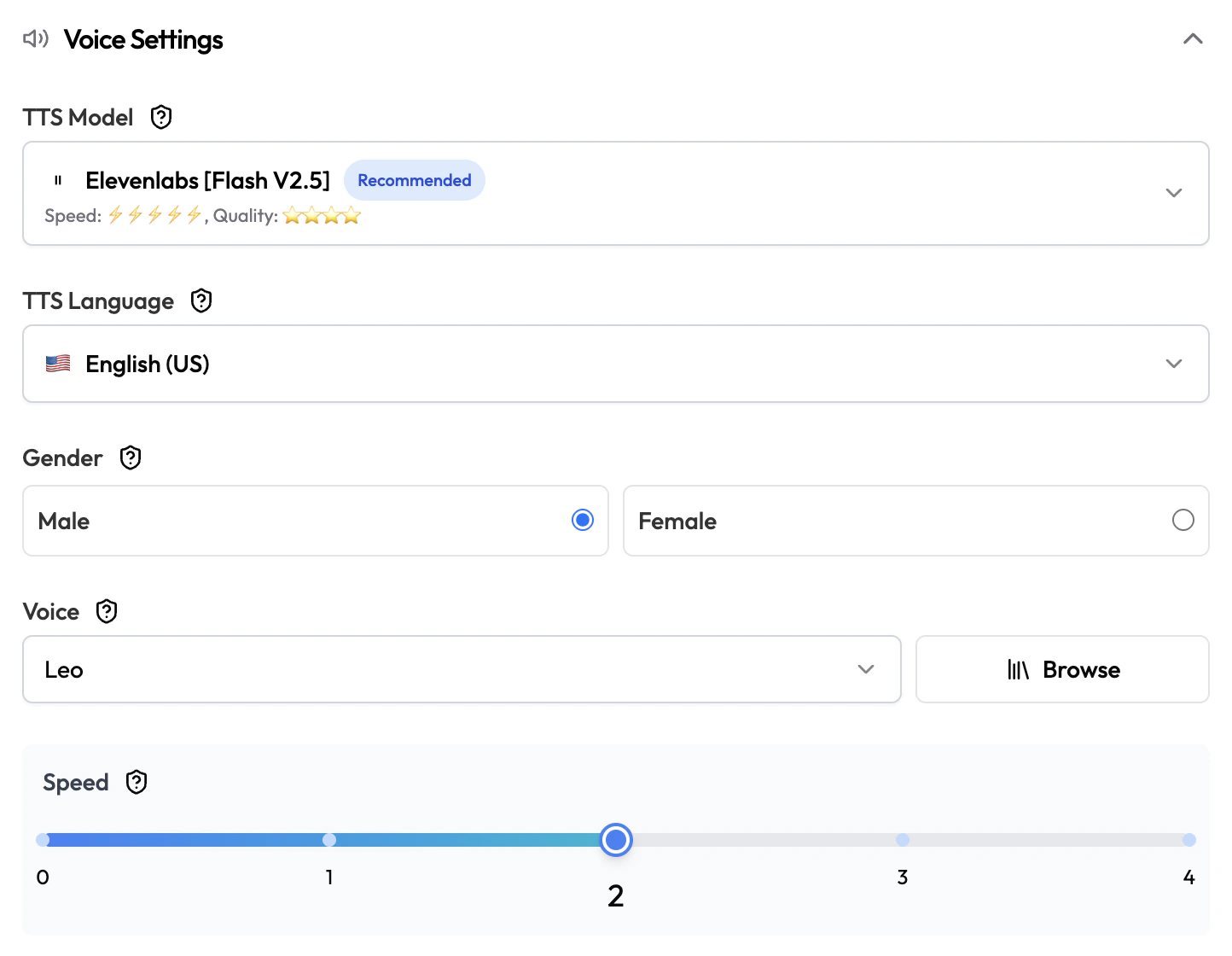
 | Field | Type | Default | Description |
| -------------------------------- | -------- | ------------ | ---------------------------------------------------------------------------------------------------- |
| TTS Model | Dropdown | — (required) | The text-to-speech model for generating speech (e.g. ElevenLabs Flash V2.5). |
| TTS Language | Dropdown | — (required) | Language for speech synthesis (e.g. English (US)). |
| Gender | Radio | None | Filter voices by **Male** or **Female**. Optional. |
| Voice | Dropdown | — (required) | The specific voice to use. Click **Browse** to preview available voices from the selected provider. |
| Speed | Slider | `2` | Speaking speed. Higher = faster. Range: 0–3. |
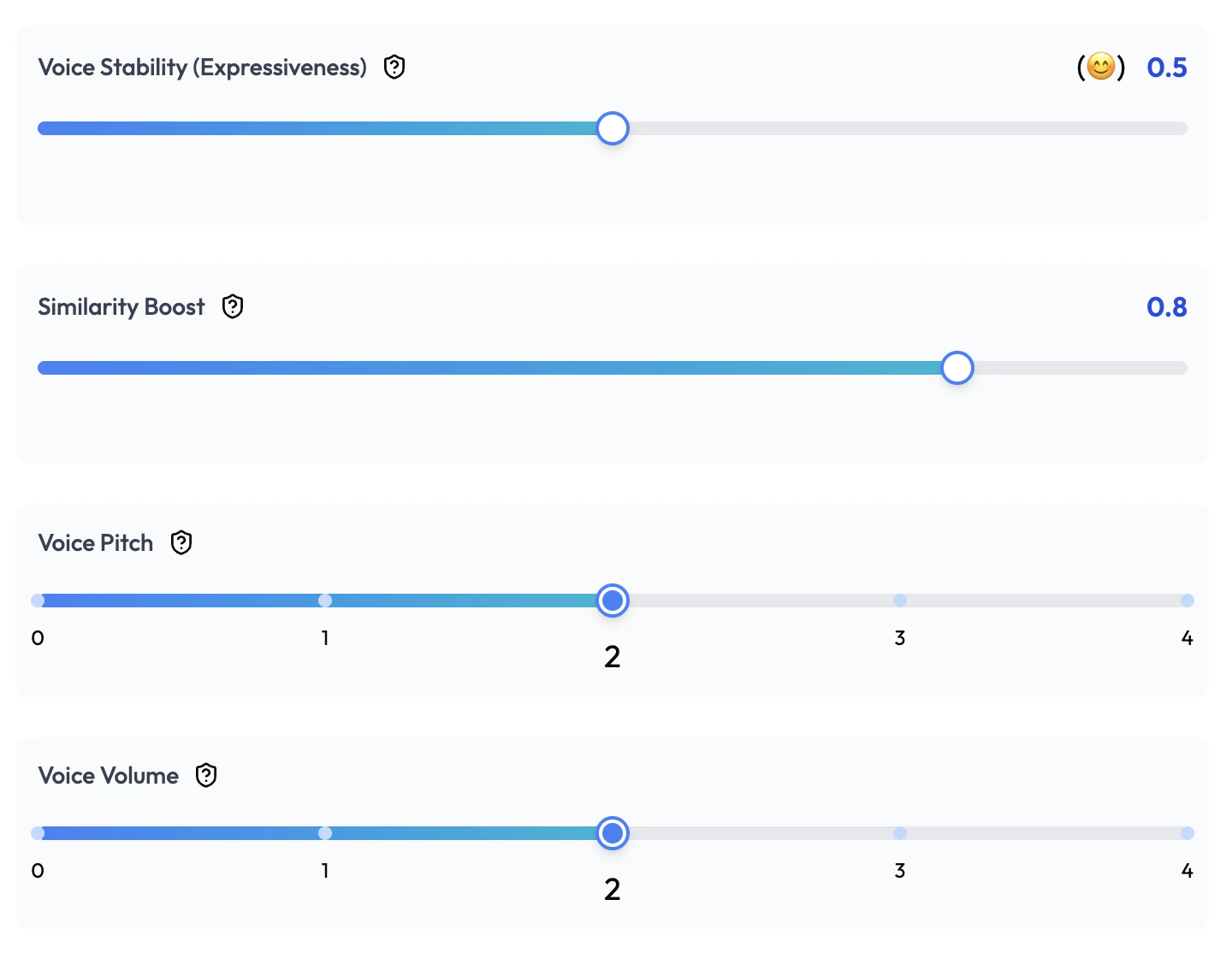
| Voice Stability (Expressiveness) | Slider | `0.5` | How consistent the voice sounds. Lower = more expressive and varied. Higher = very consistent. |
| Similarity Boost | Slider | `0.8` | How closely the voice matches its original model. Higher = more faithful but may sound less natural. |
| Voice Pitch | Slider | `2` | Voice pitch adjustment. Range: 0–4. |
| Voice Volume | Slider | `2` | Output volume level. Range: 0–4. |
***
## Call Settings
| Field | Type | Default | Description |
| -------------------------------- | -------- | ------------ | ---------------------------------------------------------------------------------------------------- |
| TTS Model | Dropdown | — (required) | The text-to-speech model for generating speech (e.g. ElevenLabs Flash V2.5). |
| TTS Language | Dropdown | — (required) | Language for speech synthesis (e.g. English (US)). |
| Gender | Radio | None | Filter voices by **Male** or **Female**. Optional. |
| Voice | Dropdown | — (required) | The specific voice to use. Click **Browse** to preview available voices from the selected provider. |
| Speed | Slider | `2` | Speaking speed. Higher = faster. Range: 0–3. |
| Voice Stability (Expressiveness) | Slider | `0.5` | How consistent the voice sounds. Lower = more expressive and varied. Higher = very consistent. |
| Similarity Boost | Slider | `0.8` | How closely the voice matches its original model. Higher = more faithful but may sound less natural. |
| Voice Pitch | Slider | `2` | Voice pitch adjustment. Range: 0–4. |
| Voice Volume | Slider | `2` | Output volume level. Range: 0–4. |
***
## Call Settings
 | Field | Type | Default | Description |
| ---------------------- | -------- | ------------------- | -------------------------------------------------------------------------------------------------------------------------------------------------------------------------- |
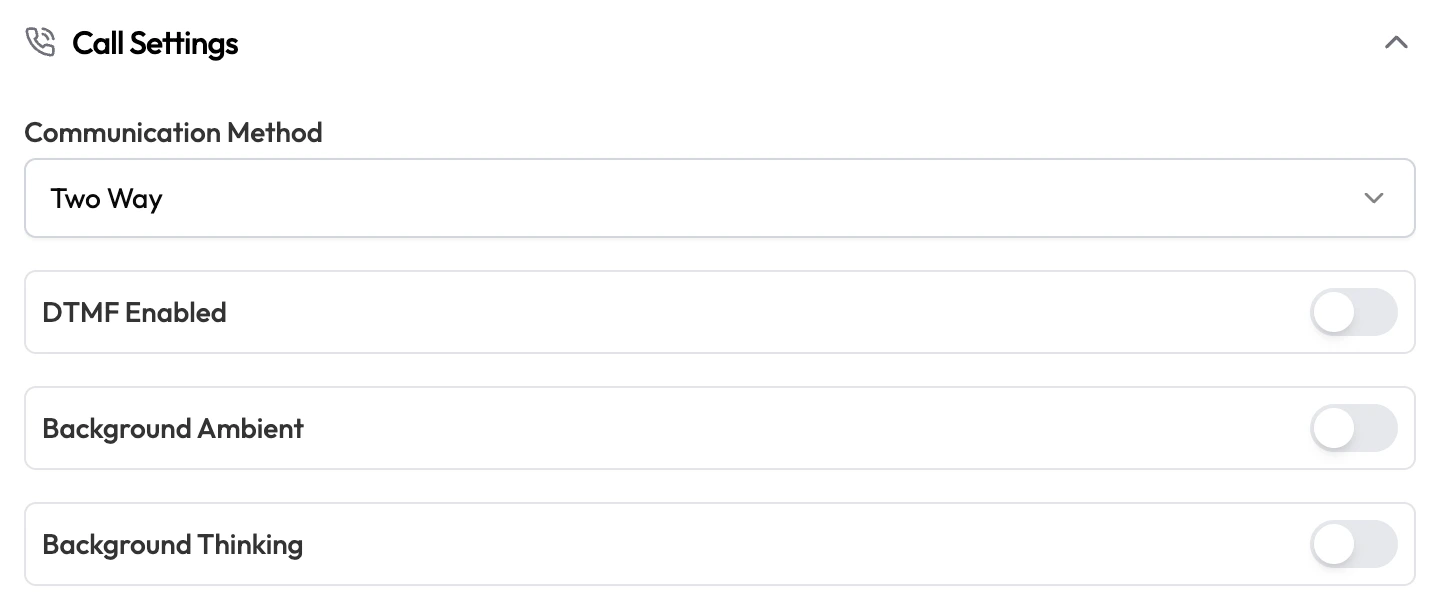
| Communication Method | Dropdown | `Two Way` | **Two Way** — agent speaks and listens. **One Way** — agent only speaks (e.g. announcements). |
| DTMF Enabled | Toggle | Off | Enable touch-tone input. The agent can detect digit presses (e.g. "Press 1 for sales"). |
| Background Ambient | Toggle | Off | Play subtle background audio (e.g. office sounds) to make calls feel less robotic. |
| Background Thinking | Toggle | Off | Play a brief sound while the agent is generating a response, signaling to the caller that something is happening. |
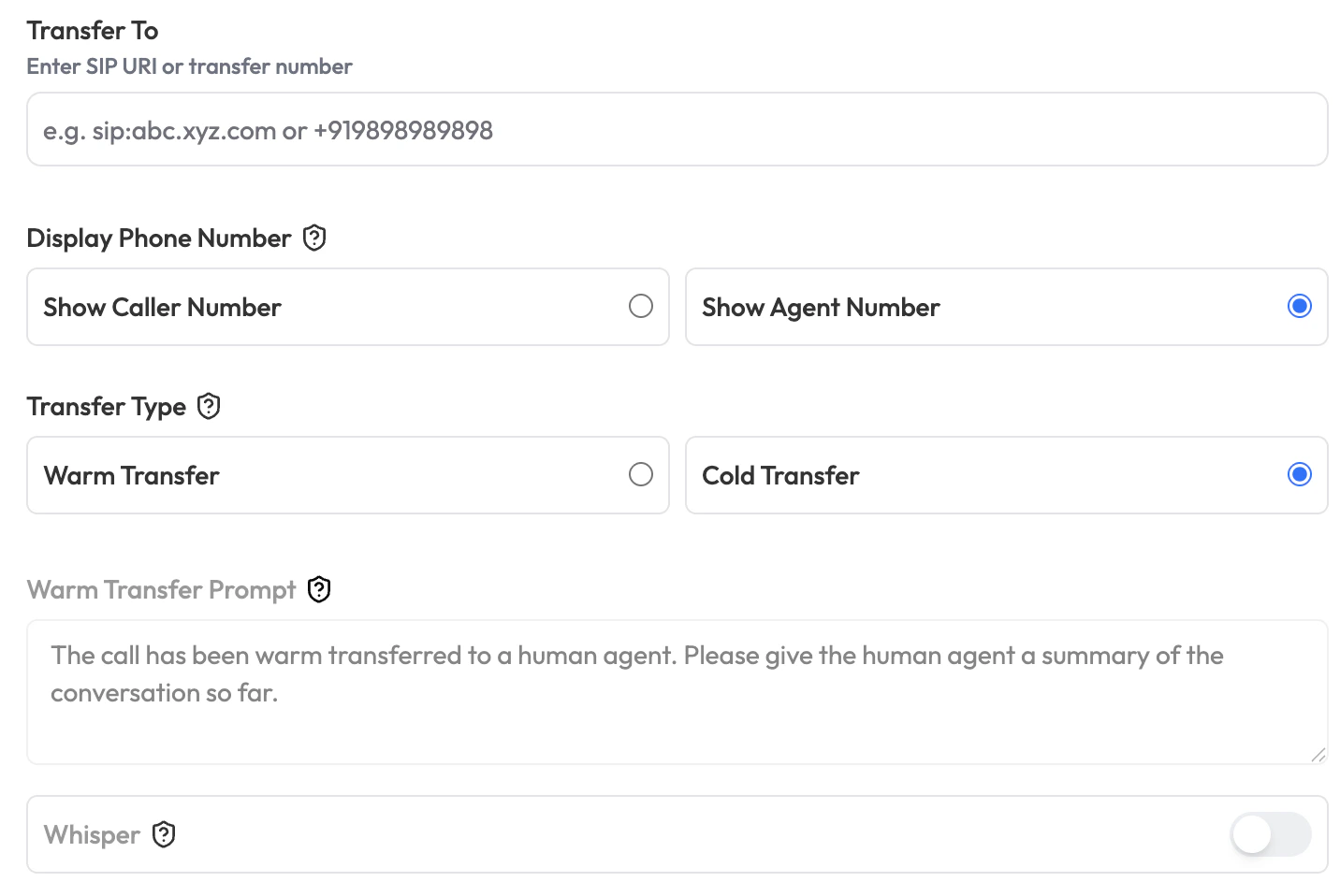
| Transfer To | Text | None | SIP URI or phone number to transfer the call to when a transfer is triggered. |
| Display Phone Number | Radio | `Show Agent Number` | **Show Caller Number** — displays the caller's number to the recipient. **Show Agent Number** — displays the agent's number. |
| Transfer Type | Radio | `Cold Transfer` | **Warm Transfer** — agent introduces the caller before transferring. **Cold Transfer** — call is transferred immediately without introduction. |
| Warm Transfer Prompt | Text | `""` | The message the agent reads during a warm transfer (e.g. "I have a customer calling about a billing issue"). Only applies when Transfer Type is **Warm Transfer**. |
| Whisper | Toggle | Off | The agent can hear the caller but the caller cannot hear the agent. Useful for live coaching scenarios. |
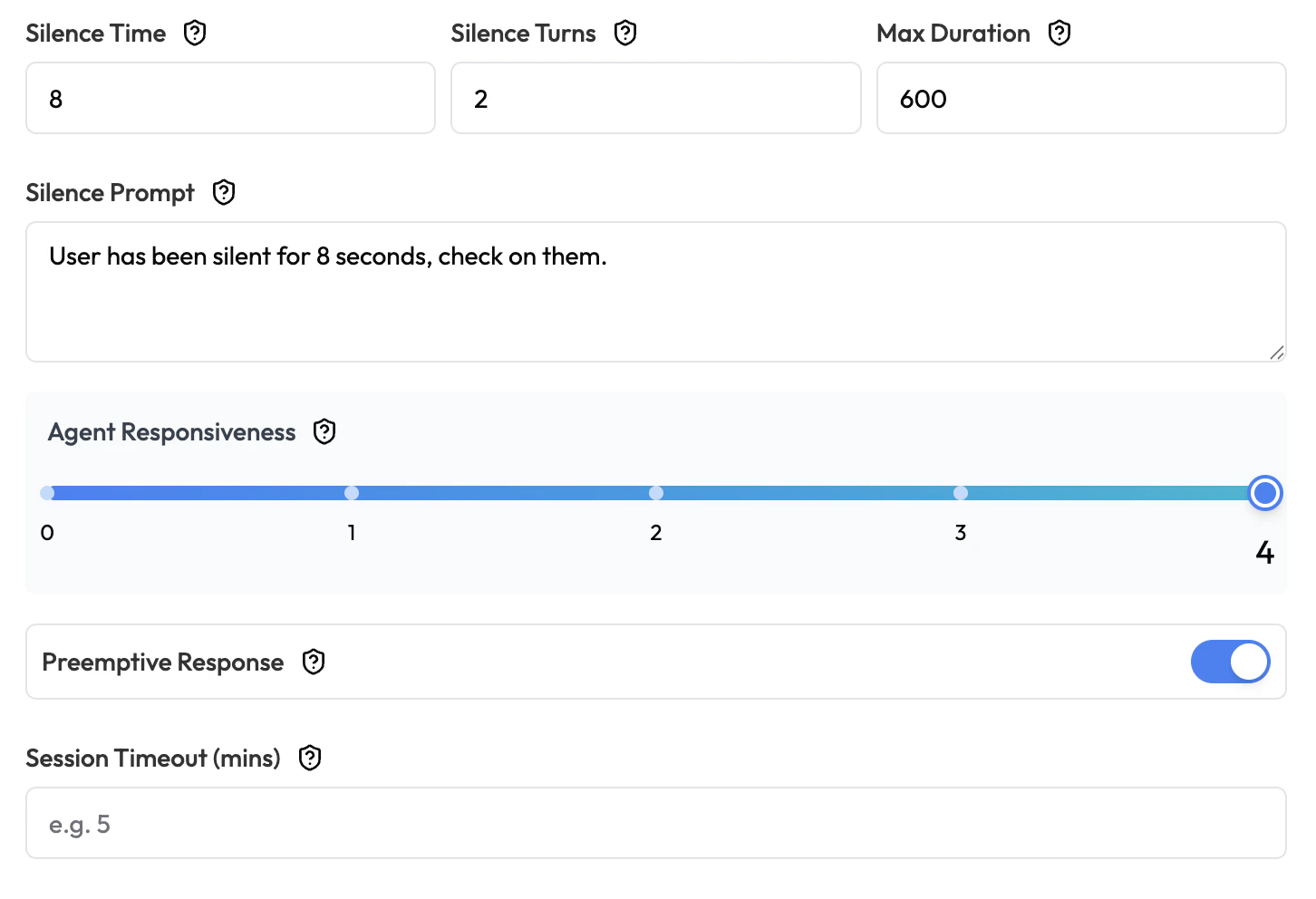
| Silence Time | Number | `8` | Seconds of caller silence before a silence action is triggered. |
| Silence Turns | Number | `2` | Consecutive silence events before the agent takes action. |
| Max Duration | Number | `600` | Maximum call length in seconds. The call ends automatically at this limit. |
| Silence Prompt | Text | `""` | What the agent says when a silence timeout occurs (e.g. "Are you still there?"). |
| Agent Responsiveness | Slider | `4` | Overall responsiveness after end-of-turn is detected. Higher = responds more quickly. Range: 0–4. |
| Preemptive Response | Toggle | On | Agent starts generating a response before the caller fully finishes speaking. Significantly reduces perceived latency. Turn off only if you need strict full-turn capture. |
| Session Timeout (mins) | Number | None | Minutes of inactivity after which the call session ends automatically. Leave blank for no timeout. |
***
## Agent Transfers
| Field | Type | Default | Description |
| ---------------------- | -------- | ------------------- | -------------------------------------------------------------------------------------------------------------------------------------------------------------------------- |
| Communication Method | Dropdown | `Two Way` | **Two Way** — agent speaks and listens. **One Way** — agent only speaks (e.g. announcements). |
| DTMF Enabled | Toggle | Off | Enable touch-tone input. The agent can detect digit presses (e.g. "Press 1 for sales"). |
| Background Ambient | Toggle | Off | Play subtle background audio (e.g. office sounds) to make calls feel less robotic. |
| Background Thinking | Toggle | Off | Play a brief sound while the agent is generating a response, signaling to the caller that something is happening. |
| Transfer To | Text | None | SIP URI or phone number to transfer the call to when a transfer is triggered. |
| Display Phone Number | Radio | `Show Agent Number` | **Show Caller Number** — displays the caller's number to the recipient. **Show Agent Number** — displays the agent's number. |
| Transfer Type | Radio | `Cold Transfer` | **Warm Transfer** — agent introduces the caller before transferring. **Cold Transfer** — call is transferred immediately without introduction. |
| Warm Transfer Prompt | Text | `""` | The message the agent reads during a warm transfer (e.g. "I have a customer calling about a billing issue"). Only applies when Transfer Type is **Warm Transfer**. |
| Whisper | Toggle | Off | The agent can hear the caller but the caller cannot hear the agent. Useful for live coaching scenarios. |
| Silence Time | Number | `8` | Seconds of caller silence before a silence action is triggered. |
| Silence Turns | Number | `2` | Consecutive silence events before the agent takes action. |
| Max Duration | Number | `600` | Maximum call length in seconds. The call ends automatically at this limit. |
| Silence Prompt | Text | `""` | What the agent says when a silence timeout occurs (e.g. "Are you still there?"). |
| Agent Responsiveness | Slider | `4` | Overall responsiveness after end-of-turn is detected. Higher = responds more quickly. Range: 0–4. |
| Preemptive Response | Toggle | On | Agent starts generating a response before the caller fully finishes speaking. Significantly reduces perceived latency. Turn off only if you need strict full-turn capture. |
| Session Timeout (mins) | Number | None | Minutes of inactivity after which the call session ends automatically. Leave blank for no timeout. |
***
## Agent Transfers
 | Field | Type | Default | Description |
| ------------- | -------- | ------- | -------------------------------------------------------------------------------- |
| Select Agents | Dropdown | None | Other Subverse agents this agent can transfer the conversation to during a call. |
***
## Knowledgebase Settings
| Field | Type | Default | Description |
| ------------- | -------- | ------- | -------------------------------------------------------------------------------- |
| Select Agents | Dropdown | None | Other Subverse agents this agent can transfer the conversation to during a call. |
***
## Knowledgebase Settings
 | Field | Type | Default | Description |
| -------------- | -------- | ------- | ------------------------------------------------------------------------------------------- |
| Knowledge Base | Dropdown | None | Attach a Knowledge Base so the agent can look up answers from your documents during a call. |
***
## Function Settings
| Field | Type | Default | Description |
| -------------- | -------- | ------- | ------------------------------------------------------------------------------------------- |
| Knowledge Base | Dropdown | None | Attach a Knowledge Base so the agent can look up answers from your documents during a call. |
***
## Function Settings
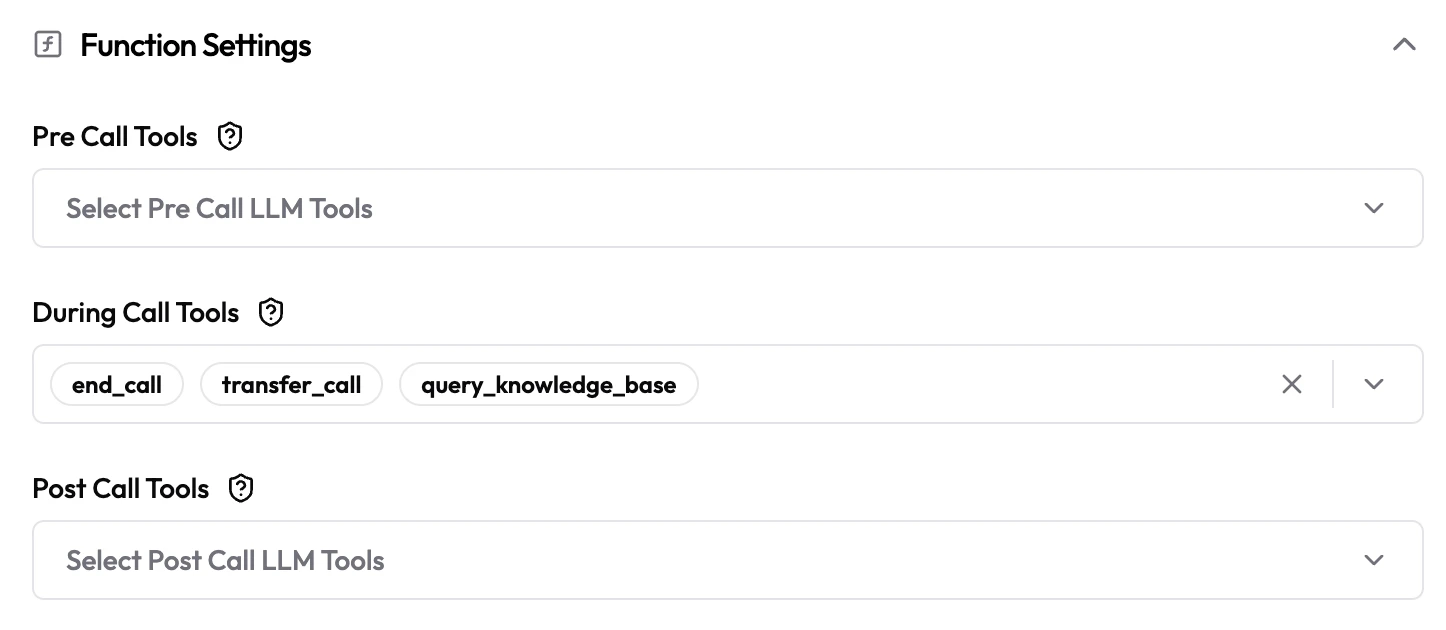 | Field | Type | Default | Description |
| ----------------- | ------------ | ------- | -------------------------------------------------------------------------------------------------------------------------------- |
| Pre Call Tools | Multi-select | Empty | LLM tools that run automatically before the call starts (e.g. fetch customer account info). |
| During Call Tools | Multi-select | Empty | Tools the agent can call mid-call based on the conversation (e.g. look up order status, book an appointment, transfer the call). |
| Post Call Tools | Multi-select | Empty | LLM tools that run automatically after the call ends (e.g. update CRM, send an SMS follow-up). |
***
## Agent Security Settings
| Field | Type | Default | Description |
| ----------------- | ------------ | ------- | -------------------------------------------------------------------------------------------------------------------------------- |
| Pre Call Tools | Multi-select | Empty | LLM tools that run automatically before the call starts (e.g. fetch customer account info). |
| During Call Tools | Multi-select | Empty | Tools the agent can call mid-call based on the conversation (e.g. look up order status, book an appointment, transfer the call). |
| Post Call Tools | Multi-select | Empty | LLM tools that run automatically after the call ends (e.g. update CRM, send an SMS follow-up). |
***
## Agent Security Settings
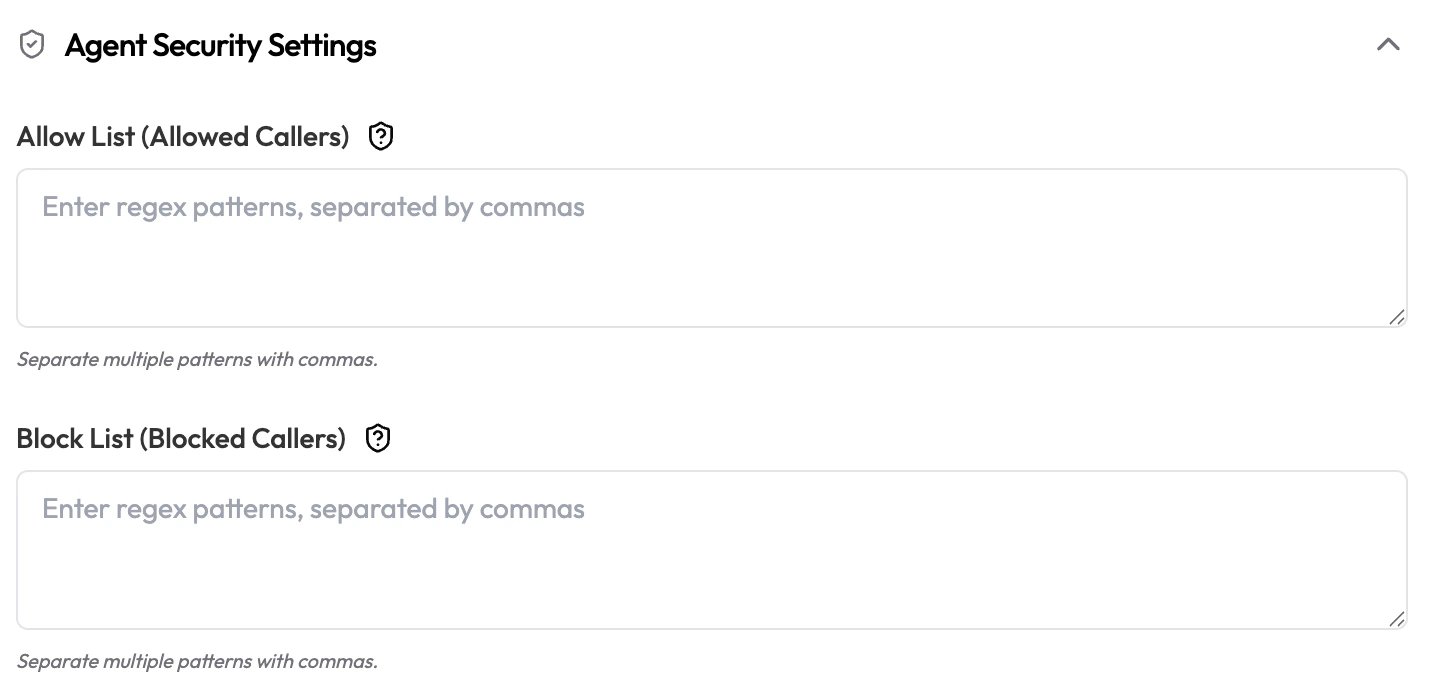 | Field | Type | Default | Description |
| ---------------------------- | --------- | ------- | ---------------------------------------------------------------------------------------------------------------------------- |
| Allow List (Allowed Callers) | Text area | Empty | Regex patterns for phone numbers allowed to interact with this agent, separated by commas. Leave empty to allow all callers. |
| Block List (Blocked Callers) | Text area | Empty | Regex patterns for phone numbers that are blocked, separated by commas. Takes priority over Allow List. |
***
## Post Call Data Analysis
| Field | Type | Default | Description |
| ---------------------------- | --------- | ------- | ---------------------------------------------------------------------------------------------------------------------------- |
| Allow List (Allowed Callers) | Text area | Empty | Regex patterns for phone numbers allowed to interact with this agent, separated by commas. Leave empty to allow all callers. |
| Block List (Blocked Callers) | Text area | Empty | Regex patterns for phone numbers that are blocked, separated by commas. Takes priority over Allow List. |
***
## Post Call Data Analysis
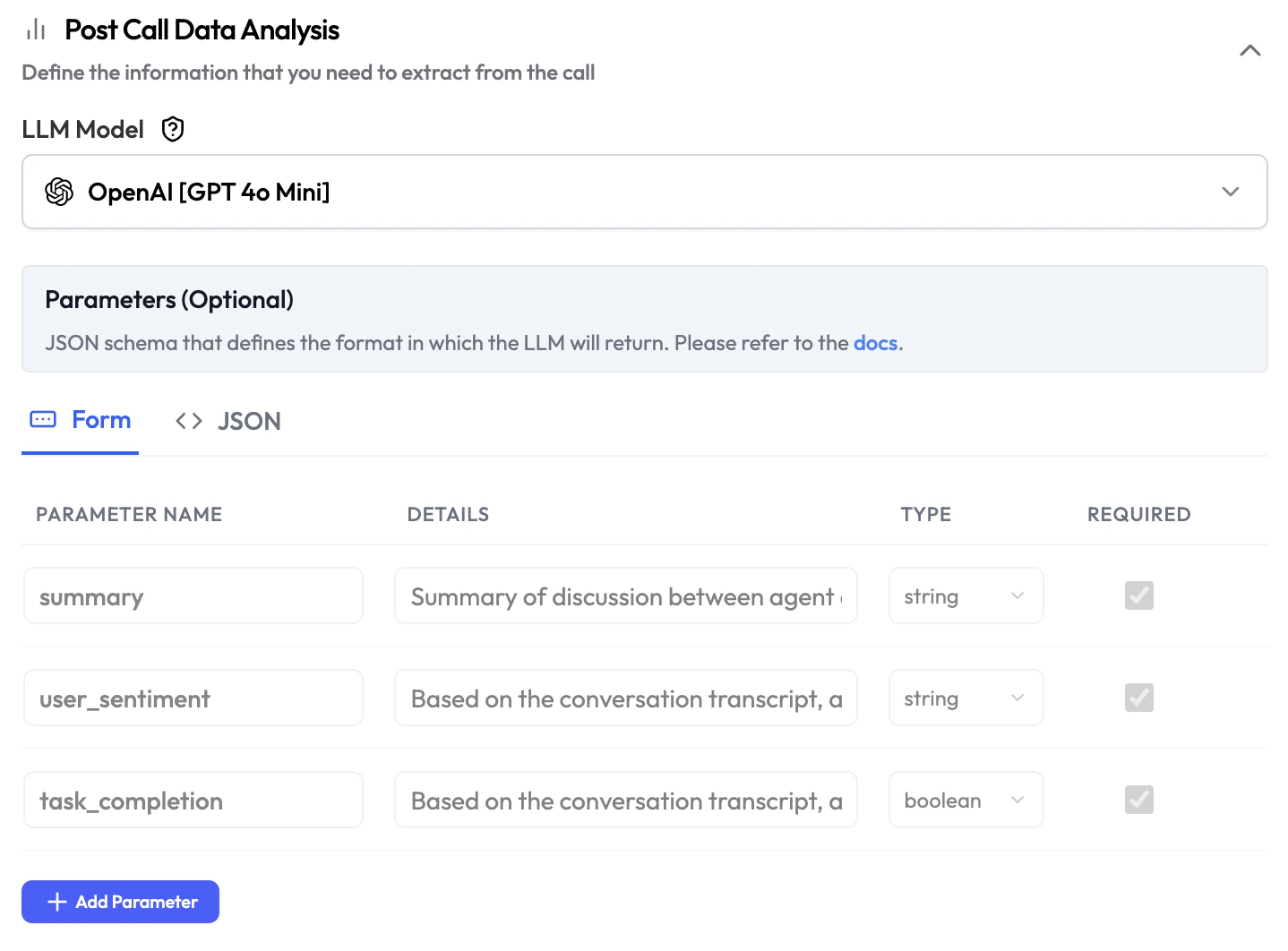 After each call, the agent can automatically analyze the transcript and extract structured data.
| Field | Type | Description |
| ---------- | ----------- | --------------------------------------------------------------------------------------------------------------------------------------------- |
| LLM Model | Dropdown | The AI model used to run the post-call analysis. Can differ from the main agent model. |
| Parameters | Form / JSON | Define the data points to extract from each call. Switch between **Form** (add parameters one by one) and **JSON** (paste a raw JSON schema). |
**Parameter fields:**
| Field | Description |
| -------------- | -------------------------------------------------------------------- |
| Parameter Name | The key name for this data point (e.g. `summary`, `user_sentiment`). |
| Details | Description of what this parameter represents and how to extract it. |
| Type | Data type: `string`, `boolean`, `number`, etc. |
| Required | Whether this parameter must be present in every analysis output. |
After each call, the agent can automatically analyze the transcript and extract structured data.
| Field | Type | Description |
| ---------- | ----------- | --------------------------------------------------------------------------------------------------------------------------------------------- |
| LLM Model | Dropdown | The AI model used to run the post-call analysis. Can differ from the main agent model. |
| Parameters | Form / JSON | Define the data points to extract from each call. Switch between **Form** (add parameters one by one) and **JSON** (paste a raw JSON schema). |
**Parameter fields:**
| Field | Description |
| -------------- | -------------------------------------------------------------------- |
| Parameter Name | The key name for this data point (e.g. `summary`, `user_sentiment`). |
| Details | Description of what this parameter represents and how to extract it. |
| Type | Data type: `string`, `boolean`, `number`, etc. |
| Required | Whether this parameter must be present in every analysis output. |