> ## Documentation Index
> Fetch the complete documentation index at: https://docs.subverseai.com/llms.txt
> Use this file to discover all available pages before exploring further.
# Introduction to AgentVerse
> SubVerse AI's Agent Orchestration Engine — build and run automated workflows that combine AI agents with business integrations
# Introduction to AgentVerse
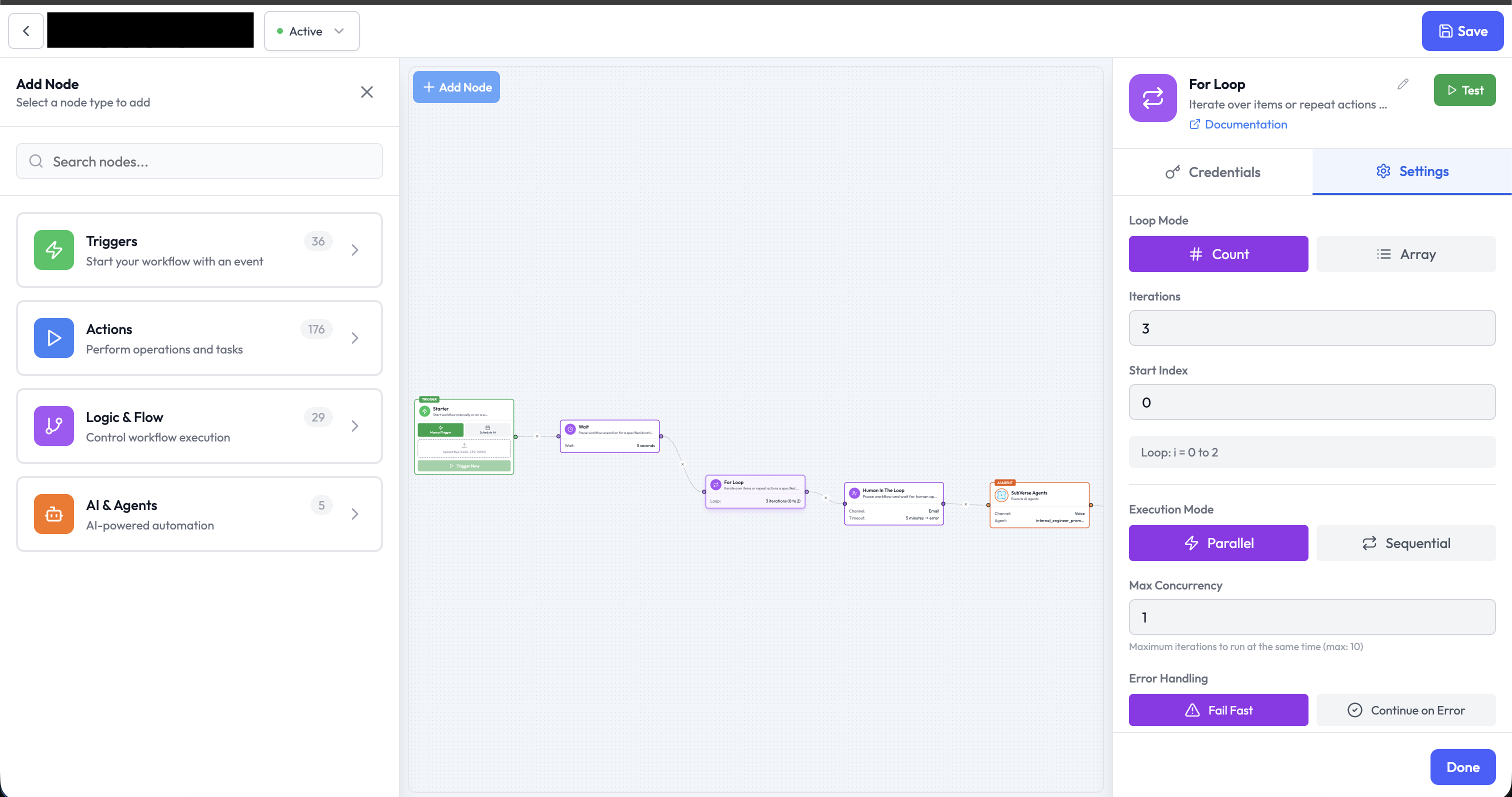
AgentVerse is SubVerse AI's Agent Orchestration Engine — a visual, low-code platform for building and running automated workflows that combine AI agents with business integrations.
 ***
## What is AgentVerse?
AgentVerse lets you design **orchestrations** — directed graphs of nodes that execute in sequence or in parallel. Each node represents a discrete unit of work: calling an API, running an AI model, applying conditional logic, or waiting for a human decision.
Orchestrations are triggered by events (webhooks, schedules, incoming messages) and can route data through AI agents, third-party services, and control-flow logic before delivering a result.
***
## Core Concepts
| Concept | Description |
| --------------------- | ----------------------------------------------------------------- |
| **Orchestration** | The workflow graph you build — a collection of connected nodes |
| **Node** | A single step in an orchestration (trigger, action, logic, or AI) |
| **Orchestration Run** | A single execution instance of an orchestration |
| **Connection** | A directed edge between two nodes that carries data |
| **Credentials** | Stored authentication details used by integration nodes |
***
## Node Categories
AgentVerse nodes are organised into four categories:
Start an orchestration in response to an event — webhook, schedule, Slack, WhatsApp, Shopify, and more
Interact with external services — send messages, write records, make HTTP calls, upload files
Control execution — branch with conditions, loop over arrays, pause and wait, require human approval
Run AI — call any LLM provider or execute full SubVerse AI agent conversations
***
## Key Features
* **Visual canvas** — drag-and-drop orchestration builder with real-time previews
* **Any LLM** — connect AI Agent nodes to OpenAI, Anthropic, Google, or any OpenAI-compatible endpoint
* **Dynamic inputs** — reference upstream node outputs anywhere using `{{ nodeName.field }}` expressions
* **Human-in-the-loop** — pause orchestrations for human approval via Slack or email
* **Robust execution engine** — built for reliability with fault tolerance and retry support
* **Multi-channel AI agents** — run SubVerse AI agents over voice, WhatsApp, email, and chat
* **Fine-grained monitoring** — inspect every orchestration run, node output, and error in detail
***
## How Orchestrations Work
```
Trigger Node
│
▼
Action / AI / Logic Node(s)
│
▼
Output (API call, message, database write, etc.)
```
Data flows between nodes as a structured JSON object. Each node receives the output of its upstream node, transforms or acts on it, and passes the result downstream.
Reference any upstream value in a node parameter using double curly braces:
```
{{ webhook.body.message }}
{{ aiAgent.text }}
{{ airtable.fields.Status }}
```
See [Dynamic Inputs](./dynamic-inputs.md) for a full guide on the `{{ }}` expression syntax and how to link fields using the visual picker.
For AI Agent nodes, **AI Tool** connections (sub-edges) allow the agent to call other nodes as tools during reasoning.
***
## Next Steps
Build your first orchestration in 10 minutes
Understand all node categories in detail
Track and debug orchestration runs
***
## What is AgentVerse?
AgentVerse lets you design **orchestrations** — directed graphs of nodes that execute in sequence or in parallel. Each node represents a discrete unit of work: calling an API, running an AI model, applying conditional logic, or waiting for a human decision.
Orchestrations are triggered by events (webhooks, schedules, incoming messages) and can route data through AI agents, third-party services, and control-flow logic before delivering a result.
***
## Core Concepts
| Concept | Description |
| --------------------- | ----------------------------------------------------------------- |
| **Orchestration** | The workflow graph you build — a collection of connected nodes |
| **Node** | A single step in an orchestration (trigger, action, logic, or AI) |
| **Orchestration Run** | A single execution instance of an orchestration |
| **Connection** | A directed edge between two nodes that carries data |
| **Credentials** | Stored authentication details used by integration nodes |
***
## Node Categories
AgentVerse nodes are organised into four categories:
Start an orchestration in response to an event — webhook, schedule, Slack, WhatsApp, Shopify, and more
Interact with external services — send messages, write records, make HTTP calls, upload files
Control execution — branch with conditions, loop over arrays, pause and wait, require human approval
Run AI — call any LLM provider or execute full SubVerse AI agent conversations
***
## Key Features
* **Visual canvas** — drag-and-drop orchestration builder with real-time previews
* **Any LLM** — connect AI Agent nodes to OpenAI, Anthropic, Google, or any OpenAI-compatible endpoint
* **Dynamic inputs** — reference upstream node outputs anywhere using `{{ nodeName.field }}` expressions
* **Human-in-the-loop** — pause orchestrations for human approval via Slack or email
* **Robust execution engine** — built for reliability with fault tolerance and retry support
* **Multi-channel AI agents** — run SubVerse AI agents over voice, WhatsApp, email, and chat
* **Fine-grained monitoring** — inspect every orchestration run, node output, and error in detail
***
## How Orchestrations Work
```
Trigger Node
│
▼
Action / AI / Logic Node(s)
│
▼
Output (API call, message, database write, etc.)
```
Data flows between nodes as a structured JSON object. Each node receives the output of its upstream node, transforms or acts on it, and passes the result downstream.
Reference any upstream value in a node parameter using double curly braces:
```
{{ webhook.body.message }}
{{ aiAgent.text }}
{{ airtable.fields.Status }}
```
See [Dynamic Inputs](./dynamic-inputs.md) for a full guide on the `{{ }}` expression syntax and how to link fields using the visual picker.
For AI Agent nodes, **AI Tool** connections (sub-edges) allow the agent to call other nodes as tools during reasoning.
***
## Next Steps
Build your first orchestration in 10 minutes
Understand all node categories in detail
Track and debug orchestration runs