> ## Documentation Index
> Fetch the complete documentation index at: https://docs.subverseai.com/llms.txt
> Use this file to discover all available pages before exploring further.
# Google sheets
# Google Sheets
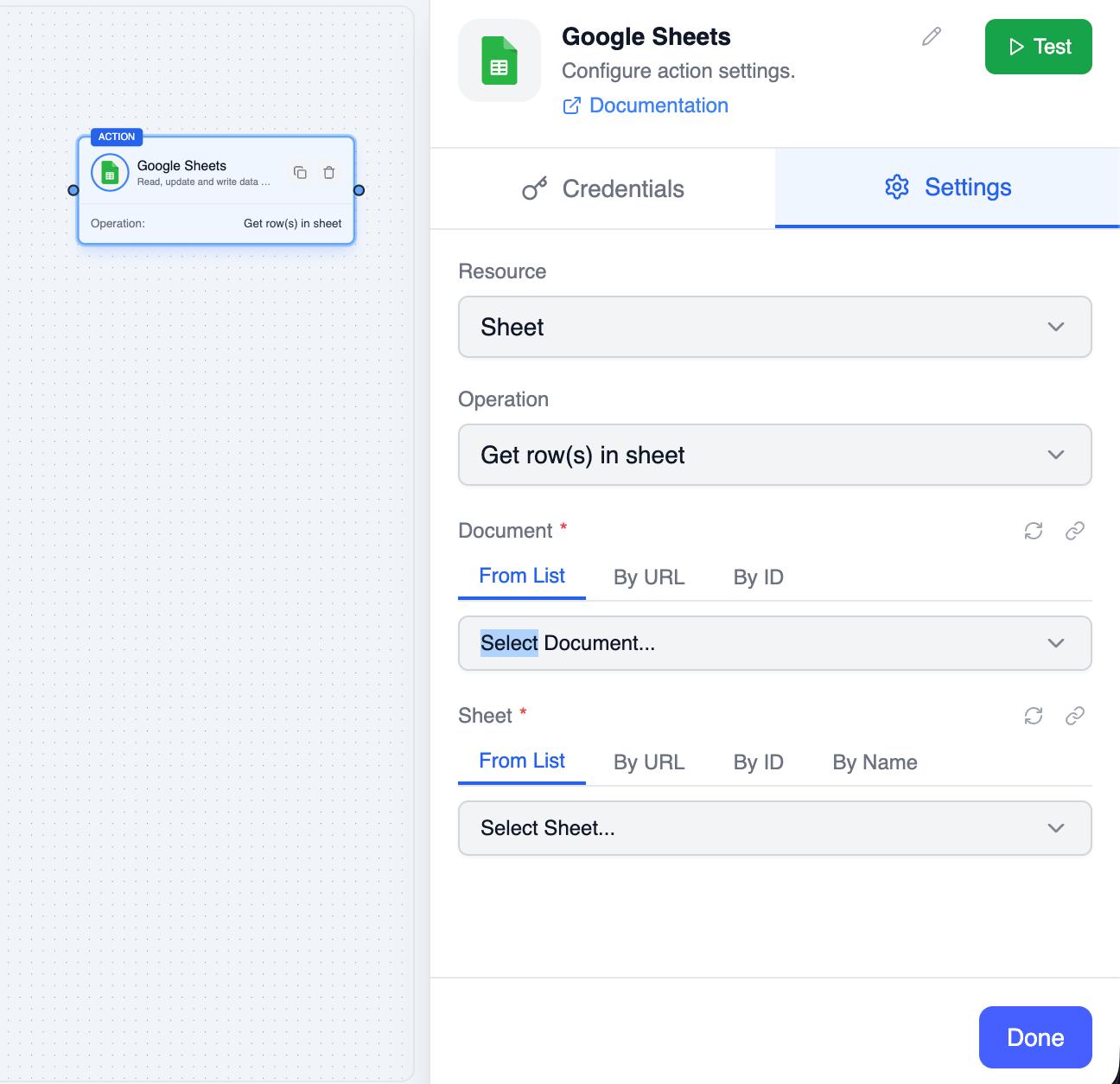
The **Google Sheets** node lets you read and write data in Google Spreadsheets — read ranges, append rows, update cells, upsert rows, clear values, delete rows or columns, create and delete sheets, and create and delete entire spreadsheets.
 ***
## Credentials
Three credential types are supported:
| Type | Description |
| --------------------------------- | ---------------------------------------------------------------------------------------------------------------------------------------------- |
| **Google Sheets Service Account** | Server-to-server authentication using a service account JSON key — works with private sheets after sharing them with the service account email |
| **Google Sheets OAuth2 API** | Sign in with your own Google account — accesses any sheet your account can open, no manual sharing required |
| **Google Sheets API Key** | Read-only access to publicly shared sheets — no write operations |
To create a credential:
1. Go to **Settings → Credentials → New Credential**
2. Select the desired Google Sheets credential type
3. Complete the authentication flow
The **API Key** credential only works for sheets shared as **Anyone with the link** and supports read operations only. For private sheets or any write operation, use **Service Account** or **OAuth2 API**.
***
## Operations
### Values
| Operation | Description |
| ------------------------ | ------------------------------------------------------------------------------ |
| `Read Rows` | Read values from a range — returns a 2D array of rows |
| `Append Rows` | Add rows after the last row with data in a sheet |
| `Update Rows` | Overwrite cells at a specific range |
| `Append or Update Rows` | Upsert rows by a lookup column — update matching rows or append new ones |
| `Clear Range` | Remove values from a range while preserving formatting |
| `Delete Rows or Columns` | Remove rows or columns by index — remaining rows/columns shift to fill the gap |
### Spreadsheet
| Operation | Description |
| -------------------- | -------------------------------------------------------------- |
| `Create Sheet` | Add a new tab to an existing spreadsheet |
| `Delete Sheet` | Remove a tab from a spreadsheet by its numeric sheet ID |
| `Create Spreadsheet` | Create a brand new spreadsheet owned by the credential account |
| `Delete Spreadsheet` | Move a spreadsheet to trash via the Google Drive API |
***
## Parameters: Read Rows
| Parameter | Type | Required | Description |
| ----------------------- | ------ | -------- | -------------------------------------------------------------- |
| **Spreadsheet ID** | String | Yes | Spreadsheet ID from the URL: `/spreadsheets/d/{id}/` |
| **Range** | String | Yes | A1 notation range — e.g. `Sheet1!A1:D10` or just `Sheet1` |
| **Value Render Option** | Select | No | `FORMATTED_VALUE` (default), `FORMULA`, or `UNFORMATTED_VALUE` |
## Parameters: Append Rows
| Parameter | Type | Required | Description |
| ---------------------- | ------ | -------- | ---------------------------------------------------------------------------- |
| **Spreadsheet ID** | String | Yes | Spreadsheet ID |
| **Range** | String | Yes | Sheet name or range — only the sheet name matters for append (e.g. `Sheet1`) |
| **Rows** | Array | Yes | Array of rows to append. Each row is an array of cell values |
| **Value Input Option** | Select | No | `RAW` (as-is) or `USER_ENTERED` (parsed). Default `USER_ENTERED` |
## Parameters: Update Rows
| Parameter | Type | Required | Description |
| ---------------------- | ------ | -------- | ---------------------------------------------------- |
| **Spreadsheet ID** | String | Yes | Spreadsheet ID |
| **Range** | String | Yes | A1 notation range to overwrite — e.g. `Sheet1!A2:C2` |
| **Rows** | Array | Yes | Array of rows. Dimensions must match the range |
| **Value Input Option** | Select | No | `RAW` or `USER_ENTERED`. Default `USER_ENTERED` |
## Parameters: Append or Update Rows
| Parameter | Type | Required | Description |
| ----------------------- | ------ | -------- | ----------------------------------------------------------------- |
| **Spreadsheet ID** | String | Yes | Spreadsheet ID |
| **Range** | String | Yes | A1 notation range to search and write within (e.g. `Sheet1!A1:D`) |
| **Rows** | Array | Yes | Array of rows to upsert. Each row is an array of cell values |
| **Lookup Column Index** | Number | Yes | 0-based column index used to match rows (0 = column A) |
| **Value Input Option** | Select | No | `RAW` or `USER_ENTERED`. Default `USER_ENTERED` |
## Parameters: Clear Range
| Parameter | Type | Required | Description |
| ------------------ | ------ | -------- | ------------------------------------------------- |
| **Spreadsheet ID** | String | Yes | Spreadsheet ID |
| **Range** | String | Yes | A1 notation range to clear — e.g. `Sheet1!A1:D10` |
## Parameters: Delete Rows or Columns
| Parameter | Type | Required | Description |
| ------------------------ | ---------- | -------- | ------------------------------------------------------------------- |
| **Spreadsheet ID** | String | Yes | Spreadsheet ID |
| **Dimension** | Select | Yes | `ROWS` or `COLUMNS` |
| **Ranges** | Collection | Yes | Array of ranges to delete — at least one required |
| **Ranges → Sheet ID** | Number | Yes | Numeric sheet (tab) ID |
| **Ranges → Start Index** | Number | Yes | 0-based index of first row/column to delete (row 1 = index 0) |
| **Ranges → End Index** | Number | Yes | 0-based index after the last row/column to delete (must be > start) |
## Parameters: Create Sheet
| Parameter | Type | Required | Description |
| ------------------ | ------ | -------- | ---------------------------------------------------- |
| **Spreadsheet ID** | String | Yes | Spreadsheet to add the sheet to |
| **Title** | String | Yes | Title for the new tab — must be non-empty and unique |
| **Row Count** | Number | No | Number of rows. Default `1000` |
| **Column Count** | Number | No | Number of columns. Default `26` |
## Parameters: Delete Sheet
| Parameter | Type | Required | Description |
| ------------------ | ------ | -------- | --------------------------------------- |
| **Spreadsheet ID** | String | Yes | Spreadsheet ID |
| **Sheet ID** | Number | Yes | Numeric ID of the sheet (tab) to delete |
## Parameters: Create Spreadsheet
| Parameter | Type | Required | Description |
| ---------- | ------ | -------- | -------------------------------------------------- |
| **Title** | String | Yes | Spreadsheet title — must be non-empty |
| **Locale** | String | No | Spreadsheet locale (e.g. `en_US`). Default `en_US` |
## Parameters: Delete Spreadsheet
| Parameter | Type | Required | Description |
| ------------------ | ------ | -------- | ------------------------------------------------------ |
| **Spreadsheet ID** | String | Yes | Spreadsheet ID to delete (moved to Google Drive trash) |
***
## Output Data
A read result from `Read Rows`:
```json theme={null}
{
"range": "Sheet1!A1:D3",
"majorDimension": "ROWS",
"values": [
["Name", "Email", "Phone", "Status"],
["John Doe", "john@example.com", "1234567890", "Active"],
["Jane Smith", "jane@example.com", "0987654321", "Inactive"]
]
}
```
Reference cells in downstream nodes:
```
{{ googleSheets.values[0][0] }}
{{ googleSheets.values[1][1] }}
```
An append or update result:
```json theme={null}
{
"spreadsheetId": "spreadsheet-id-123",
"updates": {
"updatedRange": "Sheet1!A4:C4",
"updatedRows": 1,
"updatedCells": 3
}
}
```
An append-or-update result:
```json theme={null}
{
"spreadsheetId": "spreadsheet-id-123",
"appendResult": {
"updatedRange": "Sheet1!A4:C4",
"updatedRows": 1,
"updatedCells": 3
},
"updateResults": [
{
"updatedRange": "Sheet1!A2:C2",
"updatedRows": 1,
"updatedCells": 3
}
]
}
```
A create sheet result:
```json theme={null}
{
"spreadsheetId": "spreadsheet-id-123",
"sheetId": 1234567890,
"title": "February 2025"
}
```
A create spreadsheet result:
```json theme={null}
{
"spreadsheetId": "1aB2cD3eF4gH5iJ6kL7mN8oP9qR0sT1uV2wX3yZ4",
"spreadsheetUrl": "https://docs.google.com/spreadsheets/d/1aB2cD3eF4gH5iJ6kL7mN8oP9qR0sT1uV2wX3yZ4/edit"
}
```
A clear, delete sheet, delete rows/columns, or delete spreadsheet result:
```json theme={null}
{
"spreadsheetId": "spreadsheet-id-123",
"deleted": true
}
```
***
## A1 Notation Examples
| Range | Description |
| --------------- | ---------------------------------------- |
| `Sheet1` | Entire sheet named "Sheet1" |
| `Sheet1!A1:D10` | Cells A1 through D10 on "Sheet1" |
| `Sheet1!A:D` | All rows in columns A through D |
| `Sheet1!A2:A` | All rows in column A starting from row 2 |
***
## Related Nodes
* [For Loop](./for-loop.md) — Iterate over rows returned by Read Rows
* [Conditions](./conditions.md) — Branch based on cell values
* [HTTP Request](./http-request.md) — Send row data to an external API
***
## Credentials
Three credential types are supported:
| Type | Description |
| --------------------------------- | ---------------------------------------------------------------------------------------------------------------------------------------------- |
| **Google Sheets Service Account** | Server-to-server authentication using a service account JSON key — works with private sheets after sharing them with the service account email |
| **Google Sheets OAuth2 API** | Sign in with your own Google account — accesses any sheet your account can open, no manual sharing required |
| **Google Sheets API Key** | Read-only access to publicly shared sheets — no write operations |
To create a credential:
1. Go to **Settings → Credentials → New Credential**
2. Select the desired Google Sheets credential type
3. Complete the authentication flow
The **API Key** credential only works for sheets shared as **Anyone with the link** and supports read operations only. For private sheets or any write operation, use **Service Account** or **OAuth2 API**.
***
## Operations
### Values
| Operation | Description |
| ------------------------ | ------------------------------------------------------------------------------ |
| `Read Rows` | Read values from a range — returns a 2D array of rows |
| `Append Rows` | Add rows after the last row with data in a sheet |
| `Update Rows` | Overwrite cells at a specific range |
| `Append or Update Rows` | Upsert rows by a lookup column — update matching rows or append new ones |
| `Clear Range` | Remove values from a range while preserving formatting |
| `Delete Rows or Columns` | Remove rows or columns by index — remaining rows/columns shift to fill the gap |
### Spreadsheet
| Operation | Description |
| -------------------- | -------------------------------------------------------------- |
| `Create Sheet` | Add a new tab to an existing spreadsheet |
| `Delete Sheet` | Remove a tab from a spreadsheet by its numeric sheet ID |
| `Create Spreadsheet` | Create a brand new spreadsheet owned by the credential account |
| `Delete Spreadsheet` | Move a spreadsheet to trash via the Google Drive API |
***
## Parameters: Read Rows
| Parameter | Type | Required | Description |
| ----------------------- | ------ | -------- | -------------------------------------------------------------- |
| **Spreadsheet ID** | String | Yes | Spreadsheet ID from the URL: `/spreadsheets/d/{id}/` |
| **Range** | String | Yes | A1 notation range — e.g. `Sheet1!A1:D10` or just `Sheet1` |
| **Value Render Option** | Select | No | `FORMATTED_VALUE` (default), `FORMULA`, or `UNFORMATTED_VALUE` |
## Parameters: Append Rows
| Parameter | Type | Required | Description |
| ---------------------- | ------ | -------- | ---------------------------------------------------------------------------- |
| **Spreadsheet ID** | String | Yes | Spreadsheet ID |
| **Range** | String | Yes | Sheet name or range — only the sheet name matters for append (e.g. `Sheet1`) |
| **Rows** | Array | Yes | Array of rows to append. Each row is an array of cell values |
| **Value Input Option** | Select | No | `RAW` (as-is) or `USER_ENTERED` (parsed). Default `USER_ENTERED` |
## Parameters: Update Rows
| Parameter | Type | Required | Description |
| ---------------------- | ------ | -------- | ---------------------------------------------------- |
| **Spreadsheet ID** | String | Yes | Spreadsheet ID |
| **Range** | String | Yes | A1 notation range to overwrite — e.g. `Sheet1!A2:C2` |
| **Rows** | Array | Yes | Array of rows. Dimensions must match the range |
| **Value Input Option** | Select | No | `RAW` or `USER_ENTERED`. Default `USER_ENTERED` |
## Parameters: Append or Update Rows
| Parameter | Type | Required | Description |
| ----------------------- | ------ | -------- | ----------------------------------------------------------------- |
| **Spreadsheet ID** | String | Yes | Spreadsheet ID |
| **Range** | String | Yes | A1 notation range to search and write within (e.g. `Sheet1!A1:D`) |
| **Rows** | Array | Yes | Array of rows to upsert. Each row is an array of cell values |
| **Lookup Column Index** | Number | Yes | 0-based column index used to match rows (0 = column A) |
| **Value Input Option** | Select | No | `RAW` or `USER_ENTERED`. Default `USER_ENTERED` |
## Parameters: Clear Range
| Parameter | Type | Required | Description |
| ------------------ | ------ | -------- | ------------------------------------------------- |
| **Spreadsheet ID** | String | Yes | Spreadsheet ID |
| **Range** | String | Yes | A1 notation range to clear — e.g. `Sheet1!A1:D10` |
## Parameters: Delete Rows or Columns
| Parameter | Type | Required | Description |
| ------------------------ | ---------- | -------- | ------------------------------------------------------------------- |
| **Spreadsheet ID** | String | Yes | Spreadsheet ID |
| **Dimension** | Select | Yes | `ROWS` or `COLUMNS` |
| **Ranges** | Collection | Yes | Array of ranges to delete — at least one required |
| **Ranges → Sheet ID** | Number | Yes | Numeric sheet (tab) ID |
| **Ranges → Start Index** | Number | Yes | 0-based index of first row/column to delete (row 1 = index 0) |
| **Ranges → End Index** | Number | Yes | 0-based index after the last row/column to delete (must be > start) |
## Parameters: Create Sheet
| Parameter | Type | Required | Description |
| ------------------ | ------ | -------- | ---------------------------------------------------- |
| **Spreadsheet ID** | String | Yes | Spreadsheet to add the sheet to |
| **Title** | String | Yes | Title for the new tab — must be non-empty and unique |
| **Row Count** | Number | No | Number of rows. Default `1000` |
| **Column Count** | Number | No | Number of columns. Default `26` |
## Parameters: Delete Sheet
| Parameter | Type | Required | Description |
| ------------------ | ------ | -------- | --------------------------------------- |
| **Spreadsheet ID** | String | Yes | Spreadsheet ID |
| **Sheet ID** | Number | Yes | Numeric ID of the sheet (tab) to delete |
## Parameters: Create Spreadsheet
| Parameter | Type | Required | Description |
| ---------- | ------ | -------- | -------------------------------------------------- |
| **Title** | String | Yes | Spreadsheet title — must be non-empty |
| **Locale** | String | No | Spreadsheet locale (e.g. `en_US`). Default `en_US` |
## Parameters: Delete Spreadsheet
| Parameter | Type | Required | Description |
| ------------------ | ------ | -------- | ------------------------------------------------------ |
| **Spreadsheet ID** | String | Yes | Spreadsheet ID to delete (moved to Google Drive trash) |
***
## Output Data
A read result from `Read Rows`:
```json theme={null}
{
"range": "Sheet1!A1:D3",
"majorDimension": "ROWS",
"values": [
["Name", "Email", "Phone", "Status"],
["John Doe", "john@example.com", "1234567890", "Active"],
["Jane Smith", "jane@example.com", "0987654321", "Inactive"]
]
}
```
Reference cells in downstream nodes:
```
{{ googleSheets.values[0][0] }}
{{ googleSheets.values[1][1] }}
```
An append or update result:
```json theme={null}
{
"spreadsheetId": "spreadsheet-id-123",
"updates": {
"updatedRange": "Sheet1!A4:C4",
"updatedRows": 1,
"updatedCells": 3
}
}
```
An append-or-update result:
```json theme={null}
{
"spreadsheetId": "spreadsheet-id-123",
"appendResult": {
"updatedRange": "Sheet1!A4:C4",
"updatedRows": 1,
"updatedCells": 3
},
"updateResults": [
{
"updatedRange": "Sheet1!A2:C2",
"updatedRows": 1,
"updatedCells": 3
}
]
}
```
A create sheet result:
```json theme={null}
{
"spreadsheetId": "spreadsheet-id-123",
"sheetId": 1234567890,
"title": "February 2025"
}
```
A create spreadsheet result:
```json theme={null}
{
"spreadsheetId": "1aB2cD3eF4gH5iJ6kL7mN8oP9qR0sT1uV2wX3yZ4",
"spreadsheetUrl": "https://docs.google.com/spreadsheets/d/1aB2cD3eF4gH5iJ6kL7mN8oP9qR0sT1uV2wX3yZ4/edit"
}
```
A clear, delete sheet, delete rows/columns, or delete spreadsheet result:
```json theme={null}
{
"spreadsheetId": "spreadsheet-id-123",
"deleted": true
}
```
***
## A1 Notation Examples
| Range | Description |
| --------------- | ---------------------------------------- |
| `Sheet1` | Entire sheet named "Sheet1" |
| `Sheet1!A1:D10` | Cells A1 through D10 on "Sheet1" |
| `Sheet1!A:D` | All rows in columns A through D |
| `Sheet1!A2:A` | All rows in column A starting from row 2 |
***
## Related Nodes
* [For Loop](./for-loop.md) — Iterate over rows returned by Read Rows
* [Conditions](./conditions.md) — Branch based on cell values
* [HTTP Request](./http-request.md) — Send row data to an external API