> ## Documentation Index
> Fetch the complete documentation index at: https://docs.subverseai.com/llms.txt
> Use this file to discover all available pages before exploring further.
# null
# HTTP Request
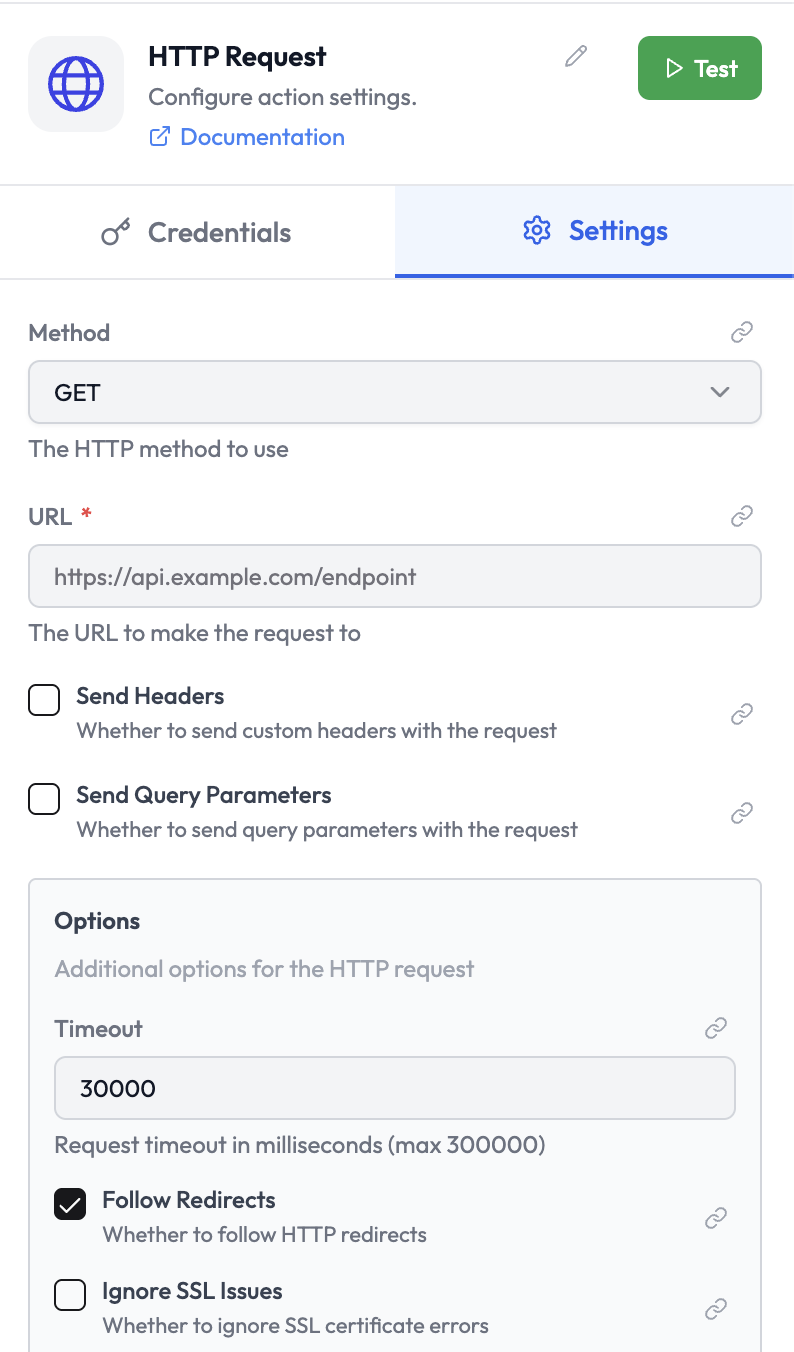
The **HTTP Request** node makes HTTP calls to any external API or web endpoint. It supports all standard HTTP methods and a wide range of authentication types.
 ***
## Use Cases
* Call a REST API that does not have a dedicated AgentVerse integration
* Interact with internal services or microservices
* Fetch data from a third-party API and pass it to downstream nodes
* Trigger webhooks on external platforms
***
## Node Reference
### Parameters
| Parameter | Type | Required | Description |
| ------------------------------- | -------------------- | -------- | ----------------------------------------------------------------------- |
| **Method** | Select | Yes | HTTP method: `GET`, `POST`, `PUT`, `PATCH`, `DELETE`, `HEAD`, `OPTIONS` |
| **URL** | String | Yes | The full URL of the endpoint |
| **Authentication** | Select | No | Authentication method (see below) |
| **Send Headers** | Boolean | No | Enable to add custom request headers |
| **Send Query Parameters** | Boolean | No | Enable to add query string parameters to the URL |
| **Body Type** | Select | No | Format of the request body (for POST/PUT/PATCH) |
| **Body** | String / JSON / Form | No | The request body payload |
| **Options — Timeout** | Number | No | Request timeout in milliseconds (default: `30000`, max: `300000`) |
| **Options — Follow Redirects** | Boolean | No | Whether to follow HTTP redirects (default: enabled) |
| **Options — Ignore SSL Issues** | Boolean | No | Skip SSL certificate verification (use with caution) |
### Body Types
| Type | Description |
| ------------------------- | ----------------------------------------------------- |
| `JSON` | Send body as `application/json` |
| `Form Data (URL Encoded)` | Send body as `application/x-www-form-urlencoded` |
| `Form Data (Multipart)` | Send body as `multipart/form-data` (for file uploads) |
| `Raw / Binary` | Send raw string or binary body |
***
## Authentication
| Type | Description |
| -------------- | --------------------------------------------------- |
| `None` | No authentication |
| `Basic Auth` | Username and password via HTTP Basic Authentication |
| `Bearer Token` | `Authorization: Bearer ` header |
| `API Key` | Custom header or query parameter with an API key |
| `Digest Auth` | HTTP Digest Authentication |
| `OAuth2` | OAuth2 Bearer token with automatic refresh |
| `Custom` | Manually specify any authentication header(s) |
***
## Output Data
By default, the node returns the parsed response body:
```json theme={null}
{
"users": [
{ "id": 1, "name": "Alice" },
{ "id": 2, "name": "Bob" }
]
}
```
When **Full Response** is enabled:
```json theme={null}
{
"statusCode": 200,
"statusMessage": "OK",
"headers": {
"content-type": "application/json"
},
"body": { ... }
}
```
Reference fields in downstream nodes:
```
{{ httpRequest.users[0].name }}
{{ httpRequest.statusCode }}
```
***
## Pagination
For APIs that return paginated results, enable **Pagination** under Options:
| Setting | Description |
| ------------------- | ------------------------------------------- |
| **Pagination Type** | `Page Number`, `Offset`, or `Cursor-Based` |
| **Max Items** | Stop paginating after this many total items |
***
## Related Nodes
* [Respond to Webhook](./respond-to-webhook.md) — Return an HTTP response from an orchestration
* [Conditions](./conditions.md) — Branch based on HTTP response status or body
Built with [Mintlify](https://mintlify.com).
***
## Use Cases
* Call a REST API that does not have a dedicated AgentVerse integration
* Interact with internal services or microservices
* Fetch data from a third-party API and pass it to downstream nodes
* Trigger webhooks on external platforms
***
## Node Reference
### Parameters
| Parameter | Type | Required | Description |
| ------------------------------- | -------------------- | -------- | ----------------------------------------------------------------------- |
| **Method** | Select | Yes | HTTP method: `GET`, `POST`, `PUT`, `PATCH`, `DELETE`, `HEAD`, `OPTIONS` |
| **URL** | String | Yes | The full URL of the endpoint |
| **Authentication** | Select | No | Authentication method (see below) |
| **Send Headers** | Boolean | No | Enable to add custom request headers |
| **Send Query Parameters** | Boolean | No | Enable to add query string parameters to the URL |
| **Body Type** | Select | No | Format of the request body (for POST/PUT/PATCH) |
| **Body** | String / JSON / Form | No | The request body payload |
| **Options — Timeout** | Number | No | Request timeout in milliseconds (default: `30000`, max: `300000`) |
| **Options — Follow Redirects** | Boolean | No | Whether to follow HTTP redirects (default: enabled) |
| **Options — Ignore SSL Issues** | Boolean | No | Skip SSL certificate verification (use with caution) |
### Body Types
| Type | Description |
| ------------------------- | ----------------------------------------------------- |
| `JSON` | Send body as `application/json` |
| `Form Data (URL Encoded)` | Send body as `application/x-www-form-urlencoded` |
| `Form Data (Multipart)` | Send body as `multipart/form-data` (for file uploads) |
| `Raw / Binary` | Send raw string or binary body |
***
## Authentication
| Type | Description |
| -------------- | --------------------------------------------------- |
| `None` | No authentication |
| `Basic Auth` | Username and password via HTTP Basic Authentication |
| `Bearer Token` | `Authorization: Bearer ` header |
| `API Key` | Custom header or query parameter with an API key |
| `Digest Auth` | HTTP Digest Authentication |
| `OAuth2` | OAuth2 Bearer token with automatic refresh |
| `Custom` | Manually specify any authentication header(s) |
***
## Output Data
By default, the node returns the parsed response body:
```json theme={null}
{
"users": [
{ "id": 1, "name": "Alice" },
{ "id": 2, "name": "Bob" }
]
}
```
When **Full Response** is enabled:
```json theme={null}
{
"statusCode": 200,
"statusMessage": "OK",
"headers": {
"content-type": "application/json"
},
"body": { ... }
}
```
Reference fields in downstream nodes:
```
{{ httpRequest.users[0].name }}
{{ httpRequest.statusCode }}
```
***
## Pagination
For APIs that return paginated results, enable **Pagination** under Options:
| Setting | Description |
| ------------------- | ------------------------------------------- |
| **Pagination Type** | `Page Number`, `Offset`, or `Cursor-Based` |
| **Max Items** | Stop paginating after this many total items |
***
## Related Nodes
* [Respond to Webhook](./respond-to-webhook.md) — Return an HTTP response from an orchestration
* [Conditions](./conditions.md) — Branch based on HTTP response status or body
Built with [Mintlify](https://mintlify.com).