> ## Documentation Index
> Fetch the complete documentation index at: https://docs.subverseai.com/llms.txt
> Use this file to discover all available pages before exploring further.
# WebChat Channel
> Enable automated chat responses on your website via webhooks and APIs
## Overview
A WebChat Channel connects a Chat Agent to your website or application via a webhook endpoint. When a user sends a message through your web chat widget or API integration, Subverse receives it at the configured webhook URL, processes it through the linked Chat Agent, and returns a response.
WebChat channels use credentials to secure the webhook connection, stored in encrypted form.
**When to use a WebChat Channel:**
* You want to embed a chat widget powered by a Subverse agent on your website
* You're building a custom chat interface and need to connect it to an AI agent via API
* You want to handle chat interactions programmatically through webhooks
***
## How to Set Up
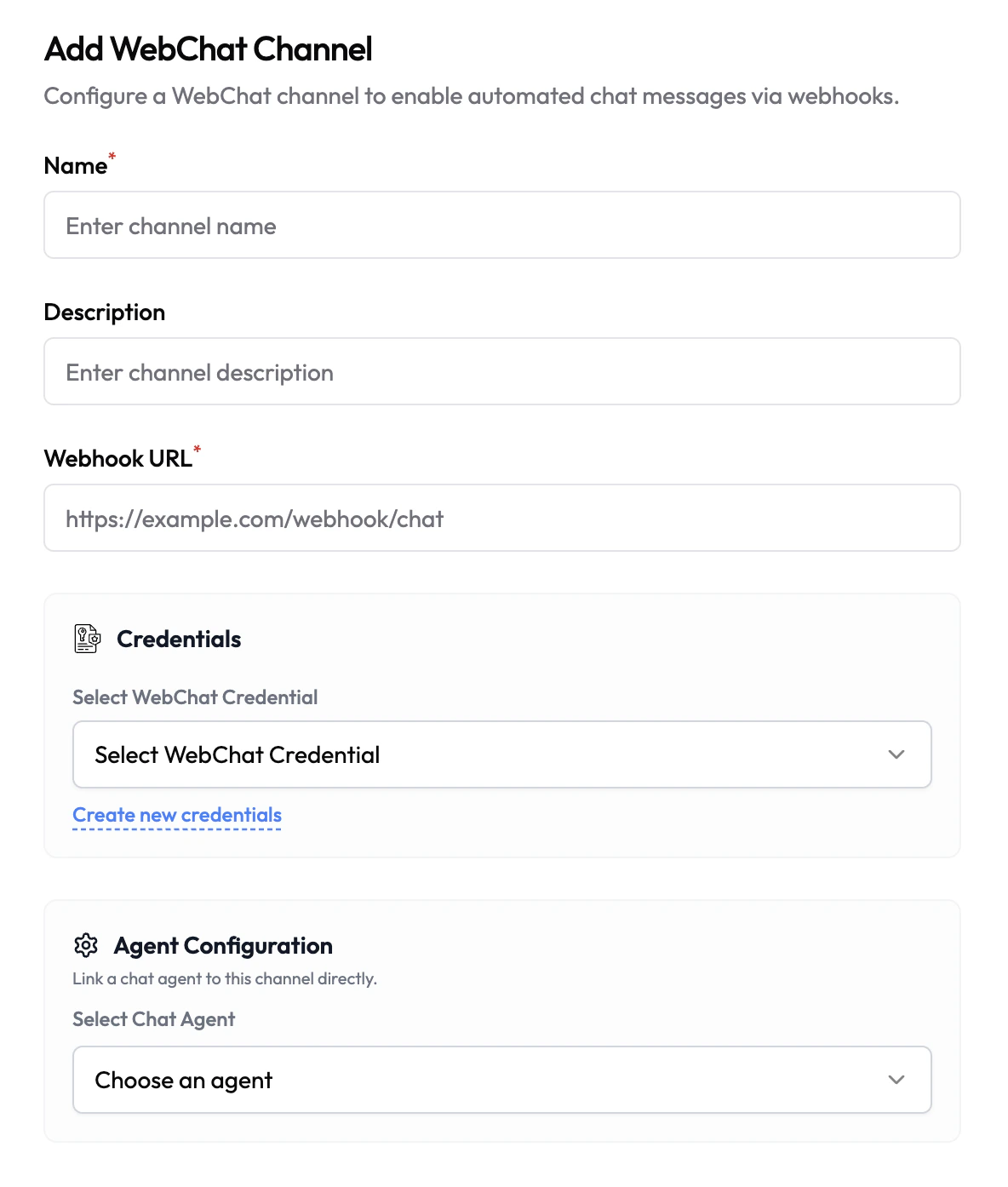 1. Navigate to **Channels** in the left sidebar.
2. Click **Add Channel** and select **WebChat**.
3. Fill in the channel details (see configuration below).
4. Select or create a **WebChat Credential**.
5. Under **Agent Configuration**, link a Chat Agent.
6. Click **Save**.
Once saved, send incoming chat messages to the configured webhook URL. The linked Chat Agent will process each message and return a response.
***
## Configuration
| Field | Type | Required | Description |
| ------------------ | -------- | -------- | ------------------------------------------------------------------------------------------------------------------------ |
| Name | Text | Yes | A friendly name for this channel (e.g. `Website Chat`). |
| Description | Text | No | Internal description for this channel. |
| Webhook URL | URL | Yes | The endpoint Subverse will use to receive and send chat messages (e.g. `https://example.com/webhook/chat`). |
| WebChat Credential | Dropdown | Yes | Select a saved WebChat credential to secure this channel. Click **Create new credentials** to add one under Credentials. |
| Chat Agent | Dropdown | No | The Chat Agent that will handle incoming messages on this channel. |
***
## Credentials
WebChat channels use credentials to authenticate webhook requests, ensuring only authorized sources can send messages to your channel. Credentials are stored encrypted and never exposed in plaintext after saving.
Create and manage your WebChat credentials in the Credentials section
1. Navigate to **Channels** in the left sidebar.
2. Click **Add Channel** and select **WebChat**.
3. Fill in the channel details (see configuration below).
4. Select or create a **WebChat Credential**.
5. Under **Agent Configuration**, link a Chat Agent.
6. Click **Save**.
Once saved, send incoming chat messages to the configured webhook URL. The linked Chat Agent will process each message and return a response.
***
## Configuration
| Field | Type | Required | Description |
| ------------------ | -------- | -------- | ------------------------------------------------------------------------------------------------------------------------ |
| Name | Text | Yes | A friendly name for this channel (e.g. `Website Chat`). |
| Description | Text | No | Internal description for this channel. |
| Webhook URL | URL | Yes | The endpoint Subverse will use to receive and send chat messages (e.g. `https://example.com/webhook/chat`). |
| WebChat Credential | Dropdown | Yes | Select a saved WebChat credential to secure this channel. Click **Create new credentials** to add one under Credentials. |
| Chat Agent | Dropdown | No | The Chat Agent that will handle incoming messages on this channel. |
***
## Credentials
WebChat channels use credentials to authenticate webhook requests, ensuring only authorized sources can send messages to your channel. Credentials are stored encrypted and never exposed in plaintext after saving.
Create and manage your WebChat credentials in the Credentials section