> ## Documentation Index
> Fetch the complete documentation index at: https://docs.subverseai.com/llms.txt
> Use this file to discover all available pages before exploring further.
# Agent Handoff
> Route an active conversation to a different specialized agent
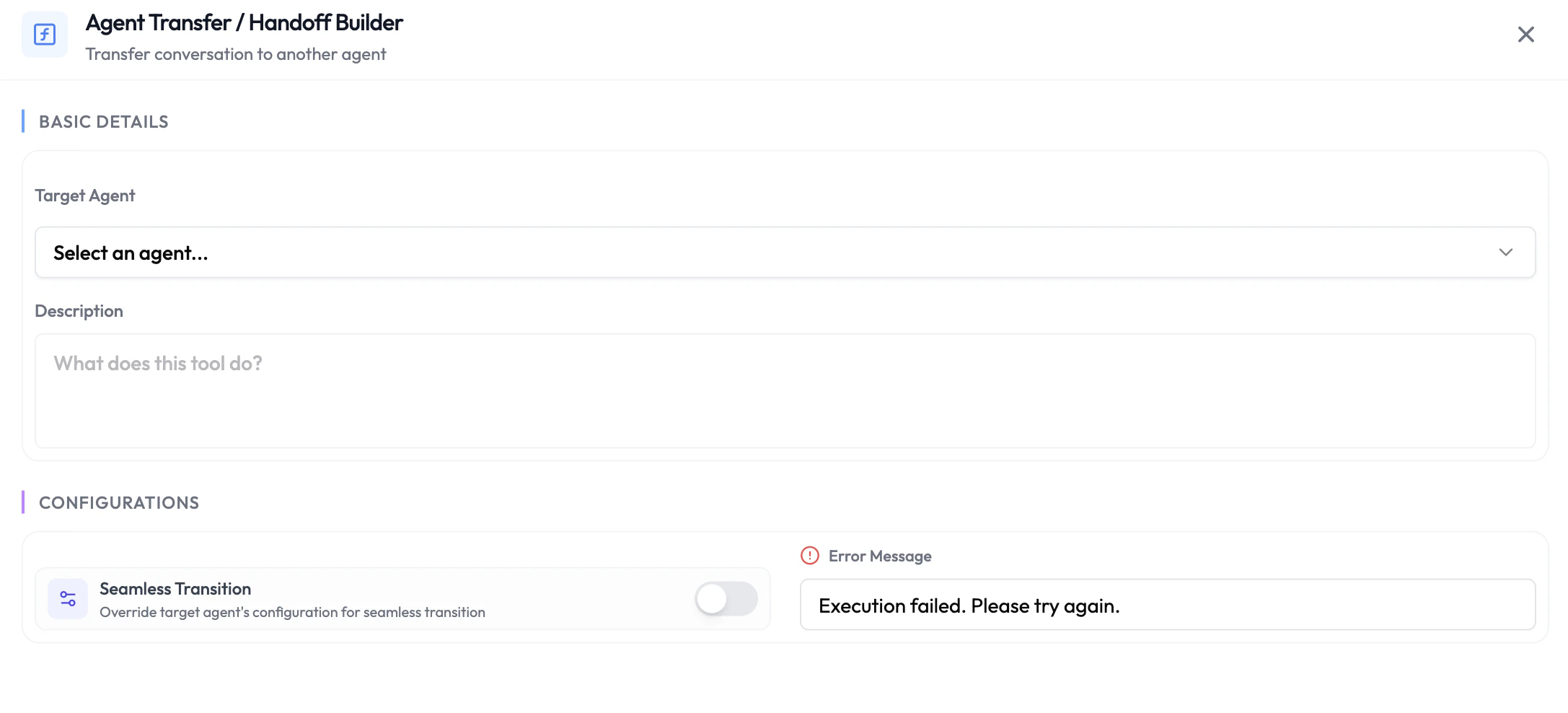
Agent Handoff lets the LLM seamlessly transfer the ongoing session to another agent on your SubVerse workspace. Use it to route customers to the right specialist — for example, escalating from a general support agent to a billing agent — without dropping the conversation.
 ## How It Works
When the LLM determines a handoff is needed (based on your instructions or the conversation context), it calls the handoff function. The session is transferred to the target agent, which picks up with the full conversation context passed along.
## Configuring an Agent Handoff
1. Navigate to **Integrations** → **Agentic Functions** and select your agent.
2. Under **During-Session Functions**, click **+ Add Function** and choose **Agent Handoff**.
3. Select the **Target Agent** to hand off to.
4. Provide a **Description** so the LLM understands when to trigger this handoff (e.g., *"Hand off to the billing agent when the customer asks about invoices or payments"*).
5. Save the function.
Write a clear, specific description. The LLM uses the description to decide when to call the handoff function — vague descriptions lead to incorrect or missed handoffs.
## Availability
| Phase | Available |
| -------------- | --------- |
| Pre-Session | No |
| During-Session | Yes |
| Post-Session | No |
## Next Steps
Trigger async tasks mid-conversation without blocking the LLM
Built-in platform actions available to every agent
## How It Works
When the LLM determines a handoff is needed (based on your instructions or the conversation context), it calls the handoff function. The session is transferred to the target agent, which picks up with the full conversation context passed along.
## Configuring an Agent Handoff
1. Navigate to **Integrations** → **Agentic Functions** and select your agent.
2. Under **During-Session Functions**, click **+ Add Function** and choose **Agent Handoff**.
3. Select the **Target Agent** to hand off to.
4. Provide a **Description** so the LLM understands when to trigger this handoff (e.g., *"Hand off to the billing agent when the customer asks about invoices or payments"*).
5. Save the function.
Write a clear, specific description. The LLM uses the description to decide when to call the handoff function — vague descriptions lead to incorrect or missed handoffs.
## Availability
| Phase | Available |
| -------------- | --------- |
| Pre-Session | No |
| During-Session | Yes |
| Post-Session | No |
## Next Steps
Trigger async tasks mid-conversation without blocking the LLM
Built-in platform actions available to every agent