> ## Documentation Index
> Fetch the complete documentation index at: https://docs.subverseai.com/llms.txt
> Use this file to discover all available pages before exploring further.
# Background Agent
> Delegate complex tasks to powerful LLM agents while keeping the customer-facing agent fast
A Background Agent is a separate, independently configured agent that handles heavy or complex tasks on behalf of the main communication agent. The main agent — typically a small, fast model — stays focused on the conversation, while background agents running large, capable models do the heavy lifting in parallel.
 ## How It Works
Customer-facing agents need to be fast and responsive. But some tasks — analysing an image, generating a PDF, processing a video, or running complex reasoning — are better suited to large, powerful models like Claude Sonnet or Gemini 2.5 Pro. Running those tasks inline would slow down the entire conversation.
Background Agents solve this by separating concerns:
* The **main agent** uses a lightweight, low-latency model to talk directly to the customer.
* **Background agents** use large, capable models to execute complex tasks in parallel.
* The main agent delegates tasks to background agents based on instructions in its prompt, then communicates the outcome back to the customer once available.
You can attach multiple background agents to a single main agent — each specialised for a different kind of task.
**Example architecture:**
```
Customer
↕
Main Agent (fast model — e.g. GPT-4o mini)
├── Background Agent A: Image Analysis (Claude Sonnet)
├── Background Agent B: Document Generation (Gemini 2.5 Pro)
└── Background Agent C: Video Processing (Claude Sonnet)
```
The main agent routes the task to the right background agent based on its prompt. The customer receives a holding response while the background agent works, and the result is returned once ready.
## Use Cases
| Task | Background Agent Role |
| ----------------------- | -------------------------------------------------------------------------- |
| Image analysis | Analyse an uploaded image and return a structured summary |
| PDF / document creation | Generate formatted documents from conversation data |
| Video processing | Transcribe, summarise, or extract data from a video file |
| Complex data reasoning | Run multi-step analysis that would exceed a small model's capability |
| Long-context tasks | Process large documents or datasets without impacting conversation latency |
## Configuring a Background Agent
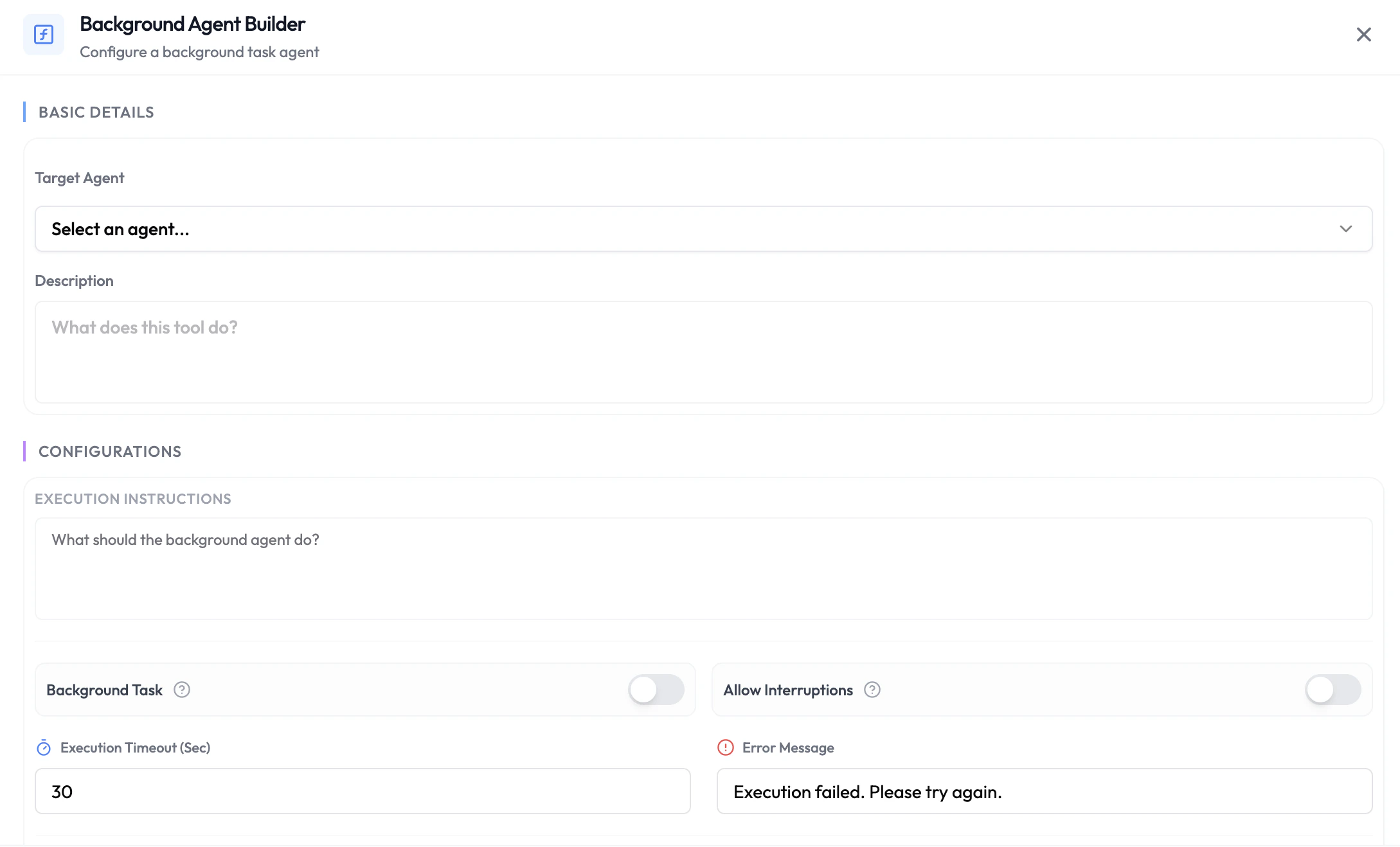
1. Navigate to **Integrations** → **Agentic Functions** and select your agent.
2. Choose the phase where you want to add the background agent (Pre-Session, During-Session, or Post-Session).
3. Click **+ Add Function** and choose **Background Agent**.
4. Select the **Target Background Agent** from your workspace — this is a fully configured agent with its own model, prompt, and tools.
5. Map any input variables that should be passed to the background agent.
6. Save the function.
In your main agent's system prompt, explicitly define when and how to delegate to each background agent. For example: *"When the customer uploads an image for analysis, delegate the task to the Image Analysis agent and tell the customer you are processing it."*
## Availability
| Phase | Available |
| -------------- | --------- |
| Pre-Session | Yes |
| During-Session | Yes |
| Post-Session | Yes |
### Pre-Session
Trigger a background agent before the session starts — for example, use a powerful model to enrich or analyse customer data before the conversation begins, then pass the results back as dynamic variables.
### During-Session
The main agent delegates tasks mid-conversation. The customer receives an acknowledgement while the background agent processes the request, keeping conversation latency low regardless of the complexity of the underlying task.
### Post-Session
Trigger a background agent after the session ends to act on the full session analysis — for example, generating a detailed report, creating a follow-up document, or running a post-call analysis with a large model.
## Next Steps
Call your own API with session or LLM-extracted data
Route the active conversation to another agent
## How It Works
Customer-facing agents need to be fast and responsive. But some tasks — analysing an image, generating a PDF, processing a video, or running complex reasoning — are better suited to large, powerful models like Claude Sonnet or Gemini 2.5 Pro. Running those tasks inline would slow down the entire conversation.
Background Agents solve this by separating concerns:
* The **main agent** uses a lightweight, low-latency model to talk directly to the customer.
* **Background agents** use large, capable models to execute complex tasks in parallel.
* The main agent delegates tasks to background agents based on instructions in its prompt, then communicates the outcome back to the customer once available.
You can attach multiple background agents to a single main agent — each specialised for a different kind of task.
**Example architecture:**
```
Customer
↕
Main Agent (fast model — e.g. GPT-4o mini)
├── Background Agent A: Image Analysis (Claude Sonnet)
├── Background Agent B: Document Generation (Gemini 2.5 Pro)
└── Background Agent C: Video Processing (Claude Sonnet)
```
The main agent routes the task to the right background agent based on its prompt. The customer receives a holding response while the background agent works, and the result is returned once ready.
## Use Cases
| Task | Background Agent Role |
| ----------------------- | -------------------------------------------------------------------------- |
| Image analysis | Analyse an uploaded image and return a structured summary |
| PDF / document creation | Generate formatted documents from conversation data |
| Video processing | Transcribe, summarise, or extract data from a video file |
| Complex data reasoning | Run multi-step analysis that would exceed a small model's capability |
| Long-context tasks | Process large documents or datasets without impacting conversation latency |
## Configuring a Background Agent
1. Navigate to **Integrations** → **Agentic Functions** and select your agent.
2. Choose the phase where you want to add the background agent (Pre-Session, During-Session, or Post-Session).
3. Click **+ Add Function** and choose **Background Agent**.
4. Select the **Target Background Agent** from your workspace — this is a fully configured agent with its own model, prompt, and tools.
5. Map any input variables that should be passed to the background agent.
6. Save the function.
In your main agent's system prompt, explicitly define when and how to delegate to each background agent. For example: *"When the customer uploads an image for analysis, delegate the task to the Image Analysis agent and tell the customer you are processing it."*
## Availability
| Phase | Available |
| -------------- | --------- |
| Pre-Session | Yes |
| During-Session | Yes |
| Post-Session | Yes |
### Pre-Session
Trigger a background agent before the session starts — for example, use a powerful model to enrich or analyse customer data before the conversation begins, then pass the results back as dynamic variables.
### During-Session
The main agent delegates tasks mid-conversation. The customer receives an acknowledgement while the background agent processes the request, keeping conversation latency low regardless of the complexity of the underlying task.
### Post-Session
Trigger a background agent after the session ends to act on the full session analysis — for example, generating a detailed report, creating a follow-up document, or running a post-call analysis with a large model.
## Next Steps
Call your own API with session or LLM-extracted data
Route the active conversation to another agent