> ## Documentation Index
> Fetch the complete documentation index at: https://docs.subverseai.com/llms.txt
> Use this file to discover all available pages before exploring further.
# Custom Functions
> Write code, connect integrations, and call your own logic at any phase of an agent session
Custom Functions give you full control over what your agent can do. You can connect to your own API endpoint, use any integration available in AgentVerse, or write custom code directly in the platform — no external server required.
And if you've never written code before, that's fine. The built-in **Code Assistant** will write it for you.
 ## What You Can Do With Custom Functions
* **Call your own API or webhook** — POST session data to your backend and return a response.
* **Use AgentVerse integrations** — Connect to Shopify, Airtable, Slack, WhatsApp, Freshdesk, and other platforms without writing any integration code yourself.
* **Write custom code** — Define exactly what happens using code that runs securely on SubVerse infrastructure. No server needed.
***
## Code Assistant — No Coding Experience Required
Writing a custom function is as simple as having a conversation.
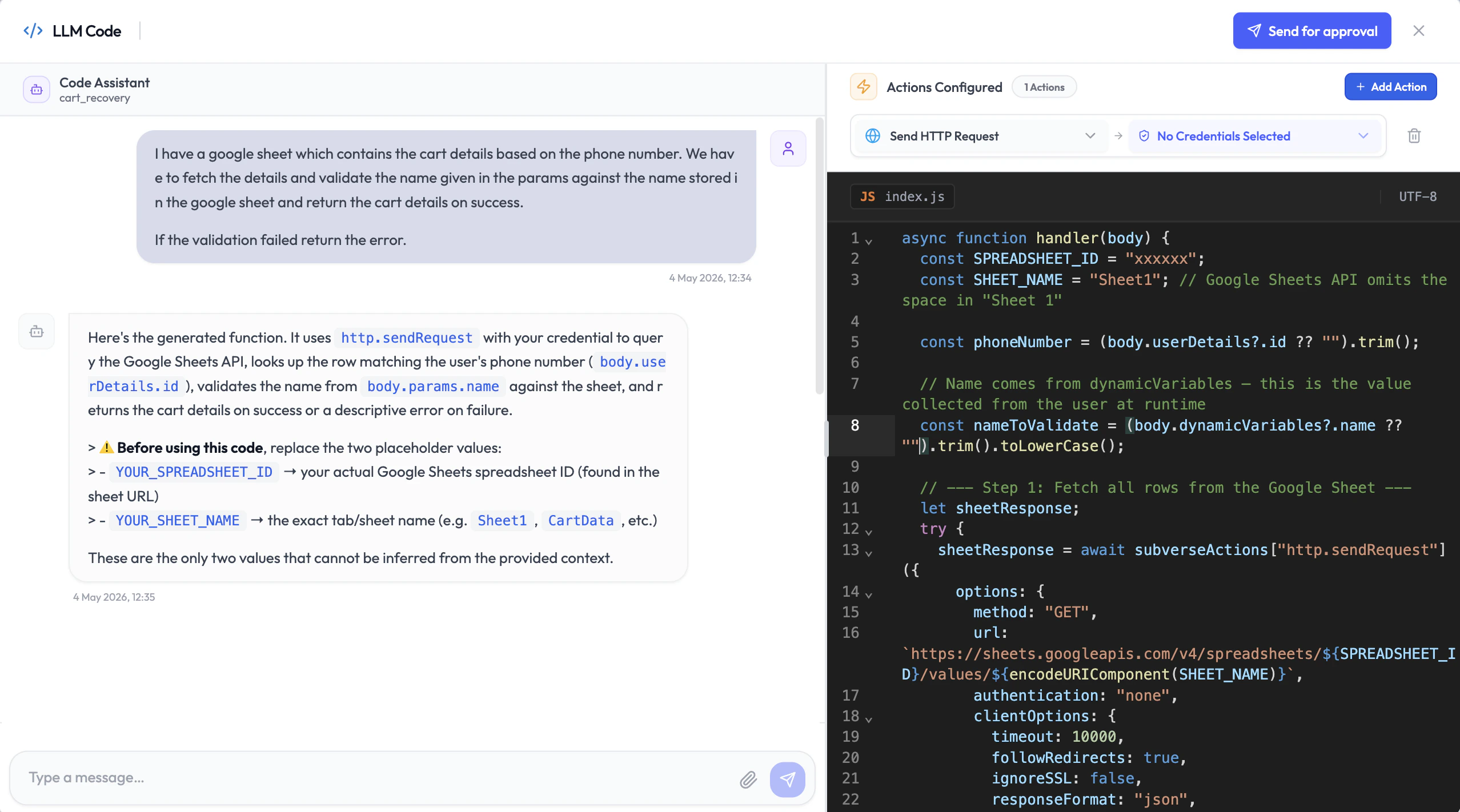
The **Code Assistant** is built into the function editor. Describe what you want your function to do in plain English, and the Code Assistant writes the code for you — in 5 to 10 minutes. You don't need to know how to code. You don't need to set up a server. Just describe the task, review what it generates, and ship it.
**How the Code Assistant works:**
1. Open the function editor and open the Code Assistant panel.
2. Describe what you want the function to do — for example: *"Look up the customer's order status from Shopify using their email, and return the latest order details."*
3. The Code Assistant writes the code, aware of the session body structure and the integrations you have enabled.
4. Review the generated code and request changes by chatting with the assistant.
5. Once satisfied, **request approval**.
## What You Can Do With Custom Functions
* **Call your own API or webhook** — POST session data to your backend and return a response.
* **Use AgentVerse integrations** — Connect to Shopify, Airtable, Slack, WhatsApp, Freshdesk, and other platforms without writing any integration code yourself.
* **Write custom code** — Define exactly what happens using code that runs securely on SubVerse infrastructure. No server needed.
***
## Code Assistant — No Coding Experience Required
Writing a custom function is as simple as having a conversation.
The **Code Assistant** is built into the function editor. Describe what you want your function to do in plain English, and the Code Assistant writes the code for you — in 5 to 10 minutes. You don't need to know how to code. You don't need to set up a server. Just describe the task, review what it generates, and ship it.
**How the Code Assistant works:**
1. Open the function editor and open the Code Assistant panel.
2. Describe what you want the function to do — for example: *"Look up the customer's order status from Shopify using their email, and return the latest order details."*
3. The Code Assistant writes the code, aware of the session body structure and the integrations you have enabled.
4. Review the generated code and request changes by chatting with the assistant.
5. Once satisfied, **request approval**.
 ### Code Review and Approval
Every piece of custom code goes through an automated review before it can run in production. Once you submit for approval, SubVerse AI's code analytics pipeline evaluates the code for safety and correctness and either approves it or returns comments explaining what needs to change — instantly.
This keeps your functions secure and your agent stable, without requiring a manual review process.
### Sandbox Testing
Once approved, use the **Test** button to run the function in a sandbox environment. You'll see exactly what the function returns — including the full response object — before the agent ever uses it in a live session. This lets you verify the response shape and configure the LLM to interpret it correctly.
***
## Adding Parameters
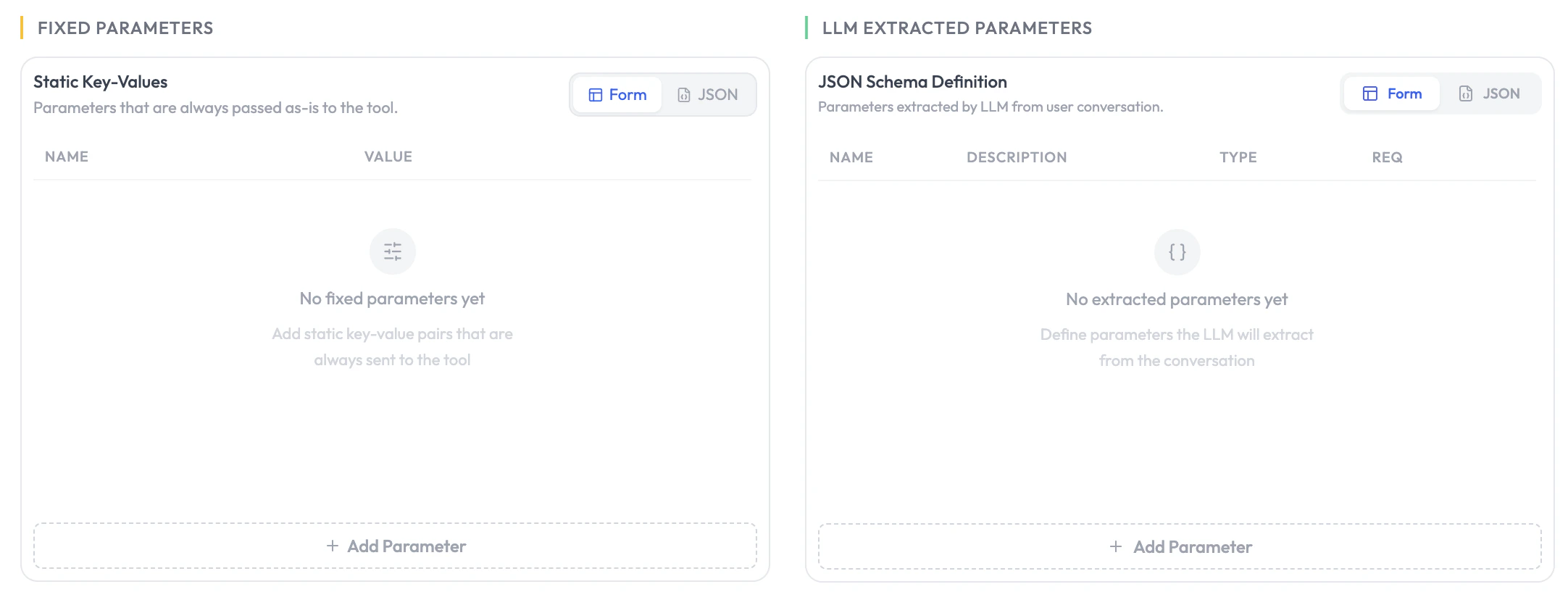
Parameters define the inputs your function receives. During a session, the LLM extracts these values from the conversation and passes them to your function automatically.
| Field | Description |
| --------------- | ---------------------------------------------------------------------------------- |
| **Data Type** | `string`, `number`, or `boolean`. |
| **Identifier** | The key name passed to your function (e.g., `customer_email`). |
| **Description** | Helps the LLM understand what to extract for this parameter (during-session only). |
### Code Review and Approval
Every piece of custom code goes through an automated review before it can run in production. Once you submit for approval, SubVerse AI's code analytics pipeline evaluates the code for safety and correctness and either approves it or returns comments explaining what needs to change — instantly.
This keeps your functions secure and your agent stable, without requiring a manual review process.
### Sandbox Testing
Once approved, use the **Test** button to run the function in a sandbox environment. You'll see exactly what the function returns — including the full response object — before the agent ever uses it in a live session. This lets you verify the response shape and configure the LLM to interpret it correctly.
***
## Adding Parameters
Parameters define the inputs your function receives. During a session, the LLM extracts these values from the conversation and passes them to your function automatically.
| Field | Description |
| --------------- | ---------------------------------------------------------------------------------- |
| **Data Type** | `string`, `number`, or `boolean`. |
| **Identifier** | The key name passed to your function (e.g., `customer_email`). |
| **Description** | Helps the LLM understand what to extract for this parameter (during-session only). |
 ## Configuration
| Field | Description |
| ------------------- | --------------------------------------------------------------------------------------------------------------------------------------------------------------- |
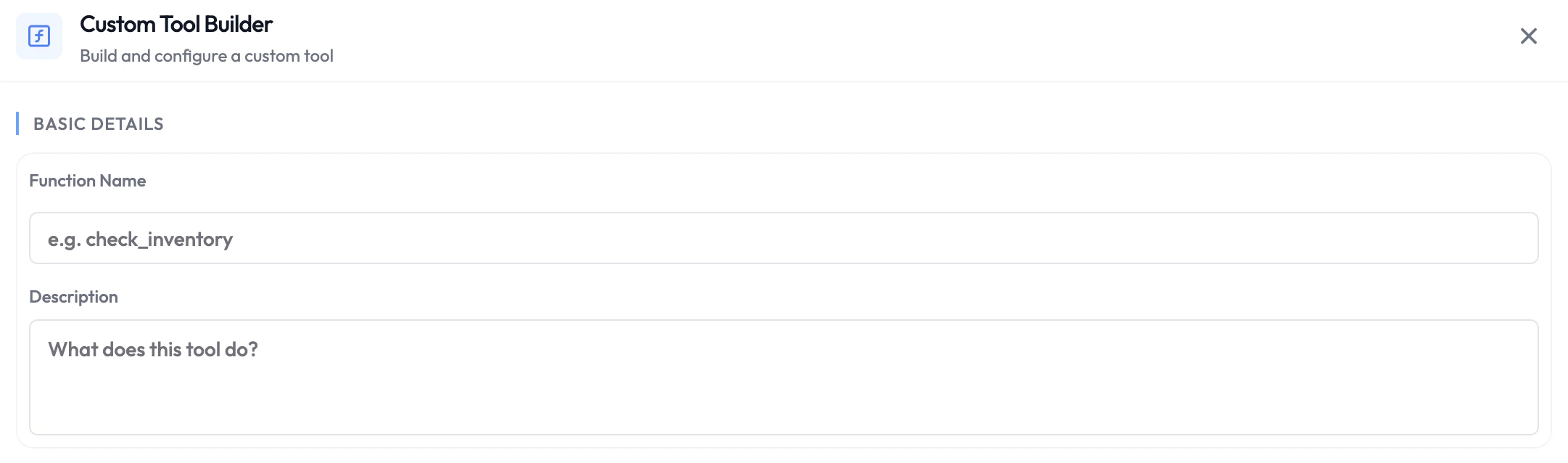
| **Function Name** | A unique identifier for the function (e.g., `fetch_order_status`). |
| **Description** | Explains what the function does. The LLM uses this during-session to decide when to call it. |
| **Webhook URL** | Your API endpoint — or leave this empty and use the built-in code editor instead. |
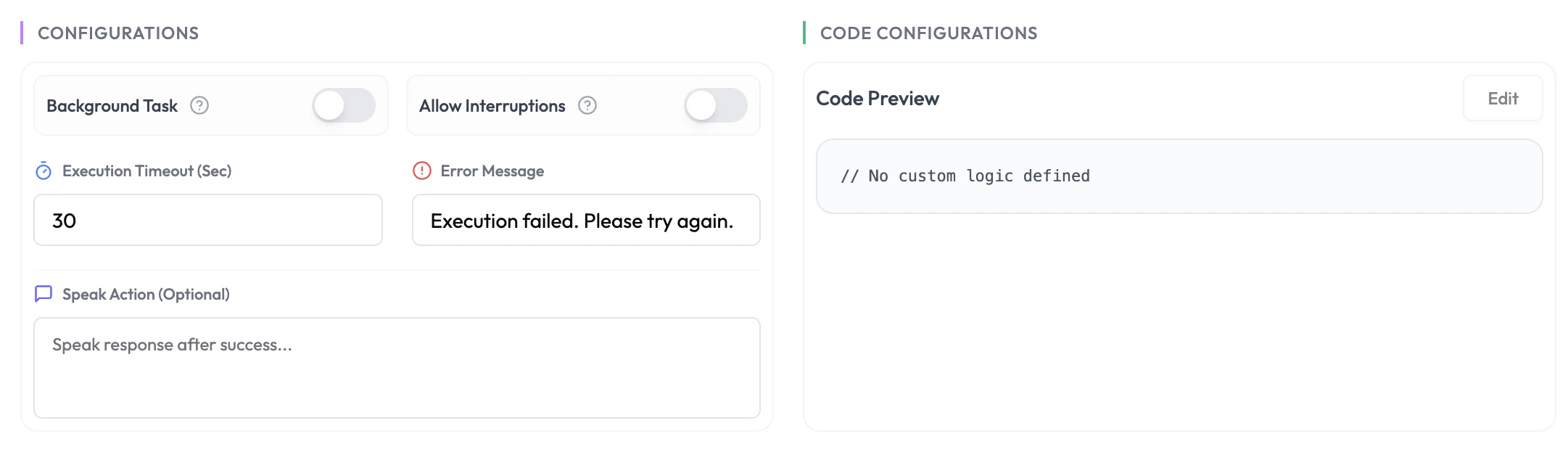
| **Error Message** | What the agent says if the function fails (e.g., *"I wasn't able to retrieve that — I'll follow up after the call."*). |
| **Return Message** | Used when the function runs in the background (e.g., *"I've sent that request — you'll hear back shortly."*). |
| **Background Task** | Toggle on to run the function without blocking the agent's response. Toggle off when the agent needs the result before replying (e.g., fetching order details). |
## Configuration
| Field | Description |
| ------------------- | --------------------------------------------------------------------------------------------------------------------------------------------------------------- |
| **Function Name** | A unique identifier for the function (e.g., `fetch_order_status`). |
| **Description** | Explains what the function does. The LLM uses this during-session to decide when to call it. |
| **Webhook URL** | Your API endpoint — or leave this empty and use the built-in code editor instead. |
| **Error Message** | What the agent says if the function fails (e.g., *"I wasn't able to retrieve that — I'll follow up after the call."*). |
| **Return Message** | Used when the function runs in the background (e.g., *"I've sent that request — you'll hear back shortly."*). |
| **Background Task** | Toggle on to run the function without blocking the agent's response. Toggle off when the agent needs the result before replying (e.g., fetching order details). |
 ***
## Session Body
Every custom function receives a consistent request body regardless of phase. Use any of these fields inside your function code.
```json theme={null}
{
"sessionId": "test_session_id",
"direction": "inbound",
"agentDetails": {
"name": "agent_name",
"version": "default - v9"
},
"userDetails": {
"id": "user@example.com",
"email": "user@example.com", // For email agent
"number": "1234567890" // For chat agent
},
"communicationChannelName": "test-channel",
"communicationChannelId": "test-channel-id",
"threadId": ["message-1", "message-2"], // For email agent
"recordingUrl": "https://test.com/recording.mp3", // For voice agents
"dynamicVariables": { "currentTime": "2026-04-28T07:13:23.915Z" },
"createdAt": "2026-04-28T07:13:23.915Z", // Session creation date
"time": "2026-04-28T07:13:23.915Z", // Last session updation date
"params": { },
"analysis": { },
"llmResponse": ""
}
```
| Field | Description |
| -------------------------- | ------------------------------------------------------------------------------------------- |
| `sessionId` | Unique identifier for this session. |
| `direction` | `"inbound"` or `"outbound"`. |
| `agentDetails.name` | The name of the agent that handled the session. |
| `agentDetails.version` | The agent version. Format is one of: `"v9"`, `"draft - v8"`, `"default - v5"`. |
| `userDetails.id` | Unique identifier for the customer or user. |
| `userDetails.email` | Customer email address. Populated for email agents. |
| `userDetails.number` | Customer phone or chat number. Populated for voice and chat agents. |
| `communicationChannelName` | The name of the channel the session came through. |
| `communicationChannelId` | Unique ID of the communication channel. |
| `threadId` | Array of message thread IDs. Populated for email agents. |
| `recordingUrl` | URL to the session recording. Populated for voice agents. |
| `dynamicVariables` | Variables set by earlier functions in the session — available to every subsequent function. |
| `createdAt` | Session creation timestamp in ISO 8601 format. |
| `time` | Timestamp of the last session update in ISO 8601 format. |
| `params` | LLM-extracted parameters defined for this function. Populated during-session only. |
| `analysis` | Post-call analysis data. Populated in post-session functions only. |
| `llmResponse` | Optional. Sent in the post-call of a background agent. |
***
## Phase Behaviour
### Pre-Session
No LLM is involved. Your function runs before the agent activates. Use it to validate the customer, pre-fetch data, or block the session entirely.
Your function can return:
```json theme={null}
{
"dynamicVariables": {
"customer_name": "Jane Smith",
"account_tier": "premium",
"open_tickets": 2
},
"terminateAgent": false
}
```
* **`dynamicVariables`** — Key-value pairs injected into the agent's context and available to all subsequent functions.
* **`terminateAgent: true`** — Abort the session before the agent activates. Acts as a security gateway — the LLM is never initialised, so no LLM cost is incurred.
Returning `terminateAgent: true` is the recommended way to block unauthorised or invalid sessions. The agent is never started, which also means zero LLM cost for rejected sessions.
### During-Session
The LLM calls the function based on the conversation context and its description. LLM-extracted `params` are populated from the conversation. Your function can return `dynamicVariables` to pass data forward to the next function in the chain.
If **Background Task** is off, the agent waits for your function's response before replying to the customer — keep response time under 3 seconds for the best experience.
### Post-Session
The function runs automatically after the session ends. `analysis` is populated with the full post-call analysis. Use it to write session outcomes to your database, trigger follow-up messages, or update your CRM.
***
## Using Actions in Your Code
Custom functions can call built-in actions — HTTP requests, Airtable, Google Sheets, and SubVerse agent triggers — without writing any integration code. Select the actions you need when creating your function, attach the required credentials, and the Code Assistant will use them when generating your code.
Browse all available actions with input options and code examples
***
## Next Steps
Delegate complex tasks to a powerful model in parallel
See all function types and session phases
***
## Session Body
Every custom function receives a consistent request body regardless of phase. Use any of these fields inside your function code.
```json theme={null}
{
"sessionId": "test_session_id",
"direction": "inbound",
"agentDetails": {
"name": "agent_name",
"version": "default - v9"
},
"userDetails": {
"id": "user@example.com",
"email": "user@example.com", // For email agent
"number": "1234567890" // For chat agent
},
"communicationChannelName": "test-channel",
"communicationChannelId": "test-channel-id",
"threadId": ["message-1", "message-2"], // For email agent
"recordingUrl": "https://test.com/recording.mp3", // For voice agents
"dynamicVariables": { "currentTime": "2026-04-28T07:13:23.915Z" },
"createdAt": "2026-04-28T07:13:23.915Z", // Session creation date
"time": "2026-04-28T07:13:23.915Z", // Last session updation date
"params": { },
"analysis": { },
"llmResponse": ""
}
```
| Field | Description |
| -------------------------- | ------------------------------------------------------------------------------------------- |
| `sessionId` | Unique identifier for this session. |
| `direction` | `"inbound"` or `"outbound"`. |
| `agentDetails.name` | The name of the agent that handled the session. |
| `agentDetails.version` | The agent version. Format is one of: `"v9"`, `"draft - v8"`, `"default - v5"`. |
| `userDetails.id` | Unique identifier for the customer or user. |
| `userDetails.email` | Customer email address. Populated for email agents. |
| `userDetails.number` | Customer phone or chat number. Populated for voice and chat agents. |
| `communicationChannelName` | The name of the channel the session came through. |
| `communicationChannelId` | Unique ID of the communication channel. |
| `threadId` | Array of message thread IDs. Populated for email agents. |
| `recordingUrl` | URL to the session recording. Populated for voice agents. |
| `dynamicVariables` | Variables set by earlier functions in the session — available to every subsequent function. |
| `createdAt` | Session creation timestamp in ISO 8601 format. |
| `time` | Timestamp of the last session update in ISO 8601 format. |
| `params` | LLM-extracted parameters defined for this function. Populated during-session only. |
| `analysis` | Post-call analysis data. Populated in post-session functions only. |
| `llmResponse` | Optional. Sent in the post-call of a background agent. |
***
## Phase Behaviour
### Pre-Session
No LLM is involved. Your function runs before the agent activates. Use it to validate the customer, pre-fetch data, or block the session entirely.
Your function can return:
```json theme={null}
{
"dynamicVariables": {
"customer_name": "Jane Smith",
"account_tier": "premium",
"open_tickets": 2
},
"terminateAgent": false
}
```
* **`dynamicVariables`** — Key-value pairs injected into the agent's context and available to all subsequent functions.
* **`terminateAgent: true`** — Abort the session before the agent activates. Acts as a security gateway — the LLM is never initialised, so no LLM cost is incurred.
Returning `terminateAgent: true` is the recommended way to block unauthorised or invalid sessions. The agent is never started, which also means zero LLM cost for rejected sessions.
### During-Session
The LLM calls the function based on the conversation context and its description. LLM-extracted `params` are populated from the conversation. Your function can return `dynamicVariables` to pass data forward to the next function in the chain.
If **Background Task** is off, the agent waits for your function's response before replying to the customer — keep response time under 3 seconds for the best experience.
### Post-Session
The function runs automatically after the session ends. `analysis` is populated with the full post-call analysis. Use it to write session outcomes to your database, trigger follow-up messages, or update your CRM.
***
## Using Actions in Your Code
Custom functions can call built-in actions — HTTP requests, Airtable, Google Sheets, and SubVerse agent triggers — without writing any integration code. Select the actions you need when creating your function, attach the required credentials, and the Code Assistant will use them when generating your code.
Browse all available actions with input options and code examples
***
## Next Steps
Delegate complex tasks to a powerful model in parallel
See all function types and session phases