> ## Documentation Index
> Fetch the complete documentation index at: https://docs.subverseai.com/llms.txt
> Use this file to discover all available pages before exploring further.
# Default Functions
> Built-in platform actions and LLM-native tools available to every agent
Default functions are pre-built actions provided by SubVerse AI and the underlying LLM provider. They are always available to the LLM during an active session — no webhook or custom code required. Simply enable the ones you need and instruct the agent when to use them.
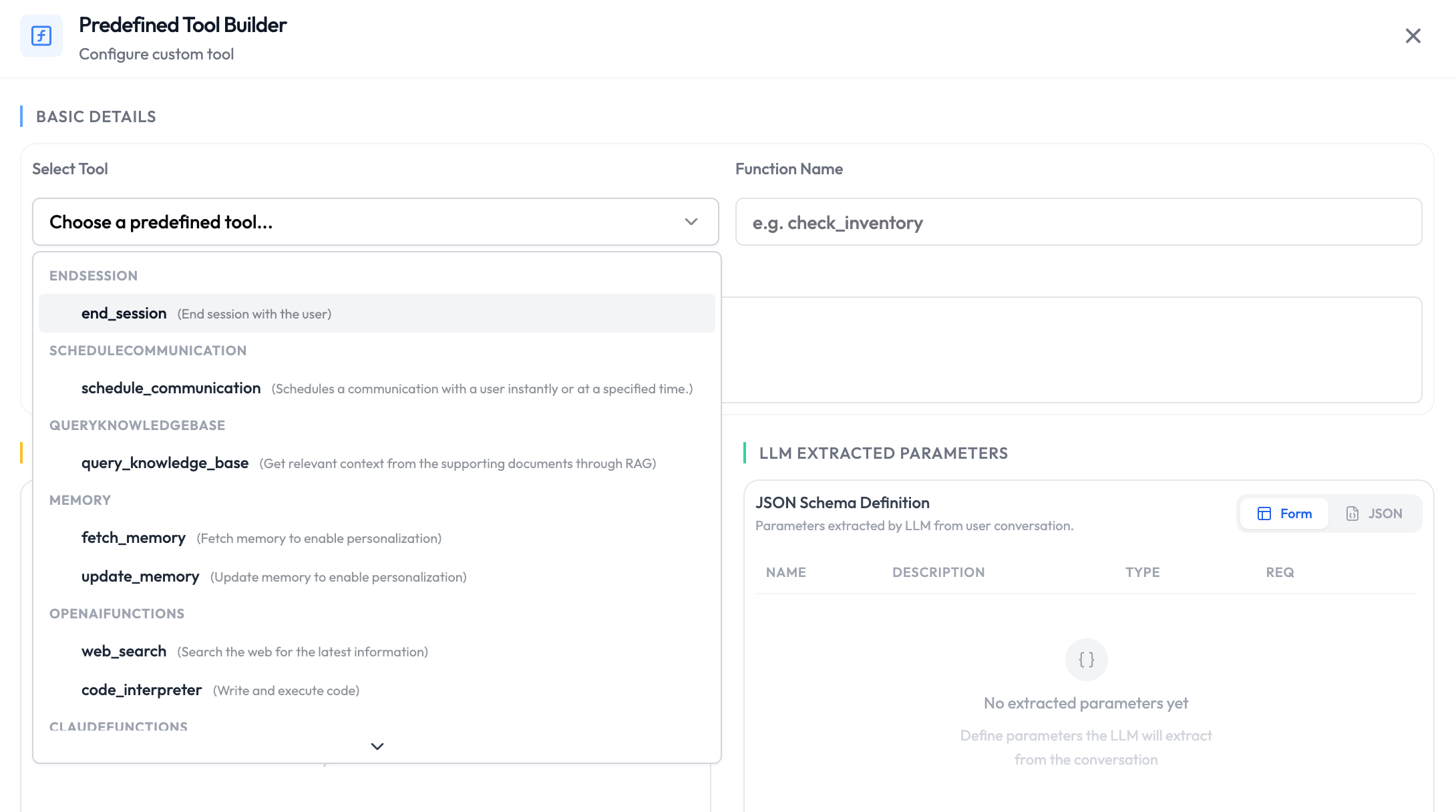 ## Available Default Functions
### Core Platform Functions
These functions are available regardless of which LLM you use.
| Function | Description |
| ------------------------ | ------------------------------------------------------------------------------------------ |
| `end_session` | End the session when the conversation is complete. |
| `schedule_communication` | Schedule a follow-up call, message, or email for a future time. |
| `query_knowledge_base` | Fetch relevant information from the agent's connected knowledge base. |
| `fetch_memory` | Retrieve previously stored memory for this customer or session. [Read more](#fetch_memory) |
| `update_memory` | Write new information to memory for use in future sessions. [Read more](#update_memory) |
### OpenAI LLM Functions
Available when your agent uses an OpenAI model.
| Function | Description |
| ------------------ | --------------------------------------------------------------------------------------------------- |
| `web_search` | Search the web for up-to-date information. |
| `code_interpreter` | Execute Python code in a sandboxed environment for calculations, data analysis, or file generation. |
### Claude LLM Functions
Available when your agent uses an Anthropic Claude model.
| Function | Description |
| ---------------- | ------------------------------------------------- |
| `web_search` | Search the web for up-to-date information. |
| `web_fetch` | Retrieve the contents of a specific URL. |
| `code_execution` | Run code in a sandboxed environment. |
| `bash` | Execute bash commands in a sandboxed environment. |
### Google Gemini LLM Functions
Available when your agent uses a Google Gemini model.
| Function | Description |
| ---------------- | ----------------------------------------------------- |
| `google_search` | Search Google for up-to-date information. |
| `url_context` | Retrieve and reason over the contents of a URL. |
| `google_maps` | Look up locations, directions, and place information. |
| `code_execution` | Run code in a sandboxed environment. |
## When to Use Default Functions
Default functions cover the most common actions an agent needs during a session. You do not need to create or configure them — just enable the ones relevant to your use case and instruct the agent in its system prompt when to call them.
**Common patterns:**
* End the session automatically once the user's query is resolved.
* Search the web when the agent needs real-time or external information.
* Store customer preferences in memory to personalise future sessions.
* Query the knowledge base for product details or policy documents.
Be explicit in the agent's system prompt about when to call each function. For example: *"When the customer says goodbye or their issue is resolved, call `end_session`."* or *"Use `web_search` only when the knowledge base does not contain a definitive answer."*
## fetch\_memory
`fetch_memory` is a **pre-session** function that retrieves previously stored memory and injects it into the agent's context before the conversation begins. The retrieved memory is placed into a dynamic variable that you define, which you can then reference anywhere in the agent's system prompt.
### How It Works
When a session starts, `fetch_memory` looks up the memory stored under the given `memoryId` and makes it available as a dynamic variable named by `paramName`. From that point on, you can reference the memory in your system prompt using the standard double-curly-brace syntax — `{{ paramName }}`.
### Parameters
| Parameter | Type | Required | Description |
| ----------- | ------ | -------- | ------------------------------------------------------------------------------------------------------------------------------------------------------------------- |
| `memoryId` | string | Yes | ID of the memory to retrieve. Accepts dynamic variables — use a session variable like `{{ claimId }}` or a nested tool body field like `{{ body.userDetails.id }}`. |
| `paramName` | string | Yes | Name of the dynamic variable the retrieved memory will be injected into. |
`memoryId` supports both top-level session variables (`{{ claimId }}`) and nested tool body paths (`{{ body.userDetails.id }}`). This makes it straightforward to scope memory to the specific customer or entity being passed in the request payload — no extra configuration needed.
### Example
```
// Tool params
memoryId: {{ claimId }}
paramName: claimMemory
// Tool response
{
"dynamicVariables": {
"claimMemory": "Previous conversation memory for this claim..."
}
}
// System prompt usage
Here is the previous claim memory which you can refer to if needed: {{ claimMemory }}
```
Memory is **shared across all agents and customers in your workspace**. Always use a customer-specific `memoryId` — such as the customer's user ID or claim ID — to prevent one customer's memory from being accessible to another.
If no memory exists for the given `memoryId`, the dynamic variable returns `null`. Handle this gracefully in your system prompt — for example: *"If `{{ claimMemory }}` is empty, treat this as a new customer with no prior history."*
***
## update\_memory
`update_memory` is a **post-session** function that extracts key information from the conversation and saves it under a given `memoryId`. If memory already exists at that ID, the function merges the new conversation with the prior memory to produce an updated record — nothing is lost.
### How It Works
After the session ends, the LLM reads the full conversation alongside your `prompt` instructions, extracts the relevant information, and writes it to the `memoryId`. If existing memory is found at that ID, it is combined with the new extraction so the stored record stays cumulative across sessions.
### Parameters
| Parameter | Type | Required | Description |
| ---------- | ------ | -------- | ---------------------------------------------------------------------------------------------------------------------------------------------- |
| `memoryId` | string | Yes | ID under which the memory will be stored. Accepts dynamic variables (e.g. `{{ claimId }}`). |
| `prompt` | string | Yes | Instructions telling the LLM what to extract and save from the conversation. This field is required — `update_memory` will not run without it. |
### Example
```
// Tool params
memoryId: {{ claimId }}
prompt: Store what has been discussed for this claim with dates and issues
```
Be specific in your `prompt`. A vague instruction like *"summarise the conversation"* produces vague memory that is less useful on retrieval. Instead, describe exactly what to capture — dates, decisions, open issues, customer preferences — so the stored memory is immediately actionable next session.
***
## Availability
| Function | Pre-Session | During-Session | Post-Session |
| ------------------------ | ----------- | -------------- | ------------ |
| `end_session` | No | Yes | No |
| `schedule_communication` | No | Yes | No |
| `query_knowledge_base` | No | Yes | No |
| `fetch_memory` | Yes | No | No |
| `update_memory` | No | No | Yes |
| LLM-native functions | No | Yes | No |
## Next Steps
Route conversations to a specialized agent
Add your own API calls for the LLM to execute
## Available Default Functions
### Core Platform Functions
These functions are available regardless of which LLM you use.
| Function | Description |
| ------------------------ | ------------------------------------------------------------------------------------------ |
| `end_session` | End the session when the conversation is complete. |
| `schedule_communication` | Schedule a follow-up call, message, or email for a future time. |
| `query_knowledge_base` | Fetch relevant information from the agent's connected knowledge base. |
| `fetch_memory` | Retrieve previously stored memory for this customer or session. [Read more](#fetch_memory) |
| `update_memory` | Write new information to memory for use in future sessions. [Read more](#update_memory) |
### OpenAI LLM Functions
Available when your agent uses an OpenAI model.
| Function | Description |
| ------------------ | --------------------------------------------------------------------------------------------------- |
| `web_search` | Search the web for up-to-date information. |
| `code_interpreter` | Execute Python code in a sandboxed environment for calculations, data analysis, or file generation. |
### Claude LLM Functions
Available when your agent uses an Anthropic Claude model.
| Function | Description |
| ---------------- | ------------------------------------------------- |
| `web_search` | Search the web for up-to-date information. |
| `web_fetch` | Retrieve the contents of a specific URL. |
| `code_execution` | Run code in a sandboxed environment. |
| `bash` | Execute bash commands in a sandboxed environment. |
### Google Gemini LLM Functions
Available when your agent uses a Google Gemini model.
| Function | Description |
| ---------------- | ----------------------------------------------------- |
| `google_search` | Search Google for up-to-date information. |
| `url_context` | Retrieve and reason over the contents of a URL. |
| `google_maps` | Look up locations, directions, and place information. |
| `code_execution` | Run code in a sandboxed environment. |
## When to Use Default Functions
Default functions cover the most common actions an agent needs during a session. You do not need to create or configure them — just enable the ones relevant to your use case and instruct the agent in its system prompt when to call them.
**Common patterns:**
* End the session automatically once the user's query is resolved.
* Search the web when the agent needs real-time or external information.
* Store customer preferences in memory to personalise future sessions.
* Query the knowledge base for product details or policy documents.
Be explicit in the agent's system prompt about when to call each function. For example: *"When the customer says goodbye or their issue is resolved, call `end_session`."* or *"Use `web_search` only when the knowledge base does not contain a definitive answer."*
## fetch\_memory
`fetch_memory` is a **pre-session** function that retrieves previously stored memory and injects it into the agent's context before the conversation begins. The retrieved memory is placed into a dynamic variable that you define, which you can then reference anywhere in the agent's system prompt.
### How It Works
When a session starts, `fetch_memory` looks up the memory stored under the given `memoryId` and makes it available as a dynamic variable named by `paramName`. From that point on, you can reference the memory in your system prompt using the standard double-curly-brace syntax — `{{ paramName }}`.
### Parameters
| Parameter | Type | Required | Description |
| ----------- | ------ | -------- | ------------------------------------------------------------------------------------------------------------------------------------------------------------------- |
| `memoryId` | string | Yes | ID of the memory to retrieve. Accepts dynamic variables — use a session variable like `{{ claimId }}` or a nested tool body field like `{{ body.userDetails.id }}`. |
| `paramName` | string | Yes | Name of the dynamic variable the retrieved memory will be injected into. |
`memoryId` supports both top-level session variables (`{{ claimId }}`) and nested tool body paths (`{{ body.userDetails.id }}`). This makes it straightforward to scope memory to the specific customer or entity being passed in the request payload — no extra configuration needed.
### Example
```
// Tool params
memoryId: {{ claimId }}
paramName: claimMemory
// Tool response
{
"dynamicVariables": {
"claimMemory": "Previous conversation memory for this claim..."
}
}
// System prompt usage
Here is the previous claim memory which you can refer to if needed: {{ claimMemory }}
```
Memory is **shared across all agents and customers in your workspace**. Always use a customer-specific `memoryId` — such as the customer's user ID or claim ID — to prevent one customer's memory from being accessible to another.
If no memory exists for the given `memoryId`, the dynamic variable returns `null`. Handle this gracefully in your system prompt — for example: *"If `{{ claimMemory }}` is empty, treat this as a new customer with no prior history."*
***
## update\_memory
`update_memory` is a **post-session** function that extracts key information from the conversation and saves it under a given `memoryId`. If memory already exists at that ID, the function merges the new conversation with the prior memory to produce an updated record — nothing is lost.
### How It Works
After the session ends, the LLM reads the full conversation alongside your `prompt` instructions, extracts the relevant information, and writes it to the `memoryId`. If existing memory is found at that ID, it is combined with the new extraction so the stored record stays cumulative across sessions.
### Parameters
| Parameter | Type | Required | Description |
| ---------- | ------ | -------- | ---------------------------------------------------------------------------------------------------------------------------------------------- |
| `memoryId` | string | Yes | ID under which the memory will be stored. Accepts dynamic variables (e.g. `{{ claimId }}`). |
| `prompt` | string | Yes | Instructions telling the LLM what to extract and save from the conversation. This field is required — `update_memory` will not run without it. |
### Example
```
// Tool params
memoryId: {{ claimId }}
prompt: Store what has been discussed for this claim with dates and issues
```
Be specific in your `prompt`. A vague instruction like *"summarise the conversation"* produces vague memory that is less useful on retrieval. Instead, describe exactly what to capture — dates, decisions, open issues, customer preferences — so the stored memory is immediately actionable next session.
***
## Availability
| Function | Pre-Session | During-Session | Post-Session |
| ------------------------ | ----------- | -------------- | ------------ |
| `end_session` | No | Yes | No |
| `schedule_communication` | No | Yes | No |
| `query_knowledge_base` | No | Yes | No |
| `fetch_memory` | Yes | No | No |
| `update_memory` | No | No | Yes |
| LLM-native functions | No | Yes | No |
## Next Steps
Route conversations to a specialized agent
Add your own API calls for the LLM to execute