> ## Documentation Index
> Fetch the complete documentation index at: https://docs.subverseai.com/llms.txt
> Use this file to discover all available pages before exploring further.
# Session History
> Unified view of all customer sessions across voice, chat, and email
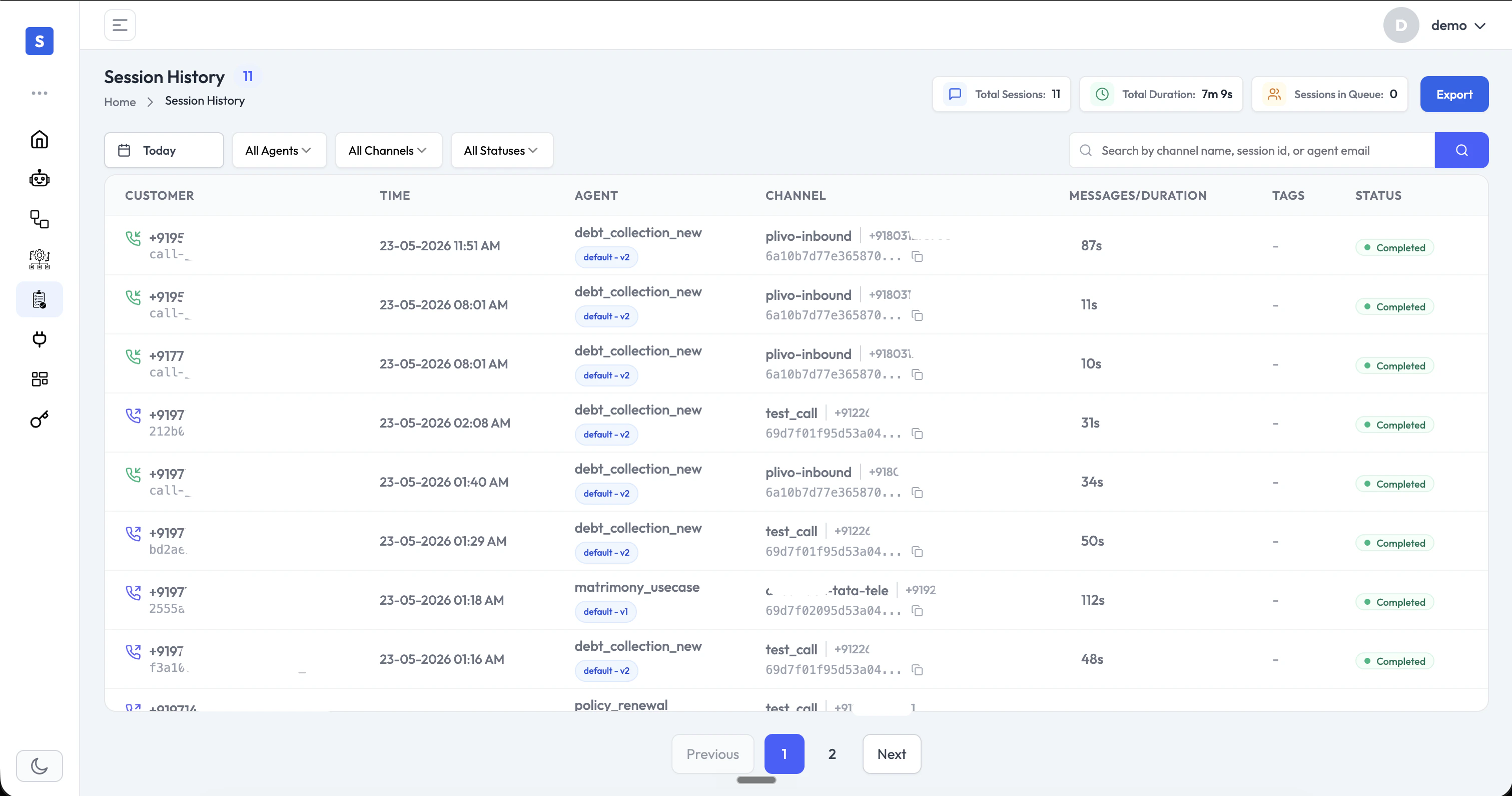
Session History gives you a single, unified view of every customer interaction across all your channels — voice, chat (WhatsApp, webchat), and email — in one place.
 ## Session List
The session list displays key details for every interaction at a glance:
* **Customer**: The customer's phone number or identifier
* **Time**: When the session started
* **Agent**: The AI agent that handled the session
* **Channel**: The communication channel (e.g., Plivo voice, WhatsApp, webchat, email)
* **Messages / Duration**: Number of messages exchanged, or call duration for voice sessions
* **Tags**: Custom labels applied to the session
* **Status**: Session outcome (e.g., Completed, Active)
The stats bar at the top shows **Total Sessions**, **Total Duration**, and **Sessions in Queue** for the selected time period.
## Search & Filter
* **Search**: Look up sessions by channel name, session ID, or agent email
* **Filter by Agent**: Narrow sessions to those handled by a specific agent
* **Filter by Channel**: View sessions from a specific channel type
* **Filter by Status**: Focus on completed, active, or other session states
* **Date range**: View sessions from a specific time period
* **Export**: Download session data for reporting or further analysis
## Session Details
Click any session to open the full detail view, which shows the complete conversation transcript alongside session metadata and AI-generated insights.
## Session List
The session list displays key details for every interaction at a glance:
* **Customer**: The customer's phone number or identifier
* **Time**: When the session started
* **Agent**: The AI agent that handled the session
* **Channel**: The communication channel (e.g., Plivo voice, WhatsApp, webchat, email)
* **Messages / Duration**: Number of messages exchanged, or call duration for voice sessions
* **Tags**: Custom labels applied to the session
* **Status**: Session outcome (e.g., Completed, Active)
The stats bar at the top shows **Total Sessions**, **Total Duration**, and **Sessions in Queue** for the selected time period.
## Search & Filter
* **Search**: Look up sessions by channel name, session ID, or agent email
* **Filter by Agent**: Narrow sessions to those handled by a specific agent
* **Filter by Channel**: View sessions from a specific channel type
* **Filter by Status**: Focus on completed, active, or other session states
* **Date range**: View sessions from a specific time period
* **Export**: Download session data for reporting or further analysis
## Session Details
Click any session to open the full detail view, which shows the complete conversation transcript alongside session metadata and AI-generated insights.
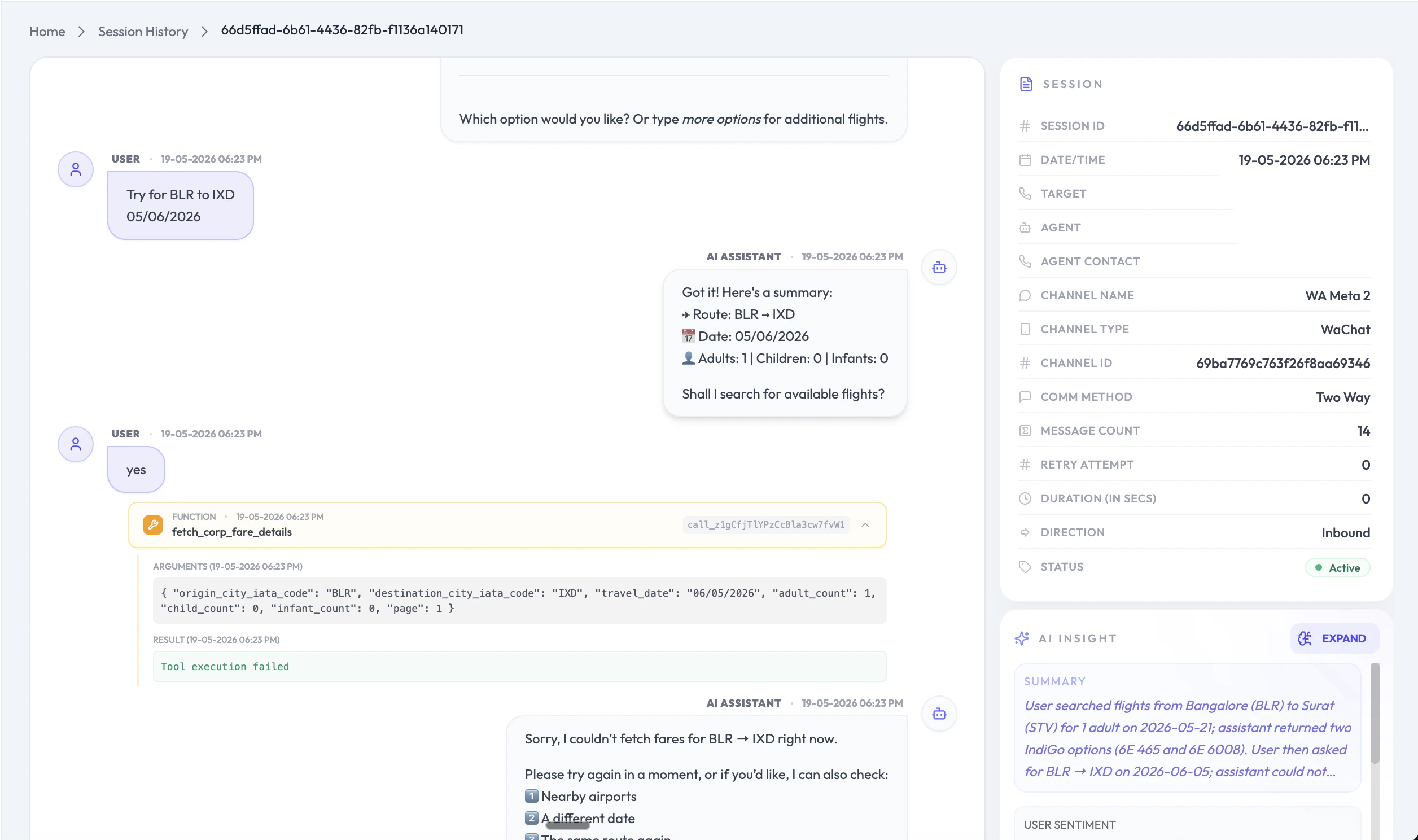 The detail view includes:
* **Transcript**: Full conversation history between the customer and the AI agent
* **Function Calls**: Every function (tool) the agent invoked during the session, including the exact arguments passed and the result returned — invaluable for debugging agent behavior and verifying integrations
* **Session Metadata**: Channel type, channel name, channel ID, communication method, message count, retry attempts, duration, direction (inbound/outbound), and status
* **AI Insight**: An AI-generated summary of the session capturing what the customer was trying to accomplish, how the agent responded, and user sentiment
## Channels Supported
Session History covers all channels in a single unified view:
* **Voice**: Inbound and outbound calls with duration and full transcripts
* **Chat**: WhatsApp, webchat, and other messaging channels
* **Email**: Email-based conversations with your agents
This unified view makes it easy to audit agent performance, debug function call issues, and identify customer pain points across your entire operation.
The detail view includes:
* **Transcript**: Full conversation history between the customer and the AI agent
* **Function Calls**: Every function (tool) the agent invoked during the session, including the exact arguments passed and the result returned — invaluable for debugging agent behavior and verifying integrations
* **Session Metadata**: Channel type, channel name, channel ID, communication method, message count, retry attempts, duration, direction (inbound/outbound), and status
* **AI Insight**: An AI-generated summary of the session capturing what the customer was trying to accomplish, how the agent responded, and user sentiment
## Channels Supported
Session History covers all channels in a single unified view:
* **Voice**: Inbound and outbound calls with duration and full transcripts
* **Chat**: WhatsApp, webchat, and other messaging channels
* **Email**: Email-based conversations with your agents
This unified view makes it easy to audit agent performance, debug function call issues, and identify customer pain points across your entire operation.