> ## Documentation Index
> Fetch the complete documentation index at: https://docs.subverseai.com/llms.txt
> Use this file to discover all available pages before exploring further.
# Subverse agents
# SubVerse Agents
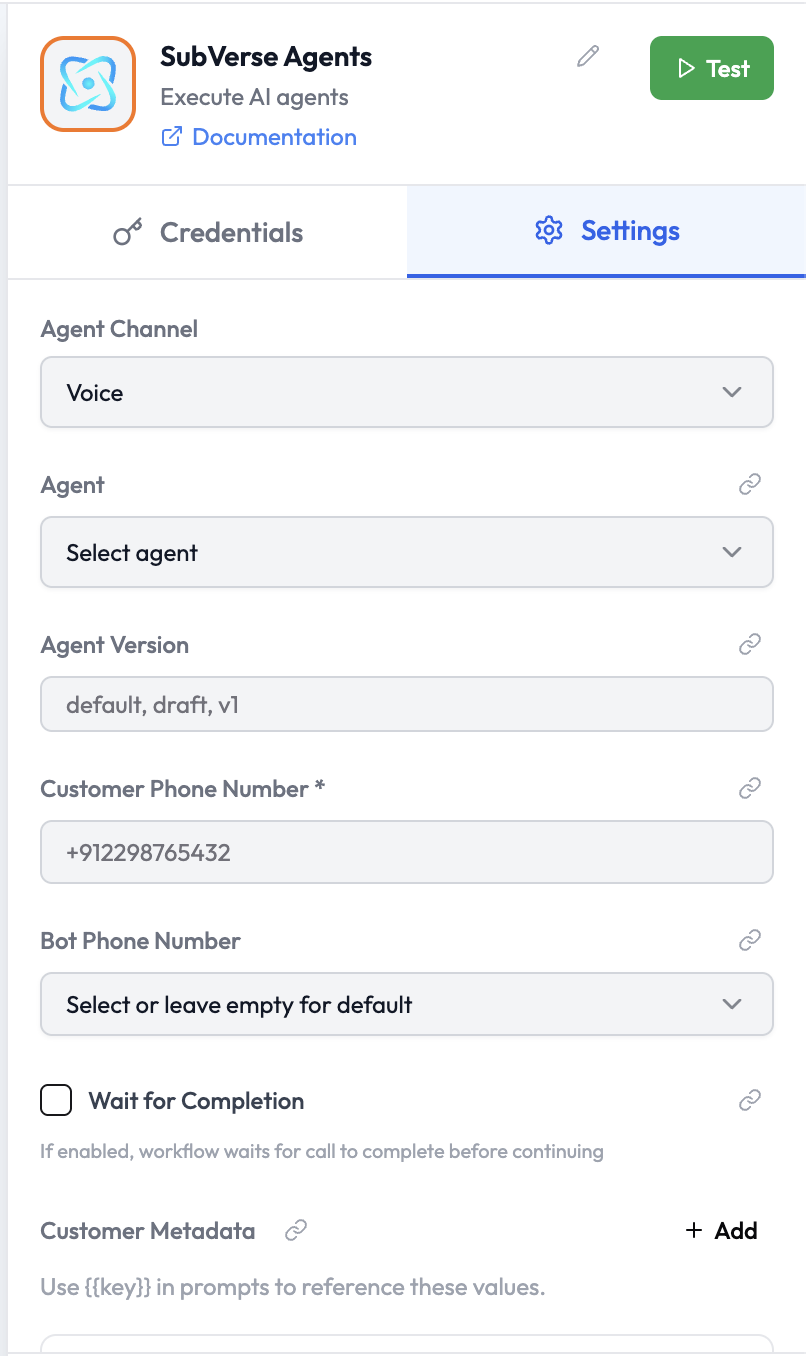
The **SubVerse Agents** node executes a SubVerse AI agent on a specific communication channel — voice, WhatsApp, email, or chat. It initiates an agent conversation and can optionally wait for the conversation to complete before passing results downstream.
 ***
## Use Cases
* Initiate an outbound voice call handled by a SubVerse AI agent
* Send a WhatsApp message and have an AI agent conduct the conversation
* Launch an AI agent over email to gather information from a contact
* Embed an AI chat session in an orchestration and use the outcome downstream
***
## Node Reference
### Parameters
| Parameter | Type | Required | Description |
| - | - | - | - |
| **Agent Channel** | Select | Yes | The communication channel: `Voice`, `WhatsApp`, `Email`, or `Chat` |
| **Agent** | Select | Yes | The SubVerse AI agent to execute (select from list) |
| **Agent Version** | String | No | The agent version to use: `default`, `draft`, or a specific version (e.g. `v1`) |
| **Wait for Completion** | Boolean | No | If enabled, the orchestration pauses until the agent conversation finishes |
| **Customer Metadata** | Key-Value | No | Custom key-value pairs passed to the agent. Reference them in agent prompts using `{{key}}` syntax. |
***
## Channel-Specific Parameters
### Voice
| Parameter | Type | Required | Description |
| - | - | - | - |
| **Customer Phone Number** | String | Yes | The phone number to call (E.164 format, e.g. `+912298765432`) |
| **Bot Phone Number** | Select | No | The SubVerse AI outbound caller number — leave empty to use the default |
### WhatsApp
| Parameter | Type | Required | Description |
| - | - | - | - |
| **Customer Phone Number** | String | Yes | The WhatsApp number to message (E.164 format) |
| **Bot Phone Number** | Select | No | The SubVerse AI WhatsApp sender number — leave empty to use the default |
#### WhatsApp Options
| Parameter | Type | Required | Description |
| - | - | - | - |
| **Message Type** | Select | No | `Prompt (AI-driven)` \| `Say (Fixed message)` \| `Template`. Default `Prompt` |
| **Message** | String | No | Fixed message text — required when **Message Type** is `Say` |
| **Template ID** | String | No | WhatsApp template name — required when **Message Type** is `Template` |
| **Template Language** | String | No | BCP-47 language code for the template (e.g. `en`, `en_US`, `hi`). Default `en` |
| **Template Variables** | Key-Value | No | Key/value pairs substituted into the WhatsApp template body placeholders. Only visible when **Message Type** is `Template` |
| **Additional Context** | String | No | Extra instructions injected into the LLM prompt — only used when **Message Type** is `Prompt` |
| **Attachment URLs** | String | No | Comma-separated list of publicly accessible URLs to attach |
**Template Variables** fill the placeholders in a WhatsApp template body (e.g. `{{1}}`, `{{customer_name}}`). They are independent from **Customer Metadata** — metadata is passed into the agent session for prompt substitution, while template variables are sent directly to the WhatsApp template. Only template variables are used for template substitution; metadata is never sent as template variables.
### Email
| Parameter | Type | Required | Description |
| - | - | - | - |
| **Customer Email** | String | Yes | The recipient email address |
### Chat
| Parameter | Type | Required | Description |
| - | - | - | - |
| **Session ID** | String | No | Optional session identifier for continuing an existing chat |
| **Initial Message** | String | No | The first message to send to the agent |
***
## Customer Metadata
Provide custom key-value pairs that the agent can reference during the conversation using `{{key}}` in prompts:
| Example Key | Example Value | Description |
| - | - | - |
| `customerName` | `John Doe` | Customer's full name |
| `orderId` | `ORD-12345` | Relevant order reference |
| `language` | `en` | Preferred language for the conversation |
***
## Wait for Completion
When **Wait for Completion** is enabled:
* The orchestration run pauses while the SubVerse AI agent handles the conversation.
* Once the agent marks the conversation as complete, execution resumes.
* The full conversation outcome (transcript, status, extracted data) is available downstream.
When disabled:
* The node starts the agent conversation and immediately moves to the next node.
* The conversation happens asynchronously — the [SubVerse AI Trigger](./subverse-ai-trigger.md) can be used to react to the completion in a separate orchestration when it finishes.
***
## Output Data
When the agent conversation completes:
```json theme={null}
{
"conversationId": "conv_XXXXXXXXX",
"channel": "voice",
"status": "completed",
"outcome": "resolved",
"agentName": "Support Agent",
"customerNumber": "+919876543210",
"duration": 120,
"transcript": [
{ "role": "agent", "text": "Hello! How can I assist you today?" },
{ "role": "user", "text": "I need to reschedule my appointment." },
{ "role": "agent", "text": "Sure, let me help with that." }
],
"extractedData": {
"intent": "reschedule_appointment",
"preferredDate": "2025-03-15"
},
"startedAt": "2025-03-10T09:00:00.000Z",
"endedAt": "2025-03-10T09:02:00.000Z"
}
```
Reference in downstream nodes:
```
{{ subverseAgents.outcome }}
{{ subverseAgents.extractedData.intent }}
{{ subverseAgents.transcript }}
{{ subverseAgents.conversationId }}
```
***
## Related Nodes
* [SubVerse AI Trigger](./subverse-ai-trigger.md) — React to a completed SubVerse AI call in a separate orchestration
* [Conditions](./conditions.md) — Branch based on the agent's outcome or extracted intent
This documentation is built and hosted on [Mintlify](https://mintlify.com), a developer documentation platform.
***
## Use Cases
* Initiate an outbound voice call handled by a SubVerse AI agent
* Send a WhatsApp message and have an AI agent conduct the conversation
* Launch an AI agent over email to gather information from a contact
* Embed an AI chat session in an orchestration and use the outcome downstream
***
## Node Reference
### Parameters
| Parameter | Type | Required | Description |
| - | - | - | - |
| **Agent Channel** | Select | Yes | The communication channel: `Voice`, `WhatsApp`, `Email`, or `Chat` |
| **Agent** | Select | Yes | The SubVerse AI agent to execute (select from list) |
| **Agent Version** | String | No | The agent version to use: `default`, `draft`, or a specific version (e.g. `v1`) |
| **Wait for Completion** | Boolean | No | If enabled, the orchestration pauses until the agent conversation finishes |
| **Customer Metadata** | Key-Value | No | Custom key-value pairs passed to the agent. Reference them in agent prompts using `{{key}}` syntax. |
***
## Channel-Specific Parameters
### Voice
| Parameter | Type | Required | Description |
| - | - | - | - |
| **Customer Phone Number** | String | Yes | The phone number to call (E.164 format, e.g. `+912298765432`) |
| **Bot Phone Number** | Select | No | The SubVerse AI outbound caller number — leave empty to use the default |
### WhatsApp
| Parameter | Type | Required | Description |
| - | - | - | - |
| **Customer Phone Number** | String | Yes | The WhatsApp number to message (E.164 format) |
| **Bot Phone Number** | Select | No | The SubVerse AI WhatsApp sender number — leave empty to use the default |
#### WhatsApp Options
| Parameter | Type | Required | Description |
| - | - | - | - |
| **Message Type** | Select | No | `Prompt (AI-driven)` \| `Say (Fixed message)` \| `Template`. Default `Prompt` |
| **Message** | String | No | Fixed message text — required when **Message Type** is `Say` |
| **Template ID** | String | No | WhatsApp template name — required when **Message Type** is `Template` |
| **Template Language** | String | No | BCP-47 language code for the template (e.g. `en`, `en_US`, `hi`). Default `en` |
| **Template Variables** | Key-Value | No | Key/value pairs substituted into the WhatsApp template body placeholders. Only visible when **Message Type** is `Template` |
| **Additional Context** | String | No | Extra instructions injected into the LLM prompt — only used when **Message Type** is `Prompt` |
| **Attachment URLs** | String | No | Comma-separated list of publicly accessible URLs to attach |
**Template Variables** fill the placeholders in a WhatsApp template body (e.g. `{{1}}`, `{{customer_name}}`). They are independent from **Customer Metadata** — metadata is passed into the agent session for prompt substitution, while template variables are sent directly to the WhatsApp template. Only template variables are used for template substitution; metadata is never sent as template variables.
### Email
| Parameter | Type | Required | Description |
| - | - | - | - |
| **Customer Email** | String | Yes | The recipient email address |
### Chat
| Parameter | Type | Required | Description |
| - | - | - | - |
| **Session ID** | String | No | Optional session identifier for continuing an existing chat |
| **Initial Message** | String | No | The first message to send to the agent |
***
## Customer Metadata
Provide custom key-value pairs that the agent can reference during the conversation using `{{key}}` in prompts:
| Example Key | Example Value | Description |
| - | - | - |
| `customerName` | `John Doe` | Customer's full name |
| `orderId` | `ORD-12345` | Relevant order reference |
| `language` | `en` | Preferred language for the conversation |
***
## Wait for Completion
When **Wait for Completion** is enabled:
* The orchestration run pauses while the SubVerse AI agent handles the conversation.
* Once the agent marks the conversation as complete, execution resumes.
* The full conversation outcome (transcript, status, extracted data) is available downstream.
When disabled:
* The node starts the agent conversation and immediately moves to the next node.
* The conversation happens asynchronously — the [SubVerse AI Trigger](./subverse-ai-trigger.md) can be used to react to the completion in a separate orchestration when it finishes.
***
## Output Data
When the agent conversation completes:
```json theme={null}
{
"conversationId": "conv_XXXXXXXXX",
"channel": "voice",
"status": "completed",
"outcome": "resolved",
"agentName": "Support Agent",
"customerNumber": "+919876543210",
"duration": 120,
"transcript": [
{ "role": "agent", "text": "Hello! How can I assist you today?" },
{ "role": "user", "text": "I need to reschedule my appointment." },
{ "role": "agent", "text": "Sure, let me help with that." }
],
"extractedData": {
"intent": "reschedule_appointment",
"preferredDate": "2025-03-15"
},
"startedAt": "2025-03-10T09:00:00.000Z",
"endedAt": "2025-03-10T09:02:00.000Z"
}
```
Reference in downstream nodes:
```
{{ subverseAgents.outcome }}
{{ subverseAgents.extractedData.intent }}
{{ subverseAgents.transcript }}
{{ subverseAgents.conversationId }}
```
***
## Related Nodes
* [SubVerse AI Trigger](./subverse-ai-trigger.md) — React to a completed SubVerse AI call in a separate orchestration
* [Conditions](./conditions.md) — Branch based on the agent's outcome or extracted intent
This documentation is built and hosted on [Mintlify](https://mintlify.com), a developer documentation platform.