> ## Documentation Index
> Fetch the complete documentation index at: https://docs.subverseai.com/llms.txt
> Use this file to discover all available pages before exploring further.
# Call API Node
> Trigger workflows by injecting customer data via API
## Overview
The Call API Node allows you to inject customer details into the system using the [workflow call API](/api-reference/workflow/trigger). This is the most flexible way to trigger workflows programmatically from your applications or systems.
 ## Use Cases
* **CRM Integration**: Trigger workflows when customer records are updated
* **E-commerce**: Initiate calls after order placement or cart abandonment
* **Scheduling Systems**: Start workflows at specific times
* **External Applications**: Connect any system that can make HTTP requests
* **Automated Campaigns**: Launch outbound calling campaigns
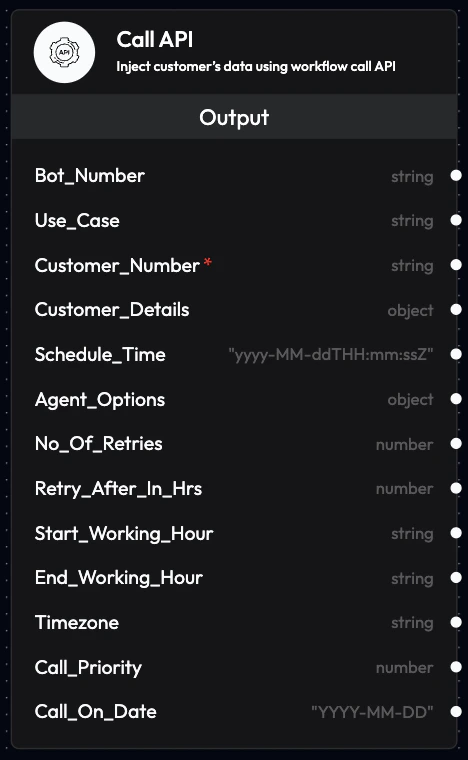
## Outputs
The Call API Node provides the following outputs that can be used by subsequent blocks in your workflow:
### **Bot\_Number**
* Phone number the voice agent will use to make or receive calls
* Format: Include country code (e.g., +91xxxxxxxxxx)
* Can be linked to telephony integrations
### **Use\_Case**
* Defines which voice agent will be used for the call
* References the agent configured in the Agents section
* Allows dynamic agent selection based on workflow logic
### **Customer\_Number**
* Customer's phone number for the call
* Format: Include country code (e.g., +91xxxxxxxxxx)
* Required for outbound calls
### **Customer\_Details**
* Customer information in JSON format
* Can include: name, email, order ID, preferences, etc.
* Used to personalize agent conversations
**Example:**
```json theme={null}
{
"name": "John Doe",
"email": "john@example.com",
"order_id": "ORD-12345",
"product": "Premium Plan"
}
```
### **Schedule\_Time**
* Schedule the call for a specific future time
* Format: ISO date format `YYYY-MM-DDTHH:MM:SSZ`
* Default: Current time (immediate execution)
**Example:**
```
2025-12-10T15:30:00Z
```
### **Agent\_Options**
* Override default agent settings for this specific call
* Can modify: language, voice, initial prompt, etc.
* Allows per-call customization
**Example:**
```json theme={null}
{
"language": "hi-IN",
"voice": "Riya",
"initial_prompt": "Custom greeting for this call"
}
```
### **No\_Of\_Retries**
* Number of retry attempts if the call fails
* Default: 0 (no retries)
* Useful for ensuring call completion
### **Retries\_After\_In\_Hrs**
* Time interval between retry attempts (in hours)
* Works in conjunction with No\_Of\_Retries
* Example: 2 (retry after 2 hours)
### **Start\_Working\_Hour**
* Start of business hours in 24-hour format (HH:MM)
* Calls scheduled before this time will be rescheduled
* Example: "09:00"
### **End\_Working\_Hour**
* End of business hours in 24-hour format (HH:MM)
* Calls after this time will be rescheduled to next day
* Example: "18:00"
### **Timezone**
* Timezone for working hours calculation
* Default: Asia/Kolkata
* Example: "America/New\_York", "Europe/London"
### **Call\_Priority**
* Priority level for the call
* Type: Number
* Higher numbers indicate higher priority
* Used for queue management
### **Call\_On\_Date**
* Specific date to make the call
* Format: `YYYY-MM-DD`
* Example: `2025-12-10`
* Works with Schedule\_Time for precise scheduling
## API Integration
To use the Call API Node, you'll need to make HTTP POST requests to the workflow trigger endpoint:
```bash theme={null}
POST https://api.subverseai.com/workflow/trigger
Content-Type: application/json
Authorization: Bearer YOUR_API_KEY
```
**Request Body Example:**
```json theme={null}
{
"workflow_id": "wf_abc123",
"bot_number": "+91xxxxxxxxxx",
"use_case": "customer_support",
"customer_number": "+91xxxxxxxxxx",
"customer_details": {
"name": "Jane Smith",
"email": "jane@example.com",
"account_id": "ACC-789"
},
"schedule_time": "2025-12-10T10:00:00Z",
"no_of_retries": 2,
"retries_after_in_hrs": 1,
"start_working_hour": "09:00",
"end_working_hour": "18:00",
"timezone": "Asia/Kolkata"
}
```
See the [Workflow Trigger API](/api-reference/workflow/trigger) documentation for complete details.
## Configuration Best Practices
### Working Hours
* Set appropriate working hours to respect customer preferences
* Consider timezone differences for international customers
* Use retry logic for calls outside business hours
### Customer Details
* Include all relevant information for personalization
* Keep JSON structure consistent across calls
* Validate data before sending to API
### Retry Strategy
* Set reasonable retry counts (2-3 attempts)
* Space out retries appropriately (1-2 hours)
* Monitor retry success rates
### Agent Selection
* Use appropriate agents for different call types
* Consider language and voice preferences
* Test agent performance before scaling
## Error Handling
The API will return appropriate error codes:
* **200**: Success - workflow triggered
* **400**: Bad Request - invalid parameters
* **401**: Unauthorized - invalid API key
* **404**: Not Found - workflow doesn't exist
* **500**: Server Error - contact support
## Monitoring
Track your API-triggered workflows:
* View in Call History section
* Monitor success/failure rates
* Analyze call outcomes
* Review transcripts and recordings
## Example Workflows
### E-commerce Order Confirmation
```json theme={null}
{
"bot_number": "+91xxxxxxxxxx",
"use_case": "order_confirmation",
"customer_number": "+91xxxxxxxxxx",
"customer_details": {
"name": "Customer Name",
"order_id": "ORD-12345",
"total_amount": "₹2,499"
}
}
```
### Appointment Reminder
```json theme={null}
{
"bot_number": "+91xxxxxxxxxx",
"use_case": "appointment_reminder",
"customer_number": "+91xxxxxxxxxx",
"customer_details": {
"name": "Patient Name",
"appointment_time": "2025-12-10 3:00 PM",
"doctor": "Dr. Smith"
},
"schedule_time": "2025-12-10T14:00:00Z"
}
```
### Payment Reminder
```json theme={null}
{
"bot_number": "+91xxxxxxxxxx",
"use_case": "payment_reminder",
"customer_number": "+91xxxxxxxxxx",
"customer_details": {
"name": "Customer Name",
"invoice_id": "INV-789",
"amount_due": "₹5,000",
"due_date": "2025-12-15"
},
"no_of_retries": 2,
"retries_after_in_hrs": 24
}
```
## Next Steps
Make outbound calls to customers
Process data with AI-driven decisions
Complete API documentation
Schedule follow-up calls
Test your API integration thoroughly in a development environment before deploying to production.
## Use Cases
* **CRM Integration**: Trigger workflows when customer records are updated
* **E-commerce**: Initiate calls after order placement or cart abandonment
* **Scheduling Systems**: Start workflows at specific times
* **External Applications**: Connect any system that can make HTTP requests
* **Automated Campaigns**: Launch outbound calling campaigns
## Outputs
The Call API Node provides the following outputs that can be used by subsequent blocks in your workflow:
### **Bot\_Number**
* Phone number the voice agent will use to make or receive calls
* Format: Include country code (e.g., +91xxxxxxxxxx)
* Can be linked to telephony integrations
### **Use\_Case**
* Defines which voice agent will be used for the call
* References the agent configured in the Agents section
* Allows dynamic agent selection based on workflow logic
### **Customer\_Number**
* Customer's phone number for the call
* Format: Include country code (e.g., +91xxxxxxxxxx)
* Required for outbound calls
### **Customer\_Details**
* Customer information in JSON format
* Can include: name, email, order ID, preferences, etc.
* Used to personalize agent conversations
**Example:**
```json theme={null}
{
"name": "John Doe",
"email": "john@example.com",
"order_id": "ORD-12345",
"product": "Premium Plan"
}
```
### **Schedule\_Time**
* Schedule the call for a specific future time
* Format: ISO date format `YYYY-MM-DDTHH:MM:SSZ`
* Default: Current time (immediate execution)
**Example:**
```
2025-12-10T15:30:00Z
```
### **Agent\_Options**
* Override default agent settings for this specific call
* Can modify: language, voice, initial prompt, etc.
* Allows per-call customization
**Example:**
```json theme={null}
{
"language": "hi-IN",
"voice": "Riya",
"initial_prompt": "Custom greeting for this call"
}
```
### **No\_Of\_Retries**
* Number of retry attempts if the call fails
* Default: 0 (no retries)
* Useful for ensuring call completion
### **Retries\_After\_In\_Hrs**
* Time interval between retry attempts (in hours)
* Works in conjunction with No\_Of\_Retries
* Example: 2 (retry after 2 hours)
### **Start\_Working\_Hour**
* Start of business hours in 24-hour format (HH:MM)
* Calls scheduled before this time will be rescheduled
* Example: "09:00"
### **End\_Working\_Hour**
* End of business hours in 24-hour format (HH:MM)
* Calls after this time will be rescheduled to next day
* Example: "18:00"
### **Timezone**
* Timezone for working hours calculation
* Default: Asia/Kolkata
* Example: "America/New\_York", "Europe/London"
### **Call\_Priority**
* Priority level for the call
* Type: Number
* Higher numbers indicate higher priority
* Used for queue management
### **Call\_On\_Date**
* Specific date to make the call
* Format: `YYYY-MM-DD`
* Example: `2025-12-10`
* Works with Schedule\_Time for precise scheduling
## API Integration
To use the Call API Node, you'll need to make HTTP POST requests to the workflow trigger endpoint:
```bash theme={null}
POST https://api.subverseai.com/workflow/trigger
Content-Type: application/json
Authorization: Bearer YOUR_API_KEY
```
**Request Body Example:**
```json theme={null}
{
"workflow_id": "wf_abc123",
"bot_number": "+91xxxxxxxxxx",
"use_case": "customer_support",
"customer_number": "+91xxxxxxxxxx",
"customer_details": {
"name": "Jane Smith",
"email": "jane@example.com",
"account_id": "ACC-789"
},
"schedule_time": "2025-12-10T10:00:00Z",
"no_of_retries": 2,
"retries_after_in_hrs": 1,
"start_working_hour": "09:00",
"end_working_hour": "18:00",
"timezone": "Asia/Kolkata"
}
```
See the [Workflow Trigger API](/api-reference/workflow/trigger) documentation for complete details.
## Configuration Best Practices
### Working Hours
* Set appropriate working hours to respect customer preferences
* Consider timezone differences for international customers
* Use retry logic for calls outside business hours
### Customer Details
* Include all relevant information for personalization
* Keep JSON structure consistent across calls
* Validate data before sending to API
### Retry Strategy
* Set reasonable retry counts (2-3 attempts)
* Space out retries appropriately (1-2 hours)
* Monitor retry success rates
### Agent Selection
* Use appropriate agents for different call types
* Consider language and voice preferences
* Test agent performance before scaling
## Error Handling
The API will return appropriate error codes:
* **200**: Success - workflow triggered
* **400**: Bad Request - invalid parameters
* **401**: Unauthorized - invalid API key
* **404**: Not Found - workflow doesn't exist
* **500**: Server Error - contact support
## Monitoring
Track your API-triggered workflows:
* View in Call History section
* Monitor success/failure rates
* Analyze call outcomes
* Review transcripts and recordings
## Example Workflows
### E-commerce Order Confirmation
```json theme={null}
{
"bot_number": "+91xxxxxxxxxx",
"use_case": "order_confirmation",
"customer_number": "+91xxxxxxxxxx",
"customer_details": {
"name": "Customer Name",
"order_id": "ORD-12345",
"total_amount": "₹2,499"
}
}
```
### Appointment Reminder
```json theme={null}
{
"bot_number": "+91xxxxxxxxxx",
"use_case": "appointment_reminder",
"customer_number": "+91xxxxxxxxxx",
"customer_details": {
"name": "Patient Name",
"appointment_time": "2025-12-10 3:00 PM",
"doctor": "Dr. Smith"
},
"schedule_time": "2025-12-10T14:00:00Z"
}
```
### Payment Reminder
```json theme={null}
{
"bot_number": "+91xxxxxxxxxx",
"use_case": "payment_reminder",
"customer_number": "+91xxxxxxxxxx",
"customer_details": {
"name": "Customer Name",
"invoice_id": "INV-789",
"amount_due": "₹5,000",
"due_date": "2025-12-15"
},
"no_of_retries": 2,
"retries_after_in_hrs": 24
}
```
## Next Steps
Make outbound calls to customers
Process data with AI-driven decisions
Complete API documentation
Schedule follow-up calls
Test your API integration thoroughly in a development environment before deploying to production.