> ## Documentation Index
> Fetch the complete documentation index at: https://docs.subverseai.com/llms.txt
> Use this file to discover all available pages before exploring further.
# Schedule Callback Node
> Schedule automated follow-up calls with customers
## Overview
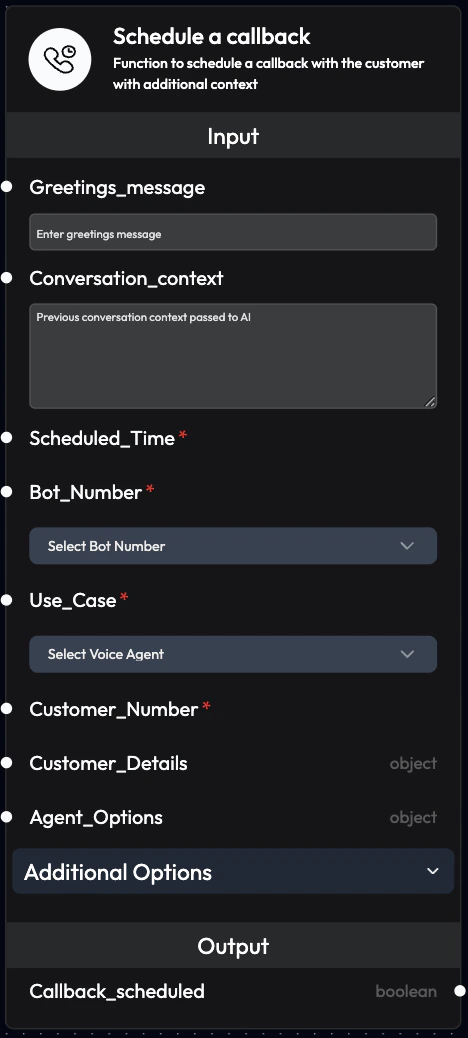
The Schedule Callback Node allows you to schedule follow-up calls with customers, passing additional context from previous interactions. This enables intelligent, context-aware callbacks based on workflow logic.
 ## Use Cases
* **Unresolved Issues**: Schedule callbacks for issues that couldn't be resolved immediately
* **Customer Requests**: Honor customer requests to be called back at specific times
* **Follow-up Campaigns**: Automated follow-ups after initial contact
* **Dropped Calls**: Reconnect with customers after unexpected disconnections
* **Appointment Reminders**: Schedule reminder calls before appointments
* **Payment Follow-ups**: Call customers about pending payments
* **Survey Callbacks**: Schedule calls to collect feedback
* **Lead Nurturing**: Follow up with leads at optimal times
## Inputs
### **Greetings\_message**
Greeting message the voice agent will say to the customer.
**Purpose:**
* Overrides the [initial prompt](/agents/agent-configurations#agent-settings) defined for the agent
* Provides context-specific greeting
* Can be AI-generated or manually written
**Behavior:**
* Can be linked from a previous block (e.g., AI-generated greeting)
* Can be manually written in the node
* Data linkage overrides written text
**Example:**
```
Hello John, this is a follow-up call regarding your support ticket #12345.
We have an update on your issue.
```
**AI-Generated Example:**
```
Link from AI Query Agent output that generates:
"Hi Jane, I'm calling back as you requested. I have the information
about the Premium Plan pricing you asked about."
```
### **Conversation\_context**
Pass previous conversation context to the voice agent.
**Purpose:**
* Provide continuity between calls
* Give agent full context of previous interactions
* Enable personalized conversations
**What to Include:**
* Previous call transcript
* Customer history
* Issue details
* Relevant notes
**Example:**
```
Previous Call Summary:
- Customer called about order delay
- Order #ORD-12345 was stuck in shipping
- Promised to investigate and call back
- Customer prefers morning calls
Customer Details:
- Name: John Doe
- Premium customer since 2023
- Previous issues: 0
```
### **Scheduled\_Time** (Required)
Set the exact time for the callback.
**Format:** ISO 8601 date format `YYYY-MM-DDTHH:MM:SSZ`
**Examples:**
* `2025-12-10T10:00:00Z` - December 10, 2025 at 10:00 AM UTC
* `2025-12-11T15:30:00Z` - December 11, 2025 at 3:30 PM UTC
**Tips:**
* Always use future timestamps
* Consider customer timezone
* Respect business hours
* Account for working hour constraints
### **Bot\_Number** (Required)
Phone number to be used to call the customer.
**Configuration:**
* Can be linked from a previous block
* Can be selected from dropdown
* Data linkage overrides dropdown selection
**Format:** +\[country code]\[number]
**Example:** `+91xxxxxxxxxx`
### **Use\_Case** (Required)
Voice agent that will handle the callback.
**Configuration:**
* Can be linked from a previous block
* Can be selected from dropdown
* Data linkage overrides dropdown selection
**Example:** `customer_support`, `sales_follow_up`
### **Customer\_Number** (Required)
Customer's phone number to call.
**Format:** +\[country code]\[number]
**Example:** `+91xxxxxxxxxx`
### **Customer\_Details**
Customer information in JSON format.
**Purpose:**
* Personalize the callback
* Provide agent with customer context
* Include relevant data for the conversation
**Example:**
```json theme={null}
{
"name": "John Doe",
"email": "john@example.com",
"ticket_id": "TKT-12345",
"issue": "Order delay",
"order_id": "ORD-789"
}
```
### **Agent\_Options**
Override default agent settings for this callback.
**Use Cases:**
* Change language for specific customers
* Use different voice
* Modify initial prompt
* Adjust call settings
**Example:**
```json theme={null}
{
"language": "hi-IN",
"voice": "Riya",
"max_duration": 300
}
```
### **No\_Of\_Retries**
Number of retry attempts if the callback fails.
**Recommended:** 2-3 retries
**Example:** `2`
### **Retries\_After\_In\_Hrs**
Time interval between retry attempts (in hours).
**Recommended:** 1-2 hours
**Example:** `1`
### **Start\_Working\_Hour**
Start of business hours in 24-hour format (HH:MM).
**Purpose:**
* Ensure calls only during business hours
* Respect customer preferences
* Avoid early morning calls
**Example:** `09:00`
### **End\_Working\_Hour**
End of business hours in 24-hour format (HH:MM).
**Purpose:**
* Prevent late evening calls
* Comply with regulations
* Respect customer time
**Example:** `18:00`
### **Timezone**
Timezone for working hours calculation.
**Default:** Asia/Kolkata
**Examples:**
* `America/New_York`
* `Europe/London`
* `Asia/Tokyo`
## Outputs
### **Callback\_scheduled**
Confirms if the callback was successfully scheduled.
**Values:**
* `True`: Callback successfully scheduled
* `False`: Scheduling failed
**Usage:**
* Connect to conditional logic
* Trigger error handling
* Log for monitoring
* Send notifications
## Configuration Examples
### Example 1: Simple Callback
```
Greetings_message: "Hello, this is a follow-up call from SubVerse."
Scheduled_Time: 2025-12-10T14:00:00Z
Bot_Number: +91xxxxxxxxxx
Use_Case: customer_support
Customer_Number: +91xxxxxxxxxx
```
### Example 2: Context-Aware Callback
```
Greetings_message: "Hi John, I'm calling back about your order #12345."
Conversation_context: "Previous call: Customer reported order delay.
Promised to check with shipping and call back."
Scheduled_Time: 2025-12-10T10:00:00Z
Bot_Number: +91xxxxxxxxxx
Use_Case: order_support
Customer_Number: +91xxxxxxxxxx
Customer_Details: {
"name": "John Doe",
"order_id": "ORD-12345",
"issue": "Shipping delay"
}
```
### Example 3: Scheduled with Retries
```
Greetings_message: "Hello, this is a reminder about your payment."
Scheduled_Time: 2025-12-10T11:00:00Z
Bot_Number: +91xxxxxxxxxx
Use_Case: payment_reminder
Customer_Number: +91xxxxxxxxxx
No_Of_Retries: 2
Retries_After_In_Hrs: 2
Start_Working_Hour: 09:00
End_Working_Hour: 18:00
Timezone: Asia/Kolkata
```
### Example 4: AI-Generated Callback
```
Greetings_message: [Linked from AI Query Agent]
Conversation_context: [Linked from previous call transcript]
Scheduled_Time: [Calculated by AI based on customer preference]
Bot_Number: +91xxxxxxxxxx
Use_Case: sales_follow_up
Customer_Number: +91xxxxxxxxxx
Customer_Details: [Linked from CRM data]
```
## Workflow Integration
### Common Patterns
**Pattern 1: Post-Call Callback**
```
Incoming Call Node
↓
AI Query Agent (analyze if callback needed)
↓
Schedule Callback Node (if needed)
```
**Pattern 2: Dropped Call Recovery**
```
Voice Agent Node
↓
Smart Filter (check if call duration < 30 seconds)
↓
Schedule Callback Node (immediate callback in 5 minutes)
```
**Pattern 3: Time-Based Follow-up**
```
Voice Agent Node
↓
AI Query Agent (determine follow-up timing)
↓
Schedule Callback Node (schedule based on AI decision)
```
**Pattern 4: Multi-Step Campaign**
```
Upload Data Node
↓
Voice Agent Node (initial call)
↓
AI Query Agent (analyze outcome)
↓
Schedule Callback Node (if not converted)
```
## Best Practices
### Timing
* **Customer Preference**: Honor requested callback times
* **Business Hours**: Always use working hour constraints
* **Timezone Awareness**: Consider customer location
* **Spacing**: Don't schedule too many callbacks close together
### Context
* **Full History**: Include complete previous interaction context
* **Relevant Details**: Only include information needed for the call
* **Clear Summary**: Provide concise context summary
* **Update Regularly**: Ensure context is current
### Personalization
* **Use Names**: Include customer name in greeting
* **Reference History**: Mention previous interactions
* **Specific Purpose**: Clearly state reason for callback
* **Custom Greetings**: Tailor message to situation
### Retry Strategy
* **Reasonable Attempts**: 2-3 retries is usually sufficient
* **Appropriate Spacing**: 1-2 hours between retries
* **Time Limits**: Don't retry beyond same day
* **Alternative Contact**: Consider other channels after failed retries
## Monitoring
### Track Callback Performance
**Metrics to Monitor:**
* **Schedule Success Rate**: Percentage of successfully scheduled callbacks
* **Connection Rate**: Callbacks that successfully connected
* **Completion Rate**: Callbacks that achieved their objective
* **Retry Effectiveness**: Success rate of retry attempts
### Analyze Patterns
**Look For:**
* **Optimal Timing**: When callbacks are most successful
* **Context Impact**: How context affects outcomes
* **Retry Patterns**: Which retries succeed
* **Failure Reasons**: Why callbacks fail
## Troubleshooting
### Callback Not Scheduling
**Possible Causes:**
* Invalid Scheduled\_Time format
* Time in the past
* Missing required fields
**Solutions:**
* Use ISO 8601 format
* Ensure future timestamp
* Verify all required inputs
### Callback Not Connecting
**Possible Causes:**
* Invalid phone number
* Customer unavailable
* Network issues
**Solutions:**
* Validate phone number format
* Set appropriate retry logic
* Check telephony integration
### Wrong Timing
**Possible Causes:**
* Timezone mismatch
* Working hours not set
* Incorrect time calculation
**Solutions:**
* Verify timezone setting
* Set Start/End Working Hours
* Double-check time calculations
## Next Steps
Configure outbound calling
Intelligent callback decisions
Send callback confirmations
Monitor callback performance
Link the Greetings\_message and Conversation\_context from AI Query Agent to create intelligent, context-aware callbacks.
Always respect customer preferences for callback timing. Unsolicited calls at inconvenient times can harm customer relationships.
## Use Cases
* **Unresolved Issues**: Schedule callbacks for issues that couldn't be resolved immediately
* **Customer Requests**: Honor customer requests to be called back at specific times
* **Follow-up Campaigns**: Automated follow-ups after initial contact
* **Dropped Calls**: Reconnect with customers after unexpected disconnections
* **Appointment Reminders**: Schedule reminder calls before appointments
* **Payment Follow-ups**: Call customers about pending payments
* **Survey Callbacks**: Schedule calls to collect feedback
* **Lead Nurturing**: Follow up with leads at optimal times
## Inputs
### **Greetings\_message**
Greeting message the voice agent will say to the customer.
**Purpose:**
* Overrides the [initial prompt](/agents/agent-configurations#agent-settings) defined for the agent
* Provides context-specific greeting
* Can be AI-generated or manually written
**Behavior:**
* Can be linked from a previous block (e.g., AI-generated greeting)
* Can be manually written in the node
* Data linkage overrides written text
**Example:**
```
Hello John, this is a follow-up call regarding your support ticket #12345.
We have an update on your issue.
```
**AI-Generated Example:**
```
Link from AI Query Agent output that generates:
"Hi Jane, I'm calling back as you requested. I have the information
about the Premium Plan pricing you asked about."
```
### **Conversation\_context**
Pass previous conversation context to the voice agent.
**Purpose:**
* Provide continuity between calls
* Give agent full context of previous interactions
* Enable personalized conversations
**What to Include:**
* Previous call transcript
* Customer history
* Issue details
* Relevant notes
**Example:**
```
Previous Call Summary:
- Customer called about order delay
- Order #ORD-12345 was stuck in shipping
- Promised to investigate and call back
- Customer prefers morning calls
Customer Details:
- Name: John Doe
- Premium customer since 2023
- Previous issues: 0
```
### **Scheduled\_Time** (Required)
Set the exact time for the callback.
**Format:** ISO 8601 date format `YYYY-MM-DDTHH:MM:SSZ`
**Examples:**
* `2025-12-10T10:00:00Z` - December 10, 2025 at 10:00 AM UTC
* `2025-12-11T15:30:00Z` - December 11, 2025 at 3:30 PM UTC
**Tips:**
* Always use future timestamps
* Consider customer timezone
* Respect business hours
* Account for working hour constraints
### **Bot\_Number** (Required)
Phone number to be used to call the customer.
**Configuration:**
* Can be linked from a previous block
* Can be selected from dropdown
* Data linkage overrides dropdown selection
**Format:** +\[country code]\[number]
**Example:** `+91xxxxxxxxxx`
### **Use\_Case** (Required)
Voice agent that will handle the callback.
**Configuration:**
* Can be linked from a previous block
* Can be selected from dropdown
* Data linkage overrides dropdown selection
**Example:** `customer_support`, `sales_follow_up`
### **Customer\_Number** (Required)
Customer's phone number to call.
**Format:** +\[country code]\[number]
**Example:** `+91xxxxxxxxxx`
### **Customer\_Details**
Customer information in JSON format.
**Purpose:**
* Personalize the callback
* Provide agent with customer context
* Include relevant data for the conversation
**Example:**
```json theme={null}
{
"name": "John Doe",
"email": "john@example.com",
"ticket_id": "TKT-12345",
"issue": "Order delay",
"order_id": "ORD-789"
}
```
### **Agent\_Options**
Override default agent settings for this callback.
**Use Cases:**
* Change language for specific customers
* Use different voice
* Modify initial prompt
* Adjust call settings
**Example:**
```json theme={null}
{
"language": "hi-IN",
"voice": "Riya",
"max_duration": 300
}
```
### **No\_Of\_Retries**
Number of retry attempts if the callback fails.
**Recommended:** 2-3 retries
**Example:** `2`
### **Retries\_After\_In\_Hrs**
Time interval between retry attempts (in hours).
**Recommended:** 1-2 hours
**Example:** `1`
### **Start\_Working\_Hour**
Start of business hours in 24-hour format (HH:MM).
**Purpose:**
* Ensure calls only during business hours
* Respect customer preferences
* Avoid early morning calls
**Example:** `09:00`
### **End\_Working\_Hour**
End of business hours in 24-hour format (HH:MM).
**Purpose:**
* Prevent late evening calls
* Comply with regulations
* Respect customer time
**Example:** `18:00`
### **Timezone**
Timezone for working hours calculation.
**Default:** Asia/Kolkata
**Examples:**
* `America/New_York`
* `Europe/London`
* `Asia/Tokyo`
## Outputs
### **Callback\_scheduled**
Confirms if the callback was successfully scheduled.
**Values:**
* `True`: Callback successfully scheduled
* `False`: Scheduling failed
**Usage:**
* Connect to conditional logic
* Trigger error handling
* Log for monitoring
* Send notifications
## Configuration Examples
### Example 1: Simple Callback
```
Greetings_message: "Hello, this is a follow-up call from SubVerse."
Scheduled_Time: 2025-12-10T14:00:00Z
Bot_Number: +91xxxxxxxxxx
Use_Case: customer_support
Customer_Number: +91xxxxxxxxxx
```
### Example 2: Context-Aware Callback
```
Greetings_message: "Hi John, I'm calling back about your order #12345."
Conversation_context: "Previous call: Customer reported order delay.
Promised to check with shipping and call back."
Scheduled_Time: 2025-12-10T10:00:00Z
Bot_Number: +91xxxxxxxxxx
Use_Case: order_support
Customer_Number: +91xxxxxxxxxx
Customer_Details: {
"name": "John Doe",
"order_id": "ORD-12345",
"issue": "Shipping delay"
}
```
### Example 3: Scheduled with Retries
```
Greetings_message: "Hello, this is a reminder about your payment."
Scheduled_Time: 2025-12-10T11:00:00Z
Bot_Number: +91xxxxxxxxxx
Use_Case: payment_reminder
Customer_Number: +91xxxxxxxxxx
No_Of_Retries: 2
Retries_After_In_Hrs: 2
Start_Working_Hour: 09:00
End_Working_Hour: 18:00
Timezone: Asia/Kolkata
```
### Example 4: AI-Generated Callback
```
Greetings_message: [Linked from AI Query Agent]
Conversation_context: [Linked from previous call transcript]
Scheduled_Time: [Calculated by AI based on customer preference]
Bot_Number: +91xxxxxxxxxx
Use_Case: sales_follow_up
Customer_Number: +91xxxxxxxxxx
Customer_Details: [Linked from CRM data]
```
## Workflow Integration
### Common Patterns
**Pattern 1: Post-Call Callback**
```
Incoming Call Node
↓
AI Query Agent (analyze if callback needed)
↓
Schedule Callback Node (if needed)
```
**Pattern 2: Dropped Call Recovery**
```
Voice Agent Node
↓
Smart Filter (check if call duration < 30 seconds)
↓
Schedule Callback Node (immediate callback in 5 minutes)
```
**Pattern 3: Time-Based Follow-up**
```
Voice Agent Node
↓
AI Query Agent (determine follow-up timing)
↓
Schedule Callback Node (schedule based on AI decision)
```
**Pattern 4: Multi-Step Campaign**
```
Upload Data Node
↓
Voice Agent Node (initial call)
↓
AI Query Agent (analyze outcome)
↓
Schedule Callback Node (if not converted)
```
## Best Practices
### Timing
* **Customer Preference**: Honor requested callback times
* **Business Hours**: Always use working hour constraints
* **Timezone Awareness**: Consider customer location
* **Spacing**: Don't schedule too many callbacks close together
### Context
* **Full History**: Include complete previous interaction context
* **Relevant Details**: Only include information needed for the call
* **Clear Summary**: Provide concise context summary
* **Update Regularly**: Ensure context is current
### Personalization
* **Use Names**: Include customer name in greeting
* **Reference History**: Mention previous interactions
* **Specific Purpose**: Clearly state reason for callback
* **Custom Greetings**: Tailor message to situation
### Retry Strategy
* **Reasonable Attempts**: 2-3 retries is usually sufficient
* **Appropriate Spacing**: 1-2 hours between retries
* **Time Limits**: Don't retry beyond same day
* **Alternative Contact**: Consider other channels after failed retries
## Monitoring
### Track Callback Performance
**Metrics to Monitor:**
* **Schedule Success Rate**: Percentage of successfully scheduled callbacks
* **Connection Rate**: Callbacks that successfully connected
* **Completion Rate**: Callbacks that achieved their objective
* **Retry Effectiveness**: Success rate of retry attempts
### Analyze Patterns
**Look For:**
* **Optimal Timing**: When callbacks are most successful
* **Context Impact**: How context affects outcomes
* **Retry Patterns**: Which retries succeed
* **Failure Reasons**: Why callbacks fail
## Troubleshooting
### Callback Not Scheduling
**Possible Causes:**
* Invalid Scheduled\_Time format
* Time in the past
* Missing required fields
**Solutions:**
* Use ISO 8601 format
* Ensure future timestamp
* Verify all required inputs
### Callback Not Connecting
**Possible Causes:**
* Invalid phone number
* Customer unavailable
* Network issues
**Solutions:**
* Validate phone number format
* Set appropriate retry logic
* Check telephony integration
### Wrong Timing
**Possible Causes:**
* Timezone mismatch
* Working hours not set
* Incorrect time calculation
**Solutions:**
* Verify timezone setting
* Set Start/End Working Hours
* Double-check time calculations
## Next Steps
Configure outbound calling
Intelligent callback decisions
Send callback confirmations
Monitor callback performance
Link the Greetings\_message and Conversation\_context from AI Query Agent to create intelligent, context-aware callbacks.
Always respect customer preferences for callback timing. Unsolicited calls at inconvenient times can harm customer relationships.