> ## Documentation Index
> Fetch the complete documentation index at: https://docs.subverseai.com/llms.txt
> Use this file to discover all available pages before exploring further.
# Smart Filter Node
> Filter and route data based on conditions and criteria
## Overview
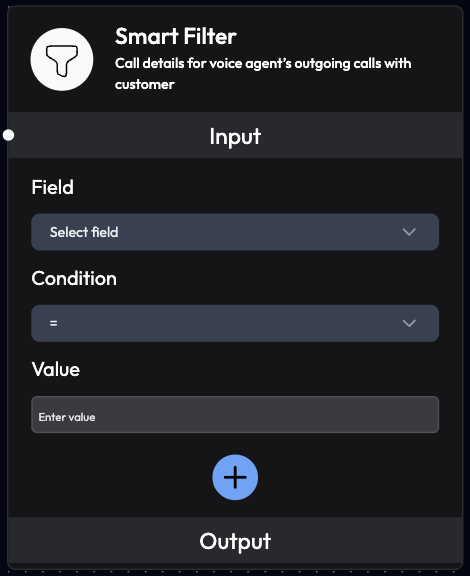
The Smart Filter Node allows you to filter data and create conditional logic in your workflows. It evaluates data against specified conditions and routes workflow execution based on the results.
 ## Use Cases
* **Conditional Routing**: Route workflows based on data values
* **Data Validation**: Filter out invalid or incomplete records
* **Priority Assignment**: Categorize by urgency or importance
* **Lead Qualification**: Filter high-quality leads
* **Error Handling**: Identify and handle failed operations
* **Status-Based Actions**: Take different actions based on status
* **Threshold Checks**: Trigger actions when values exceed limits
* **Multi-Criteria Filtering**: Apply complex filtering logic
## Inputs
### **Field** (Required)
Select a field to apply the filter on.
**Configuration:**
* Can be a single field from dropdown
* Can link multiple fields from previous blocks
* Supports nested object properties
**Examples:**
* `Call_Status`
* `Call_Duration`
* `Customer_Details.name`
* `Order_Amount`
### **Condition** (Required)
Define the filtering condition to apply.
**Available Conditions:**
**Equality:**
* `=` (equals)
* `!=` (not equals)
**Comparison:**
* `>` (greater than)
* `<` (less than)
* `>=` (greater than or equal to)
* `<=` (less than or equal to)
**Text:**
* `contains` (includes substring)
* `not contains` (doesn't include substring)
* `starts with` (begins with text)
* `ends with` (ends with text)
**Existence:**
* `is empty` (null or empty)
* `is not empty` (has value)
### **Value** (Required)
Enter the value to filter by.
**Format:**
* Text: `"connected"`, `"John Doe"`
* Numbers: `100`, `5.5`
* Boolean: `true`, `false`
**Examples:**
* For status check: `connected`
* For duration: `60`
* For amount: `1000`
### **Add More**
Apply multiple conditions simultaneously.
**Operators:**
* `AND`: All conditions must be true
* `OR`: At least one condition must be true
**Example:**
```
Condition 1: Call_Status = connected
AND
Condition 2: Call_Duration > 60
```
## Outputs
### **Filtered Results**
Returns only the data that matches the specified filter conditions.
**Behavior:**
* If conditions match: Data passes through
* If conditions don't match: Data is filtered out
* Multiple matches: All matching records returned
## Configuration Examples
### Example 1: Filter Successful Calls
```
Field: Call_Status
Condition: =
Value: connected
```
**Result:** Only passes through calls that successfully connected
### Example 2: Filter Long Calls
```
Field: Call_Duration
Condition: >
Value: 120
```
**Result:** Only passes through calls longer than 2 minutes
### Example 3: Filter High-Value Orders
```
Field: Order_Amount
Condition: >=
Value: 5000
```
**Result:** Only passes through orders of ₹5,000 or more
### Example 4: Filter by Customer Name
```
Field: Customer_Details.name
Condition: contains
Value: John
```
**Result:** Only passes through customers with "John" in their name
### Example 5: Multiple Conditions (AND)
```
Condition 1:
Field: Call_Status
Condition: =
Value: connected
AND
Condition 2:
Field: Call_Duration
Condition: >
Value: 60
```
**Result:** Only passes through calls that connected AND lasted more than 60 seconds
### Example 6: Multiple Conditions (OR)
```
Condition 1:
Field: Call_Status
Condition: =
Value: couldn't connect
OR
Condition 2:
Field: Call_Duration
Condition: <
Value: 30
```
**Result:** Passes through calls that either didn't connect OR were very short
## Workflow Integration
### Common Patterns
**Pattern 1: Success/Failure Routing**
```
Voice Agent Node
↓
Smart Filter (Call_Status = connected)
↓ (if true)
Send Email Node (success email)
↓ (if false)
Schedule Callback Node (retry call)
```
**Pattern 2: Priority-Based Routing**
```
Incoming Call Node
↓
AI Query Agent (analyze urgency)
↓
Smart Filter (urgency = high)
↓ (if true)
Webhook Node (alert team immediately)
↓ (if false)
Send Email Node (standard follow-up)
```
**Pattern 3: Lead Qualification**
```
Voice Agent Node
↓
AI Query Agent (score lead)
↓
Smart Filter (lead_score >= 7)
↓ (if true)
Webhook Node (send to sales CRM)
↓ (if false)
Send Email Node (nurture campaign)
```
**Pattern 4: Multi-Stage Filtering**
```
Upload Data Node
↓
Smart Filter 1 (valid phone number)
↓
Smart Filter 2 (opted-in customers)
↓
Smart Filter 3 (active accounts)
↓
Voice Agent Node (make calls)
```
**Pattern 5: Error Handling**
```
Send Email Node
↓
Smart Filter (Email_success = false)
↓ (if true)
Send WhatsApp Node (fallback channel)
↓
Webhook Node (log error)
```
## Advanced Filtering
### Nested Field Access
Access nested object properties using dot notation:
```
Field: Customer_Details.account.type
Condition: =
Value: premium
```
### Array Filtering
Filter based on array properties:
```
Field: Tags
Condition: contains
Value: vip
```
### Numeric Ranges
Combine conditions for range filtering:
```
Condition 1: Order_Amount >= 1000
AND
Condition 2: Order_Amount <= 5000
```
**Result:** Orders between ₹1,000 and ₹5,000
### Text Pattern Matching
Use text conditions for pattern matching:
```
Field: Email
Condition: ends with
Value: @company.com
```
**Result:** Only company email addresses
## Best Practices
### Condition Design
* **Be Specific**: Use precise conditions to avoid false matches
* **Test Thoroughly**: Verify filters with sample data
* **Document Logic**: Comment complex filter combinations
* **Handle Edge Cases**: Account for null/empty values
### Performance
* **Filter Early**: Apply filters as early as possible in workflow
* **Minimize Conditions**: Use only necessary conditions
* **Optimize Order**: Put most selective filters first
* **Batch Processing**: Filter large datasets efficiently
### Data Quality
* **Validate Input**: Ensure data format matches expectations
* **Handle Missing Data**: Account for empty or null fields
* **Type Consistency**: Match data types (text, number, boolean)
* **Case Sensitivity**: Consider case when filtering text
### Workflow Design
* **Clear Paths**: Define clear true/false paths
* **Error Handling**: Handle cases where no data passes filter
* **Logging**: Log filtered data for debugging
* **Monitoring**: Track filter effectiveness
## Use Case Examples
### Customer Service Priority Routing
```
Smart Filter 1: Call_Duration < 30
→ Schedule Callback (dropped call)
Smart Filter 2: Sentiment = negative
→ Webhook (alert supervisor)
Smart Filter 3: Issue_Type = billing
→ Send Email (billing team)
Default:
→ Send Email (standard follow-up)
```
### E-commerce Order Processing
```
Smart Filter 1: Order_Amount > 10000
→ Webhook (VIP order alert)
→ Send WhatsApp (premium confirmation)
Smart Filter 2: Payment_Method = COD
→ Voice Agent (COD confirmation call)
Smart Filter 3: Delivery_City = metro
→ Send Email (fast delivery option)
Default:
→ Send Email (standard confirmation)
```
### Lead Qualification Pipeline
```
Smart Filter 1: Lead_Score >= 8 AND Budget >= 50000
→ Webhook (hot lead to sales)
→ Schedule Callback (immediate follow-up)
Smart Filter 2: Lead_Score >= 5 AND Lead_Score < 8
→ Send Email (detailed information)
→ Schedule Callback (follow-up in 3 days)
Smart Filter 3: Lead_Score < 5
→ Send Email (nurture campaign)
Default:
→ No action
```
## Troubleshooting
### No Data Passing Through
**Possible Causes:**
* Conditions too restrictive
* Data format mismatch
* Field name incorrect
* Value comparison error
**Solutions:**
* Review and relax conditions
* Verify data types match
* Check field names (case-sensitive)
* Test with known data
### Unexpected Results
**Possible Causes:**
* Logical operator error (AND vs OR)
* Case sensitivity issues
* Numeric vs string comparison
* Nested field access error
**Solutions:**
* Review AND/OR logic
* Use exact case matching
* Ensure correct data types
* Verify nested field paths
### Performance Issues
**Possible Causes:**
* Too many conditions
* Large dataset filtering
* Complex nested conditions
**Solutions:**
* Simplify filter logic
* Filter in stages
* Optimize condition order
## Next Steps
Intelligent decision-making
Route filtered data to external systems
Send emails based on filter results
Schedule callbacks for filtered data
Use Smart Filter nodes in sequence to create multi-stage filtering pipelines for complex routing logic.
Smart Filter evaluates conditions in real-time. Ensure your data is properly formatted and field names match exactly (case-sensitive).
## Use Cases
* **Conditional Routing**: Route workflows based on data values
* **Data Validation**: Filter out invalid or incomplete records
* **Priority Assignment**: Categorize by urgency or importance
* **Lead Qualification**: Filter high-quality leads
* **Error Handling**: Identify and handle failed operations
* **Status-Based Actions**: Take different actions based on status
* **Threshold Checks**: Trigger actions when values exceed limits
* **Multi-Criteria Filtering**: Apply complex filtering logic
## Inputs
### **Field** (Required)
Select a field to apply the filter on.
**Configuration:**
* Can be a single field from dropdown
* Can link multiple fields from previous blocks
* Supports nested object properties
**Examples:**
* `Call_Status`
* `Call_Duration`
* `Customer_Details.name`
* `Order_Amount`
### **Condition** (Required)
Define the filtering condition to apply.
**Available Conditions:**
**Equality:**
* `=` (equals)
* `!=` (not equals)
**Comparison:**
* `>` (greater than)
* `<` (less than)
* `>=` (greater than or equal to)
* `<=` (less than or equal to)
**Text:**
* `contains` (includes substring)
* `not contains` (doesn't include substring)
* `starts with` (begins with text)
* `ends with` (ends with text)
**Existence:**
* `is empty` (null or empty)
* `is not empty` (has value)
### **Value** (Required)
Enter the value to filter by.
**Format:**
* Text: `"connected"`, `"John Doe"`
* Numbers: `100`, `5.5`
* Boolean: `true`, `false`
**Examples:**
* For status check: `connected`
* For duration: `60`
* For amount: `1000`
### **Add More**
Apply multiple conditions simultaneously.
**Operators:**
* `AND`: All conditions must be true
* `OR`: At least one condition must be true
**Example:**
```
Condition 1: Call_Status = connected
AND
Condition 2: Call_Duration > 60
```
## Outputs
### **Filtered Results**
Returns only the data that matches the specified filter conditions.
**Behavior:**
* If conditions match: Data passes through
* If conditions don't match: Data is filtered out
* Multiple matches: All matching records returned
## Configuration Examples
### Example 1: Filter Successful Calls
```
Field: Call_Status
Condition: =
Value: connected
```
**Result:** Only passes through calls that successfully connected
### Example 2: Filter Long Calls
```
Field: Call_Duration
Condition: >
Value: 120
```
**Result:** Only passes through calls longer than 2 minutes
### Example 3: Filter High-Value Orders
```
Field: Order_Amount
Condition: >=
Value: 5000
```
**Result:** Only passes through orders of ₹5,000 or more
### Example 4: Filter by Customer Name
```
Field: Customer_Details.name
Condition: contains
Value: John
```
**Result:** Only passes through customers with "John" in their name
### Example 5: Multiple Conditions (AND)
```
Condition 1:
Field: Call_Status
Condition: =
Value: connected
AND
Condition 2:
Field: Call_Duration
Condition: >
Value: 60
```
**Result:** Only passes through calls that connected AND lasted more than 60 seconds
### Example 6: Multiple Conditions (OR)
```
Condition 1:
Field: Call_Status
Condition: =
Value: couldn't connect
OR
Condition 2:
Field: Call_Duration
Condition: <
Value: 30
```
**Result:** Passes through calls that either didn't connect OR were very short
## Workflow Integration
### Common Patterns
**Pattern 1: Success/Failure Routing**
```
Voice Agent Node
↓
Smart Filter (Call_Status = connected)
↓ (if true)
Send Email Node (success email)
↓ (if false)
Schedule Callback Node (retry call)
```
**Pattern 2: Priority-Based Routing**
```
Incoming Call Node
↓
AI Query Agent (analyze urgency)
↓
Smart Filter (urgency = high)
↓ (if true)
Webhook Node (alert team immediately)
↓ (if false)
Send Email Node (standard follow-up)
```
**Pattern 3: Lead Qualification**
```
Voice Agent Node
↓
AI Query Agent (score lead)
↓
Smart Filter (lead_score >= 7)
↓ (if true)
Webhook Node (send to sales CRM)
↓ (if false)
Send Email Node (nurture campaign)
```
**Pattern 4: Multi-Stage Filtering**
```
Upload Data Node
↓
Smart Filter 1 (valid phone number)
↓
Smart Filter 2 (opted-in customers)
↓
Smart Filter 3 (active accounts)
↓
Voice Agent Node (make calls)
```
**Pattern 5: Error Handling**
```
Send Email Node
↓
Smart Filter (Email_success = false)
↓ (if true)
Send WhatsApp Node (fallback channel)
↓
Webhook Node (log error)
```
## Advanced Filtering
### Nested Field Access
Access nested object properties using dot notation:
```
Field: Customer_Details.account.type
Condition: =
Value: premium
```
### Array Filtering
Filter based on array properties:
```
Field: Tags
Condition: contains
Value: vip
```
### Numeric Ranges
Combine conditions for range filtering:
```
Condition 1: Order_Amount >= 1000
AND
Condition 2: Order_Amount <= 5000
```
**Result:** Orders between ₹1,000 and ₹5,000
### Text Pattern Matching
Use text conditions for pattern matching:
```
Field: Email
Condition: ends with
Value: @company.com
```
**Result:** Only company email addresses
## Best Practices
### Condition Design
* **Be Specific**: Use precise conditions to avoid false matches
* **Test Thoroughly**: Verify filters with sample data
* **Document Logic**: Comment complex filter combinations
* **Handle Edge Cases**: Account for null/empty values
### Performance
* **Filter Early**: Apply filters as early as possible in workflow
* **Minimize Conditions**: Use only necessary conditions
* **Optimize Order**: Put most selective filters first
* **Batch Processing**: Filter large datasets efficiently
### Data Quality
* **Validate Input**: Ensure data format matches expectations
* **Handle Missing Data**: Account for empty or null fields
* **Type Consistency**: Match data types (text, number, boolean)
* **Case Sensitivity**: Consider case when filtering text
### Workflow Design
* **Clear Paths**: Define clear true/false paths
* **Error Handling**: Handle cases where no data passes filter
* **Logging**: Log filtered data for debugging
* **Monitoring**: Track filter effectiveness
## Use Case Examples
### Customer Service Priority Routing
```
Smart Filter 1: Call_Duration < 30
→ Schedule Callback (dropped call)
Smart Filter 2: Sentiment = negative
→ Webhook (alert supervisor)
Smart Filter 3: Issue_Type = billing
→ Send Email (billing team)
Default:
→ Send Email (standard follow-up)
```
### E-commerce Order Processing
```
Smart Filter 1: Order_Amount > 10000
→ Webhook (VIP order alert)
→ Send WhatsApp (premium confirmation)
Smart Filter 2: Payment_Method = COD
→ Voice Agent (COD confirmation call)
Smart Filter 3: Delivery_City = metro
→ Send Email (fast delivery option)
Default:
→ Send Email (standard confirmation)
```
### Lead Qualification Pipeline
```
Smart Filter 1: Lead_Score >= 8 AND Budget >= 50000
→ Webhook (hot lead to sales)
→ Schedule Callback (immediate follow-up)
Smart Filter 2: Lead_Score >= 5 AND Lead_Score < 8
→ Send Email (detailed information)
→ Schedule Callback (follow-up in 3 days)
Smart Filter 3: Lead_Score < 5
→ Send Email (nurture campaign)
Default:
→ No action
```
## Troubleshooting
### No Data Passing Through
**Possible Causes:**
* Conditions too restrictive
* Data format mismatch
* Field name incorrect
* Value comparison error
**Solutions:**
* Review and relax conditions
* Verify data types match
* Check field names (case-sensitive)
* Test with known data
### Unexpected Results
**Possible Causes:**
* Logical operator error (AND vs OR)
* Case sensitivity issues
* Numeric vs string comparison
* Nested field access error
**Solutions:**
* Review AND/OR logic
* Use exact case matching
* Ensure correct data types
* Verify nested field paths
### Performance Issues
**Possible Causes:**
* Too many conditions
* Large dataset filtering
* Complex nested conditions
**Solutions:**
* Simplify filter logic
* Filter in stages
* Optimize condition order
## Next Steps
Intelligent decision-making
Route filtered data to external systems
Send emails based on filter results
Schedule callbacks for filtered data
Use Smart Filter nodes in sequence to create multi-stage filtering pipelines for complex routing logic.
Smart Filter evaluates conditions in real-time. Ensure your data is properly formatted and field names match exactly (case-sensitive).