
WhatsApp Trigger

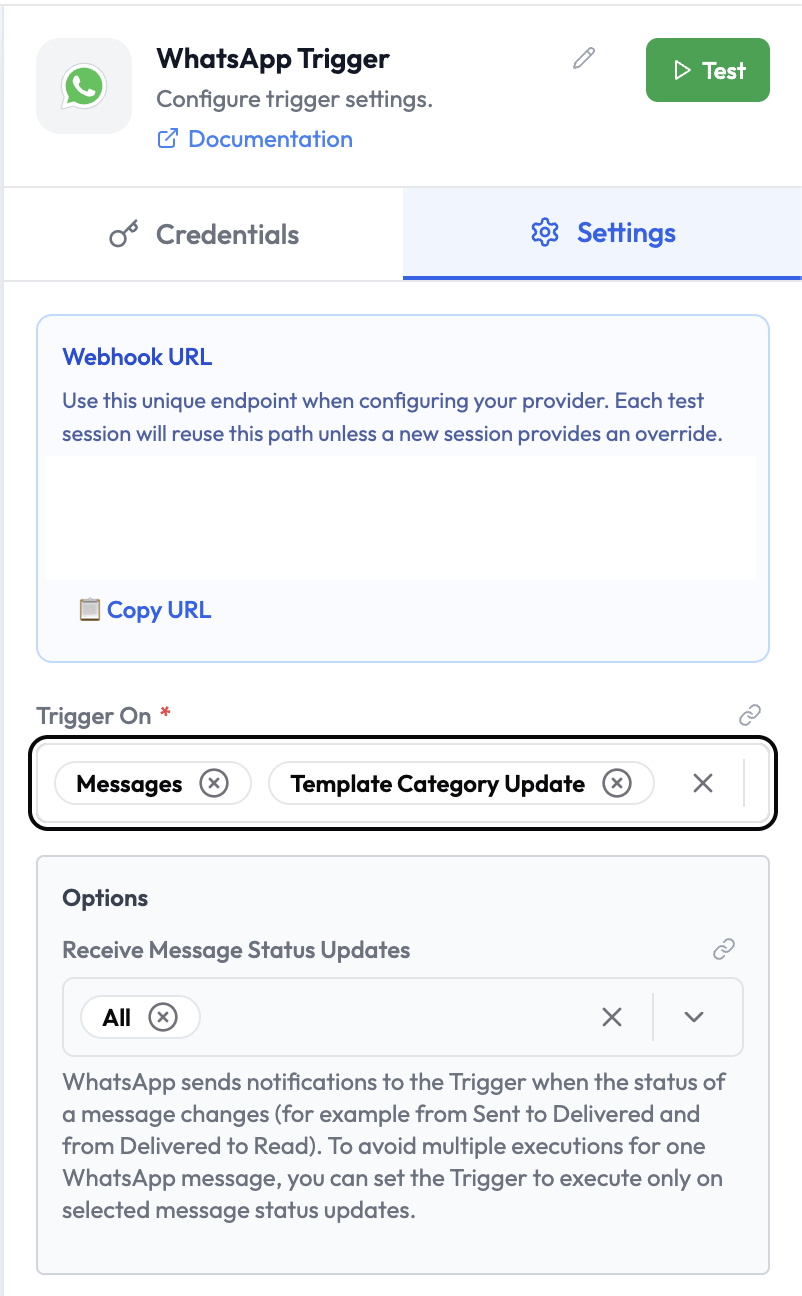
The WhatsApp Trigger starts an orchestration when an incoming WhatsApp message is received on a connected number. WhatsApp Trigger Node
Use Cases

  • Build AI-powered WhatsApp bots using AgentVerse
  • Automate customer support workflows triggered by WhatsApp messages
  • Route incoming messages based on content or sender
  • Integrate WhatsApp as an input channel for AI agents

Credentials

This node requires a WhatsApp credential configured with your WhatsApp Business API access token and phone number ID. To create a credential:
  1. Go to Settings → Credentials → New Credential
  2. Select WhatsApp
  3. Enter your WhatsApp Business API access token and phone number ID

Node Reference

Parameters

ParameterTypeDescription
CredentialCredentialSelect or create a WhatsApp credential
Trigger OnMulti-selectEvent types to listen for (e.g. Messages, Template Category Update)

Trigger On Options

OptionDescription
MessagesFires when a text or media message is received
Template Category UpdateFires when a message template’s category changes

Options

OptionDescription
Receive Message Status UpdatesFilter which delivery status updates trigger the orchestration: All, Sent, Delivered, Read. WhatsApp sends a notification when a message status changes (e.g. from Sent → Delivered). Set this to avoid multiple executions per message.

Webhook URL

The WhatsApp Trigger displays a unique Webhook URL in the node panel. Configure this URL in your WhatsApp Business API app settings under Webhooks.

Output Data

The trigger outputs the incoming message payload:
{
  "from": "919876543210",
  "to": "911234567890",
  "messageId": "wamid.XXXXXXXXXXXX",
  "type": "text",
  "text": {
    "body": "Hello, I need help with my order."
  },
  "timestamp": "1678901234"
}
For media messages:
{
  "from": "919876543210",
  "type": "image",
  "image": {
    "id": "media-id",
    "mimeType": "image/jpeg",
    "caption": "Here's my receipt"
  },
  "timestamp": "1678901234"
}
Reference fields in downstream nodes:
{{ whatsappTrigger.text.body }}
{{ whatsappTrigger.from }}
{{ whatsappTrigger.messageId }}

  • WhatsApp — Send WhatsApp messages within an orchestration
  • SubVerse Agents — Route the message to a SubVerse AI agent
  • AI Agent — Process the incoming message with an LLM