

WhatsApp Trigger
The WhatsApp Trigger starts an orchestration when an incoming WhatsApp message is received on a connected number.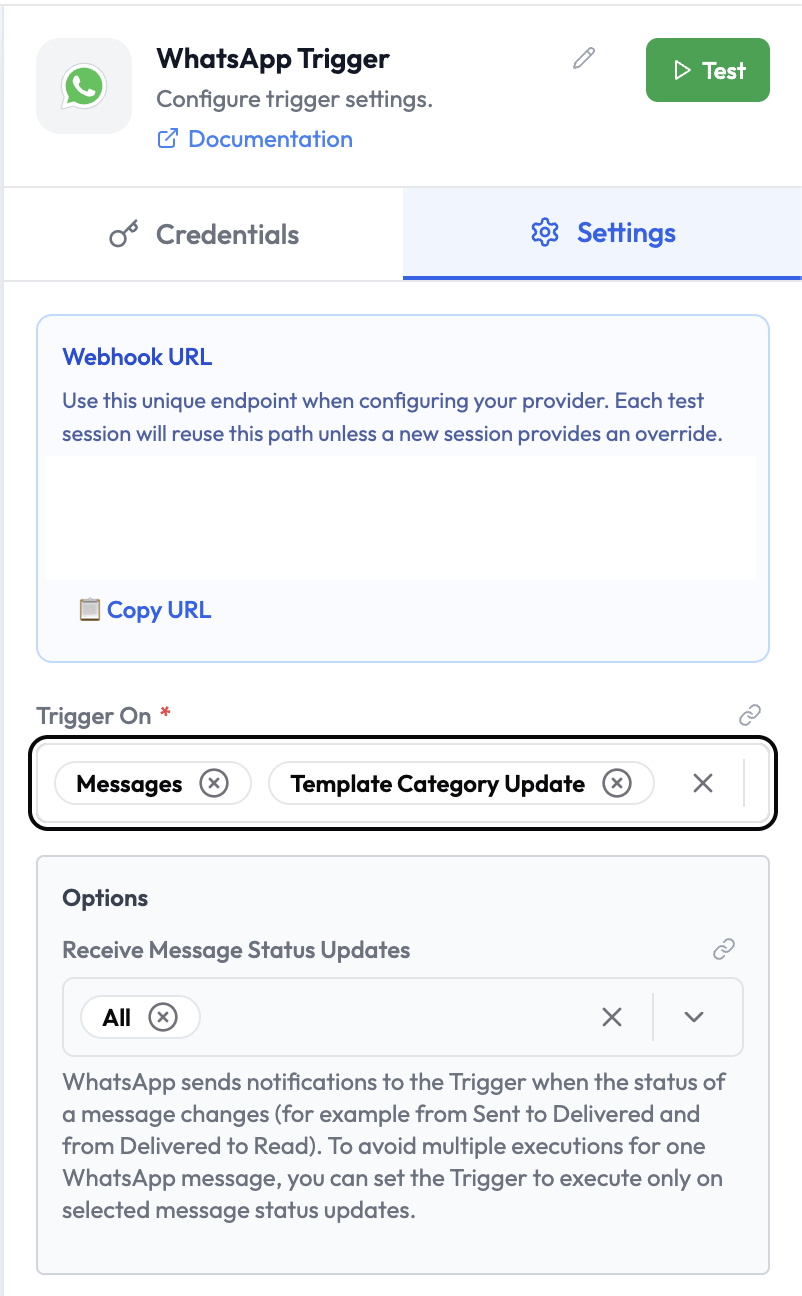
Use Cases
- Build AI-powered WhatsApp bots using Orchestration
- Automate customer support workflows triggered by WhatsApp messages
- Route incoming messages based on content or sender
- Integrate WhatsApp as an input channel for AI agents
Credentials
This node requires a WhatsApp credential configured with your WhatsApp Business API access token and phone number ID. To create a credential:- Go to Integrations → WhatsApp and select New connection
- Select WhatsApp OAuth API
- Enter your Meta app’s Client ID and Client Secret
Node Reference
Parameters
Trigger On Options
Options
Webhook URL
The WhatsApp Trigger displays a unique Webhook URL in the node panel. Configure this URL in your WhatsApp Business API app settings under Webhooks.Output Data
The trigger outputs the incoming message payload:Related Nodes
- WhatsApp — Send WhatsApp messages within an orchestration
- SubVerse Agents — Route the message to a SubVerse AI agent
- AI Agent — Process the incoming message with an LLM