

Overview
A WhatsApp Channel connects your WhatsApp Business number to a Chat Agent. When a customer messages your WhatsApp number, the linked agent receives the message and responds automatically — just like a human agent would. WhatsApp channels use your WhatsApp Business API credentials to authorize sending and receiving messages. These credentials are stored securely in encrypted form. When to use a WhatsApp Channel:- You want to automate customer support or FAQs over WhatsApp
- You need a conversational agent available 24/7 on WhatsApp
- You want to qualify leads or handle bookings via WhatsApp messaging
How to Set Up
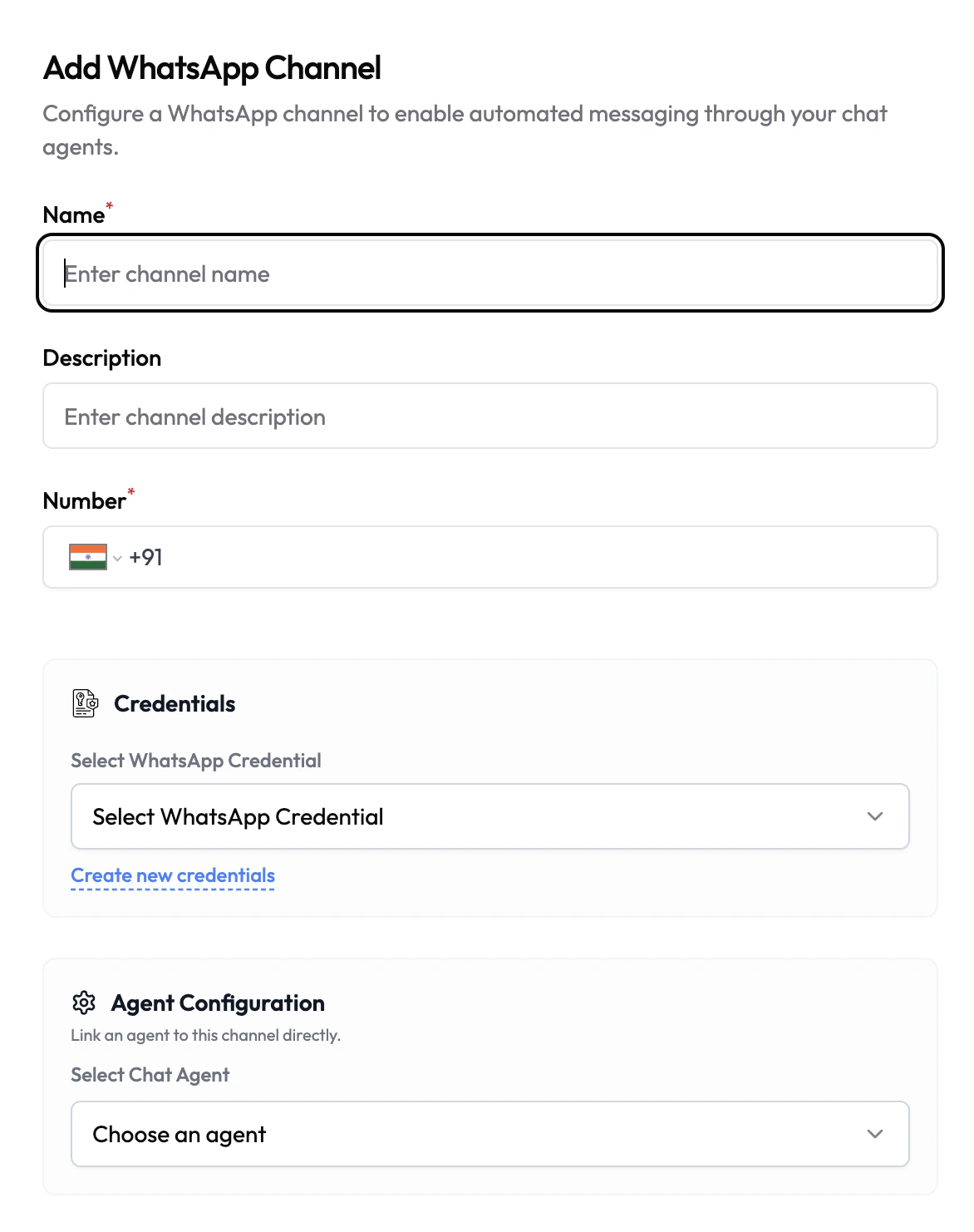
- Navigate to Channels in the left sidebar.
- Click Add Channel and select WhatsApp.
- Fill in the channel details (see configuration below).
- Select or create a WhatsApp Credential.
- Under Agent Configuration, link a Chat Agent.
- Click Save.
Configuration
Credentials
WhatsApp channels require a WhatsApp API credential containing your WhatsApp Business API token and configuration. Credentials are stored encrypted and never exposed in plaintext after saving.WhatsApp API Credential
Create and manage WhatsApp API credentials
All Credentials
Overview of all credential types in Subverse