

Overview
Webhooks allow your applications to receive real-time notifications when specific events occur in SubVerse AI, such as call completions, workflow executions, or agent interactions. This enables you to build responsive integrations and automate workflows based on SubVerse events.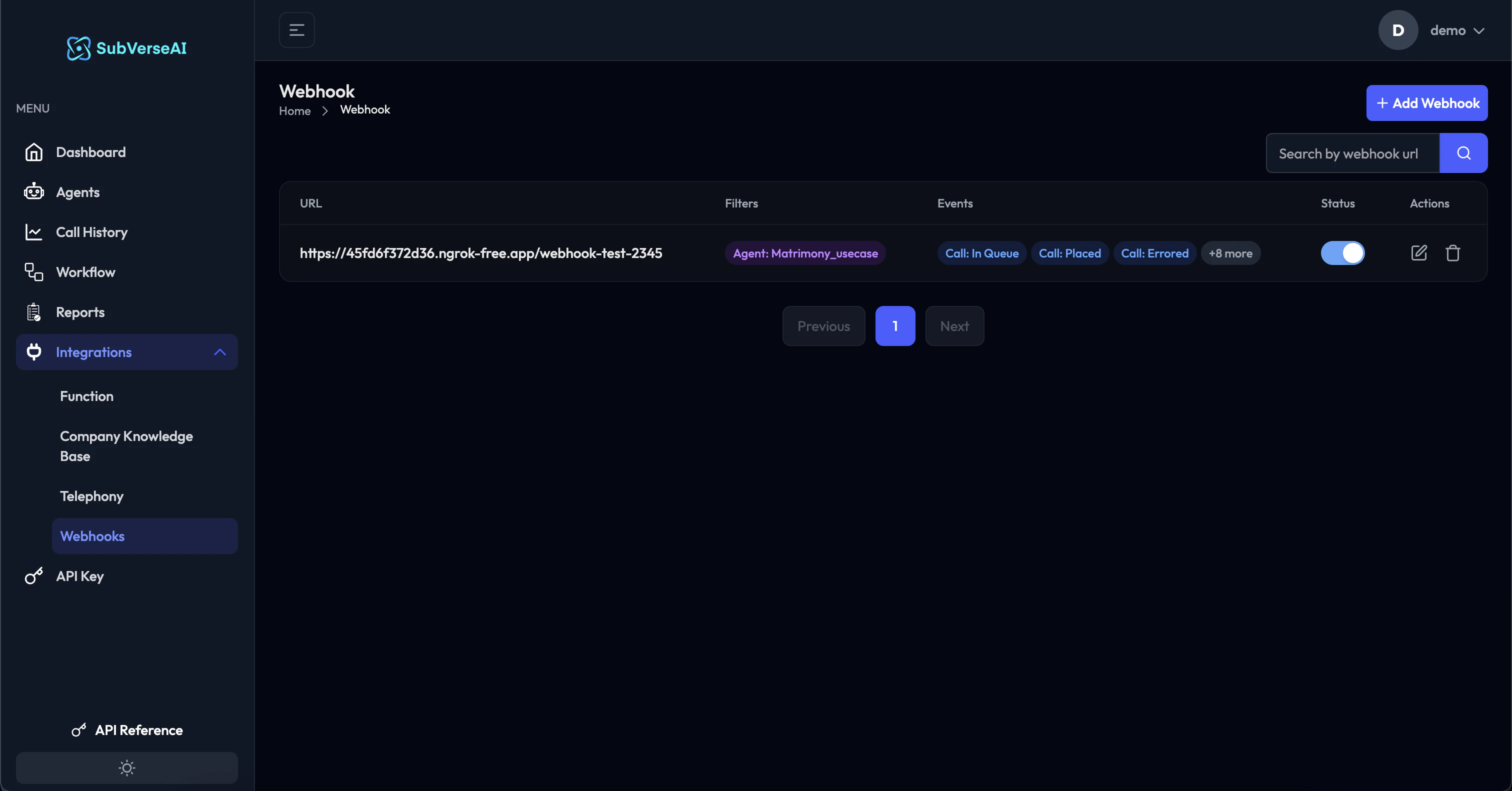
How Webhooks Work
When an event occurs in SubVerse AI (like a call completing or workflow finishing), we send an HTTP POST request to your configured webhook URL with relevant event data. This enables you to:- Track call outcomes and analytics in your systems
- Trigger downstream processes automatically
- Update your CRM or database in real-time
- Send notifications to your team
- Integrate with third-party tools
Creating a Webhook
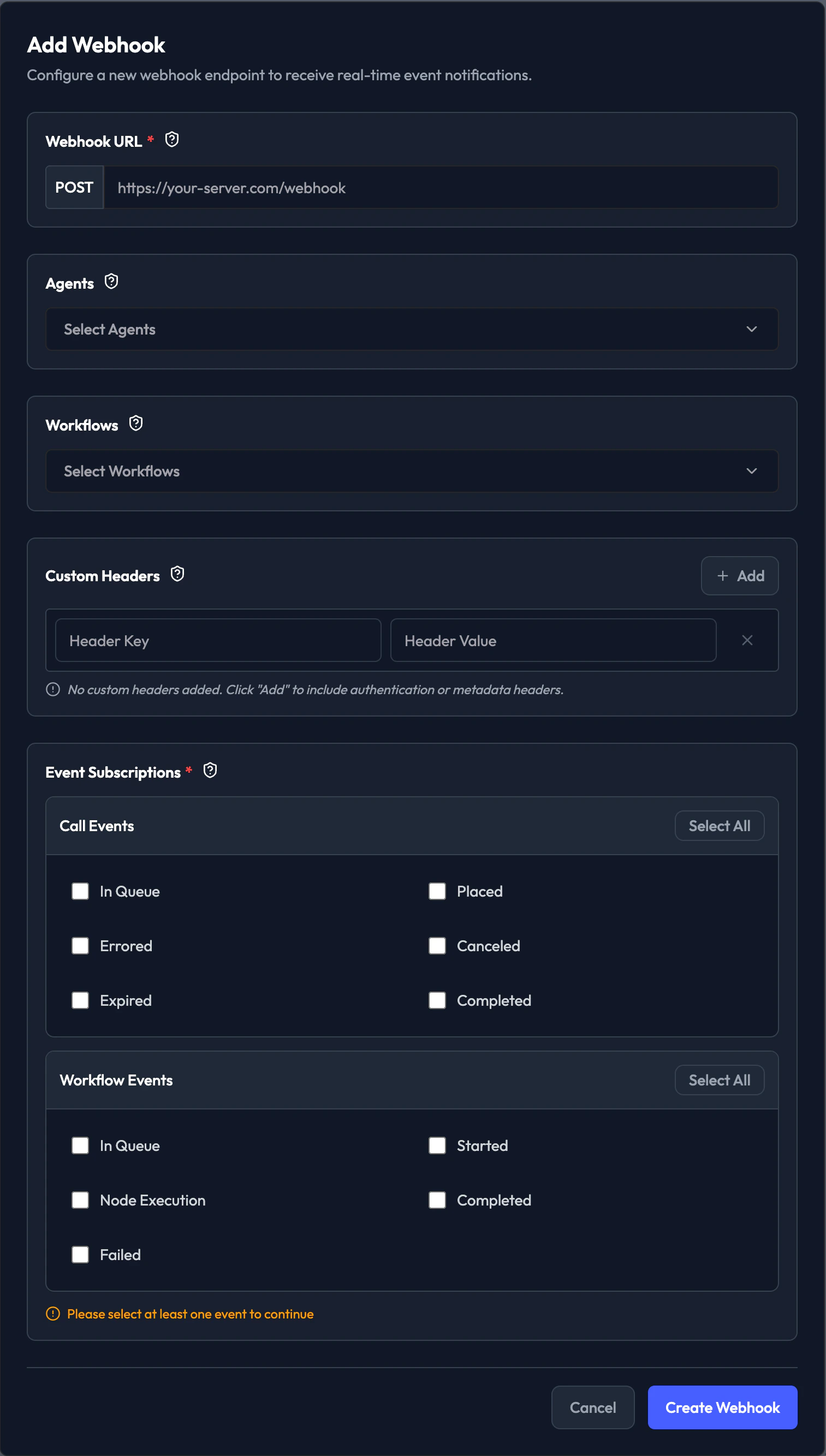
Step 1: Navigate to Webhooks
- Log in to your SubVerse dashboard
- Go to Integrations → Webhooks
- Click + Add Webhook
Step 2: Configure Webhook URL
Webhook URL- Enter your endpoint URL that will receive webhook events
- Must be a publicly accessible HTTPS URL
- Format:
https://your-server.com/webhook
https://api.yourcompany.com/subverse/webhookhttps://your-app.com/api/v1/webhooks/subversehttps://hooks.zapier.com/hooks/catch/123456/abcdef
Step 3: Select Agents (Optional)
Choose specific agents whose events you want to receive:- Select All: Receive events from all agents
- Specific Agents: Select individual agents from the dropdown
- Monitor specific high-priority agents
- Route different agents to different endpoints
- Filter events by agent type
Step 4: Select Workflows (Optional)
Choose specific workflows whose events you want to receive:- Select All: Receive events from all workflows
- Specific Workflows: Select individual workflows from the dropdown
- Track specific campaign workflows
- Monitor critical business processes
- Separate workflow events by type
Step 5: Configure Custom Headers (Optional)
Add custom HTTP headers to webhook requests for authentication or metadata: Common Use Cases:- Authentication:
Authorization: Bearer your-token-here - API Keys:
X-API-Key: your-api-key - Custom Metadata:
X-Client-ID: your-client-id
- Click + Add in the Custom Headers section
- Enter Header Key (e.g.,
Authorization) - Enter Header Value (e.g.,
Bearer abc123xyz) - Add multiple headers as needed
Step 6: Subscribe to Events
Select which events you want to receive notifications for:Call Events
- In Queue: Call is waiting to be processed
- Placed: Outbound call has been initiated
- Errored: Call encountered an error
- Canceled: Call was canceled before completion
- Expired: Call expired (timeout)
- Completed: Call finished successfully
Workflow Events
- In Queue: Workflow is waiting to execute
- Started: Workflow execution has begun
- Node Execution: Individual workflow node executed
- Failed: Workflow execution failed
- Completed: Workflow finished successfully
- Click Select All to subscribe to all events in a category
- Select individual events for specific use cases
- You must select at least one event to create the webhook
Step 7: Create Webhook
- Review your configuration
- Click Create Webhook
- Your webhook will appear in the webhooks dashboard
- Toggle the switch to enable/disable the webhook
Event Payload Structure
SubVerse sends webhook events as HTTP POST requests with JSON payloads.Call Events Payload
Workflow Events Payload
Common Fields
All webhook payloads include:- eventType: Type of event (e.g.,
call.completed,call.placed,workflow.started,workflow.in_queue) - createdAt: ISO 8601 timestamp when event occurred
- data: Event-specific data payload with camelCase field names
Webhook Endpoint Requirements
Your webhook endpoint must meet the following requirements:1. Accept POST Requests
2. Parse JSON Body
3. Return 2xx Status Code
4. Respond Quickly
- Return response within 5 seconds
- Process heavy operations asynchronously
- Use background jobs for time-consuming tasks
Example Webhook Endpoint
Node.js/Express
Python/Flask
Security Best Practices
1. Use HTTPS
Always use HTTPS endpoints to encrypt data in transit.2. Validate Requests
Verify requests are coming from SubVerse:- Check custom headers you configured
- Validate event structure
- Implement request signing (if available)
3. Implement Idempotency
Handle duplicate events gracefully:4. Rate Limiting
Protect your endpoint from abuse:Managing Webhooks
Enable/Disable Webhooks
Toggle the switch in the webhooks dashboard to enable or disable a webhook without deleting it.Edit Webhooks
- Click the edit icon next to the webhook
- Modify URL, agents, workflows, headers, or events
- Click Update Webhook
Delete Webhooks
- Click the delete icon next to the webhook
- Confirm deletion
- Webhook will stop receiving events immediately
Test Webhooks
Send a test event to verify your endpoint:- Click the test icon next to the webhook
- Select an event type to test
- Check your endpoint receives the test payload
Monitoring Webhooks
Webhook Logs
View webhook delivery status and responses:- Click on a webhook in the dashboard
- View recent deliveries
- Check success/failure status
- Review response codes and error messages
Retry Logic
SubVerse automatically retries failed webhook deliveries:- Attempts: Up to 3 retries
- Backoff: Exponential backoff (1s, 5s, 25s)
- Status Codes: Retries on 5xx errors and timeouts
- Success: 2xx status codes mark delivery as successful
Common Use Cases
1. CRM Integration
Update customer records when calls complete:2. Team Notifications
Send Slack notifications for important events:3. Analytics Tracking
Send events to analytics platforms:4. Workflow Automation
Trigger follow-up actions based on call outcomes:Troubleshooting
Webhook Not Receiving Events
Check:- Webhook is enabled (toggle switch is on)
- URL is publicly accessible
- Correct events are selected
- Agents/workflows are selected (if filtered)
- Test URL accessibility from external service
- Verify firewall rules allow incoming requests
- Check webhook logs for delivery attempts
- Ensure endpoint returns 2xx status code
Timeout Errors
Check:- Endpoint response time
- Heavy processing in request handler
- Database query performance
- Return 200 response immediately
- Move processing to background jobs
- Use async/await properly
- Optimize database queries
Duplicate Events
Check:- Retry logic triggering multiple deliveries
- Idempotency handling in your code
- Implement event ID tracking
- Use database constraints for uniqueness
- Return 200 even for duplicates
Next Steps
Webhook Node
Use webhooks in workflows
API Reference
Webhook API documentation
Call History
Monitor call events
Workflow Getting Started
Build automated workflows