

Overview
The Webhook Node sends events and data to client-side applications via HTTP POST requests. This enables your workflows to integrate with external systems, CRMs, databases, and custom applications.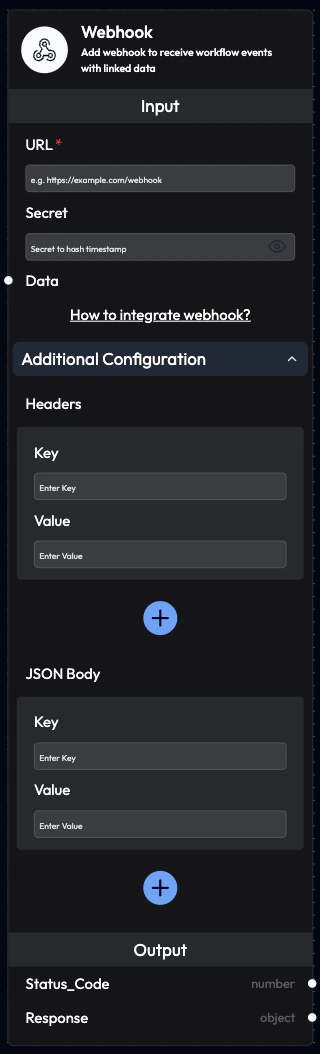
Use Cases
- CRM Integration: Update customer records in Salesforce, HubSpot, etc.
- Database Updates: Send data to your database
- Ticket Systems: Create tickets in Jira, Zendesk, Freshdesk
- Analytics: Send events to analytics platforms
- Notifications: Trigger alerts in Slack, Microsoft Teams
- Custom Applications: Integrate with your proprietary systems
- Data Pipelines: Feed data into ETL processes
- Third-Party APIs: Call any external API
Inputs
URL (Required)
Webhook URL to send the events to. Format:https://your-domain.com/webhook-endpoint
Requirements:
- Must be HTTPS (HTTP not recommended for production)
- Must be publicly accessible
- Should accept POST requests
- Should return appropriate HTTP status codes
https://api.yourcompany.com/subverse/webhookhttps://hooks.zapier.com/hooks/catch/123456/abcdefhttps://your-crm.com/api/v1/leads
Secret
Optional secret key for webhook authentication. Purpose:- Generate HMAC SHA256 hash for request validation
- Secure webhook endpoint from unauthorized requests
- Recommended for production environments
- Enter a strong secret string
- Use same secret on your server to validate requests
- Hash will be included in webhook payload
Data (Required)
Data or events to send through webhook. Configuration:- Can be manually entered JSON
- Can link outputs from previous blocks
- Supports multiple data sources
- Automatically formatted as JSON
Call_Statusfrom Voice Agent NodeTranscriptfrom Incoming Call NodeLLM_Responsefrom AI Query AgentEmail_successfrom Send Email Node
Additional Configuration
Headers Custom HTTP headers to include in the request. Configuration:- Add key-value pairs for headers
- Common uses: Authentication, Content-Type overrides
- Example:
Authorization: Bearer token123
- Define custom JSON structure
- Map workflow data to specific JSON keys
- Useful for APIs with specific payload requirements
Outputs
Status_Code
HTTP status code returned by the webhook endpoint. Values:200-299: Success responses400-499: Client error responses500-599: Server error responses
- Check specific response codes
- Implement conditional logic based on status
- Debug webhook issues
Response
Response body returned by the webhook endpoint. Type: Object Contains:- Data returned by your endpoint
- Error messages (if any)
- Confirmation details
- Extract data from response
- Log response for debugging
- Use response data in subsequent blocks
Webhook Payload Structure
SubVerse sends the following payload to your webhook URL:Payload Fields
data- Contains all the data you configured in the node
- Includes linked outputs from previous blocks
- Formatted as JSON object
- Current Unix timestamp in milliseconds
- When the webhook was sent
- Use for chronological ordering and replay protection
- Authentication hash for request validation
- SHA256 or HMAC SHA256 (if secret provided)
- Verify to ensure request authenticity
Client-Side Setup
Webhook Endpoint Requirements
Your webhook endpoint must:- Accept POST Requests: Only POST method is used
- Parse JSON: Accept
application/jsoncontent type - Respond with JSON: Use
Content-Type: application/json - Return Status Codes: Use proper HTTP status codes
200-299: Success400-499: Client error500-599: Server error
Example Endpoint (Node.js/Express)
Security and Validation
Timestamp Validation
Protect against replay attacks by validating the timestamp:Hash Validation (Without Secret)
When no secret is provided, a SHA256 hash is generated:Hash Validation (With Secret)
When a secret is provided, an HMAC SHA256 hash is generated:Configuration Examples
Example 1: CRM Update
Example 2: Slack Notification
Example 3: Database Insert
Example 4: Zapier Integration
Workflow Integration
Common Patterns
Pattern 1: Post-Call CRM UpdateBest Practices
Endpoint Design
- Idempotency: Handle duplicate requests gracefully
- Fast Response: Return 200 quickly, process asynchronously
- Error Handling: Return appropriate error codes
- Logging: Log all webhook requests for debugging
Security
- Use HTTPS: Always use secure connections
- Validate Signature: Verify hash to ensure authenticity
- Check Timestamp: Prevent replay attacks
- Rate Limiting: Protect against abuse
- IP Whitelisting: Restrict to SubVerse IPs (if possible)
Data Handling
- Validate Data: Check data format and completeness
- Error Recovery: Implement retry logic for failures
- Data Privacy: Handle sensitive data appropriately
- Compliance: Follow data protection regulations
Monitoring
- Track Success Rate: Monitor webhook delivery success
- Alert on Failures: Set up alerts for failed webhooks
- Log Payloads: Keep logs for troubleshooting
- Performance: Monitor response times
Retry Logic
SubVerse automatically retries failed webhook requests: Retry Policy:- Attempts: Up to 3 retries
- Backoff: Exponential backoff between retries
- Timing: 1s, 5s, 25s delays
- Status Codes: Retries on 5xx errors and timeouts
- Return 2xx for successful processing
- Return 4xx for client errors (no retry)
- Return 5xx for server errors (will retry)
- Respond within 30 seconds (timeout)
Troubleshooting
Webhook Not Receiving Data
Possible Causes:- URL not publicly accessible
- Firewall blocking requests
- Endpoint not accepting POST
- SSL certificate issues
- Verify URL is accessible from internet
- Check firewall rules
- Ensure POST method is supported
- Use valid SSL certificate
Authentication Failures
Possible Causes:- Incorrect hash validation
- Secret mismatch
- Timestamp validation too strict
- Verify hash calculation logic
- Check secret is correct
- Allow reasonable timestamp window (10 min)
Timeout Errors
Possible Causes:- Endpoint processing too slow
- Network latency
- Database queries taking too long
- Return 200 immediately
- Process data asynchronously
- Optimize database queries
- Use message queue for heavy processing
Integration Examples
Salesforce
HubSpot
Google Sheets
Next Steps
AI Query Agent Node
Process data before sending
Smart Filter Node
Filter data before webhook
Webhooks Integration
Learn more about webhooks
API Reference
Workflow API documentation