

Overview
The Schedule Callback Node allows you to schedule follow-up calls with customers, passing additional context from previous interactions. This enables intelligent, context-aware callbacks based on workflow logic.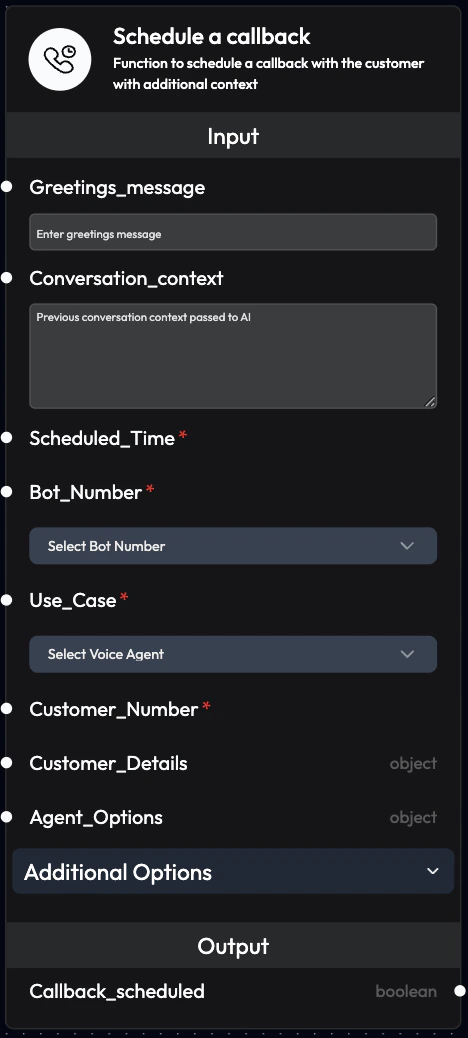
Use Cases
- Unresolved Issues: Schedule callbacks for issues that couldn’t be resolved immediately
- Customer Requests: Honor customer requests to be called back at specific times
- Follow-up Campaigns: Automated follow-ups after initial contact
- Dropped Calls: Reconnect with customers after unexpected disconnections
- Appointment Reminders: Schedule reminder calls before appointments
- Payment Follow-ups: Call customers about pending payments
- Survey Callbacks: Schedule calls to collect feedback
- Lead Nurturing: Follow up with leads at optimal times
Inputs
Greetings_message
Greeting message the voice agent will say to the customer. Purpose:- Overrides the initial prompt defined for the agent
- Provides context-specific greeting
- Can be AI-generated or manually written
- Can be linked from a previous block (e.g., AI-generated greeting)
- Can be manually written in the node
- Data linkage overrides written text
Conversation_context
Pass previous conversation context to the voice agent. Purpose:- Provide continuity between calls
- Give agent full context of previous interactions
- Enable personalized conversations
- Previous call transcript
- Customer history
- Issue details
- Relevant notes
Scheduled_Time (Required)
Set the exact time for the callback. Format: ISO 8601 date formatYYYY-MM-DDTHH:MM:SSZ
Examples:
2025-12-10T10:00:00Z- December 10, 2025 at 10:00 AM UTC2025-12-11T15:30:00Z- December 11, 2025 at 3:30 PM UTC
- Always use future timestamps
- Consider customer timezone
- Respect business hours
- Account for working hour constraints
Bot_Number (Required)
Phone number to be used to call the customer. Configuration:- Can be linked from a previous block
- Can be selected from dropdown
- Data linkage overrides dropdown selection
+91xxxxxxxxxx
Use_Case (Required)
Voice agent that will handle the callback. Configuration:- Can be linked from a previous block
- Can be selected from dropdown
- Data linkage overrides dropdown selection
customer_support, sales_follow_up
Customer_Number (Required)
Customer’s phone number to call. Format: +[country code][number] Example:+91xxxxxxxxxx
Customer_Details
Customer information in JSON format. Purpose:- Personalize the callback
- Provide agent with customer context
- Include relevant data for the conversation
Agent_Options
Override default agent settings for this callback. Use Cases:- Change language for specific customers
- Use different voice
- Modify initial prompt
- Adjust call settings
No_Of_Retries
Number of retry attempts if the callback fails. Recommended: 2-3 retries Example:2
Retries_After_In_Hrs
Time interval between retry attempts (in hours). Recommended: 1-2 hours Example:1
Start_Working_Hour
Start of business hours in 24-hour format (HH:MM). Purpose:- Ensure calls only during business hours
- Respect customer preferences
- Avoid early morning calls
09:00
End_Working_Hour
End of business hours in 24-hour format (HH:MM). Purpose:- Prevent late evening calls
- Comply with regulations
- Respect customer time
18:00
Timezone
Timezone for working hours calculation. Default: Asia/Kolkata Examples:America/New_YorkEurope/LondonAsia/Tokyo
Outputs
Callback_scheduled
Confirms if the callback was successfully scheduled. Values:True: Callback successfully scheduledFalse: Scheduling failed
- Connect to conditional logic
- Trigger error handling
- Log for monitoring
- Send notifications
Configuration Examples
Example 1: Simple Callback
Example 2: Context-Aware Callback
Example 3: Scheduled with Retries
Example 4: AI-Generated Callback
Workflow Integration
Common Patterns
Pattern 1: Post-Call CallbackBest Practices
Timing
- Customer Preference: Honor requested callback times
- Business Hours: Always use working hour constraints
- Timezone Awareness: Consider customer location
- Spacing: Don’t schedule too many callbacks close together
Context
- Full History: Include complete previous interaction context
- Relevant Details: Only include information needed for the call
- Clear Summary: Provide concise context summary
- Update Regularly: Ensure context is current
Personalization
- Use Names: Include customer name in greeting
- Reference History: Mention previous interactions
- Specific Purpose: Clearly state reason for callback
- Custom Greetings: Tailor message to situation
Retry Strategy
- Reasonable Attempts: 2-3 retries is usually sufficient
- Appropriate Spacing: 1-2 hours between retries
- Time Limits: Don’t retry beyond same day
- Alternative Contact: Consider other channels after failed retries
Monitoring
Track Callback Performance
Metrics to Monitor:- Schedule Success Rate: Percentage of successfully scheduled callbacks
- Connection Rate: Callbacks that successfully connected
- Completion Rate: Callbacks that achieved their objective
- Retry Effectiveness: Success rate of retry attempts
Analyze Patterns
Look For:- Optimal Timing: When callbacks are most successful
- Context Impact: How context affects outcomes
- Retry Patterns: Which retries succeed
- Failure Reasons: Why callbacks fail
Troubleshooting
Callback Not Scheduling
Possible Causes:- Invalid Scheduled_Time format
- Time in the past
- Missing required fields
- Use ISO 8601 format
- Ensure future timestamp
- Verify all required inputs
Callback Not Connecting
Possible Causes:- Invalid phone number
- Customer unavailable
- Network issues
- Validate phone number format
- Set appropriate retry logic
- Check telephony integration
Wrong Timing
Possible Causes:- Timezone mismatch
- Working hours not set
- Incorrect time calculation
- Verify timezone setting
- Set Start/End Working Hours
- Double-check time calculations
Next Steps
Voice Agent Node
Configure outbound calling
AI Query Agent Node
Intelligent callback decisions
Send Email Node
Send callback confirmations
Call History
Monitor callback performance