

Overview
The Voice Agent Node enables your workflow to make outbound calls to customers using your configured AI voice agents. This is the core action block for customer outreach, follow-ups, and automated calling campaigns.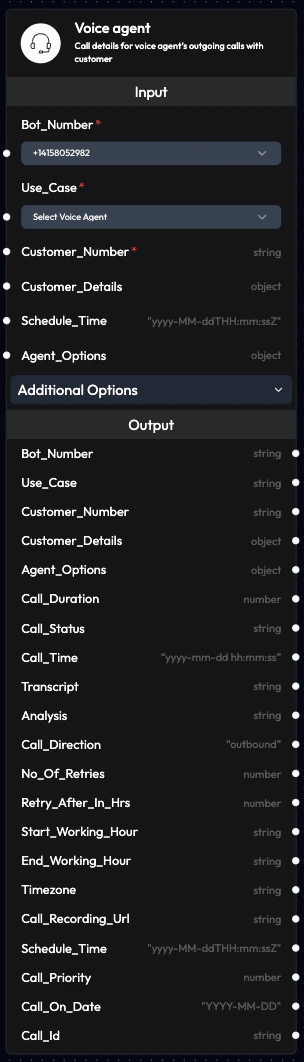
Use Cases
- Outbound Campaigns: Launch sales or marketing call campaigns
- Appointment Reminders: Automated reminder calls for appointments
- Order Confirmations: Confirm orders and delivery details
- Payment Reminders: Follow up on pending payments
- Customer Surveys: Collect feedback and ratings
- Lead Follow-ups: Call leads from your CRM
- Event Notifications: Inform customers about events
- Service Updates: Notify about service changes or outages
Inputs
The Voice Agent Node accepts the following inputs, which can be linked from previous blocks or manually configured:Bot_Number (Required)
- Phone number the voice agent will use to make the call
- Can be linked from a previous block or selected from dropdown
- Data linkage overrides dropdown selection
- Format: +[country code][number]
+91xxxxxxxxxx
Use_Case (Required)
- Defines which voice agent will handle the call
- Can be linked from a previous block or selected from dropdown
- Data linkage overrides dropdown selection
- Must match an existing agent in your account
customer_support, sales_agent
Customer_Number (Required)
- Customer’s phone number to call
- Format: +[country code][number]
- Must be a valid, callable number
+91xxxxxxxxxx
Customer_Details
- Customer information in JSON format
- Used to personalize the conversation
- Can include: name, email, order ID, account details, etc.
Schedule_Time
- Schedule the call for a specific future time
- Format: ISO 8601 date format
YYYY-MM-DDTHH:MM:SSZ - Default: Current time (immediate execution)
2025-12-10T15:30:00Z
Agent_Options
- Override default agent settings for this specific call
- Allows per-call customization
- Can modify: language, voice, initial prompt, etc.
No_Of_Retries
- Number of retry attempts if the call fails
- Default: 0 (no retries)
- Recommended: 2-3 for important calls
2
Retries_After_In_Hrs
- Time interval between retry attempts (in hours)
- Works with No_Of_Retries
- Recommended: 1-2 hours
1
Start_Working_Hour
- Start of business hours in 24-hour format (HH:MM)
- Calls scheduled before this time will be rescheduled
- Respects customer preferences
09:00
End_Working_Hour
- End of business hours in 24-hour format (HH:MM)
- Calls after this time will be rescheduled to next day
- Prevents late-night calls
18:00
Timezone
- Timezone for working hours calculation
- Default: Asia/Kolkata
- Important for international customers
America/New_York, Europe/London, Asia/Kolkata
Outputs
After the call is completed, the Voice Agent Node provides the following outputs:Bot_Number
- Phone number the voice agent used to make the call
- Same as input value
Use_Case
- Voice agent that handled the call
- Same as input value
Customer_Number
- Customer’s phone number that was called
- Same as input value
Customer_Details
- Customer information that was provided
- Same as input value
Agent_Options
- Options that were used to override settings
- Same as input value (if provided)
Call_Time
- Timestamp when the call was made
- Format: ISO 8601
YYYY-MM-DDTHH:MM:SSZ
2025-12-10T10:30:00Z
Call_Status
- Final status of the call
- Possible values:
connected: Call was successfully connectedcouldn't connect: Call failed to connect
connected
Call_Duration
- Duration of the call in seconds
- Excludes ring time
- 0 for failed connections
125 (2 minutes 5 seconds)
Call_Direction
- Direction of the call
- Always
outboundfor this node
outbound
Transcript
- Complete transcript of the call conversation
- Includes speaker tags (Assistant vs Customer)
- Available after call completion
Analysis
- Post-call analysis data (if configured)
- Extracted information from the conversation
- Custom fields defined in agent settings
- Type: String
Call_Recording_Url
- URL to access the call recording
- Available after call completion
- Can be used for quality assurance
- Type: String
Call_Id
- Unique identifier for the call
- Used for tracking and reference
- Type: String
No_Of_Retries
- Number of retries configured (if provided)
Retries_After_In_Hrs
- Retry interval configured (if provided)
Start_Working_Hour
- Working hours start time (if provided)
End_Working_Hour
- Working hours end time (if provided)
Timezone
- Timezone used for scheduling (if provided)
Call_Priority
- Priority level configured (if provided)
- Type: Number
Call_On_Date
- Scheduled date configured (if provided)
- Format:
YYYY-MM-DD
Configuration Examples
Basic Outbound Call
Scheduled Call with Retries
Call with Working Hours
Call with Custom Agent Options
Workflow Integration
Connecting with Other Nodes
From Trigger Nodes:- Call API Node → Voice Agent Node
- Upload Data Node → Voice Agent Node
- Incoming Call Node → Voice Agent Node (for callbacks)
- Voice Agent Node → Send Email Node (follow-up email)
- Voice Agent Node → Send WhatsApp Node (confirmation message)
- Voice Agent Node → Webhook Node (CRM update)
- Voice Agent Node → Schedule Callback Node (if needed)
- Voice Agent Node → AI Query Agent Node (analyze call outcome)
- AI Query Agent Node → Voice Agent Node (make decision-based calls)
Best Practices
Call Timing
- Respect Time Zones: Always set appropriate timezone
- Business Hours: Use Start/End Working Hour constraints
- Spacing: Don’t schedule all calls at once
- Retry Strategy: Set reasonable retry intervals
Personalization
- Use Customer Data: Include name and relevant details
- Context: Provide conversation context in Customer_Details
- Dynamic Prompts: Use Agent_Options for per-call customization
- Relevant Information: Only include necessary data
Quality Assurance
- Test First: Make test calls before launching campaigns
- Monitor: Check Call History regularly
- Review Transcripts: Listen to sample calls
- Iterate: Improve based on feedback
Performance
- Batch Processing: Use Upload Data Node for bulk campaigns
- Rate Limiting: Don’t exceed your concurrent call limit
- Error Handling: Set up retry logic for failed calls
- Monitoring: Track success rates
Monitoring Call Performance
Key Metrics to Track
Connection Rate- Percentage of calls that successfully connected
- Target: >80%
- Low rate indicates phone number or timing issues
- Typical length of conversations
- Helps identify engagement levels
- Very short calls may indicate problems
- Calls that reached intended outcome
- Based on post-call analysis
- Indicates agent effectiveness
- Percentage of retries that succeeded
- Validates retry strategy
- Adjust timing if low
Analyzing Results
Use the outputs to:- Segment Customers: Group by call outcome
- Trigger Actions: Based on call status
- Update Records: Send data to CRM
- Schedule Follow-ups: For unsuccessful calls
- Generate Reports: Export for analysis
Troubleshooting
Call Not Connecting
Possible Causes:- Invalid phone number format
- Number is unreachable or blocked
- Telephony provider issues
- Insufficient credits
- Verify phone number format (+[country][number])
- Test with a known working number
- Check telephony integration status
- Review account balance
Short Call Duration
Possible Causes:- Customer hung up immediately
- Poor audio quality
- Agent not responding
- Wrong number
- Review greeting message
- Test audio quality
- Check agent configuration
- Validate target audience
Calls Not Scheduling
Possible Causes:- Invalid Schedule_Time format
- Time in the past
- Working hours conflict
- Use ISO 8601 format
- Ensure future timestamp
- Review working hour settings
Next Steps
AI Query Agent Node
Process call outcomes with AI
Schedule Callback Node
Schedule follow-up calls
Send Email Node
Send post-call emails
Call History
Monitor call performance