

Overview
The Smart Filter Node allows you to filter data and create conditional logic in your workflows. It evaluates data against specified conditions and routes workflow execution based on the results.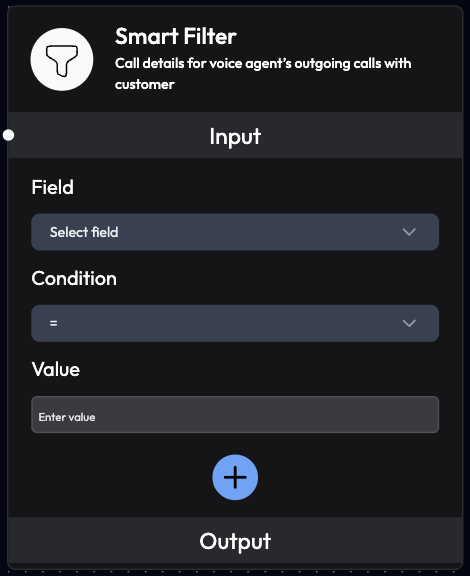
Use Cases
- Conditional Routing: Route workflows based on data values
- Data Validation: Filter out invalid or incomplete records
- Priority Assignment: Categorize by urgency or importance
- Lead Qualification: Filter high-quality leads
- Error Handling: Identify and handle failed operations
- Status-Based Actions: Take different actions based on status
- Threshold Checks: Trigger actions when values exceed limits
- Multi-Criteria Filtering: Apply complex filtering logic
Inputs
Field (Required)
Select a field to apply the filter on. Configuration:- Can be a single field from dropdown
- Can link multiple fields from previous blocks
- Supports nested object properties
Call_StatusCall_DurationCustomer_Details.nameOrder_Amount
Condition (Required)
Define the filtering condition to apply. Available Conditions: Equality:=(equals)!=(not equals)
>(greater than)<(less than)>=(greater than or equal to)<=(less than or equal to)
contains(includes substring)not contains(doesn’t include substring)starts with(begins with text)ends with(ends with text)
is empty(null or empty)is not empty(has value)
Value (Required)
Enter the value to filter by. Format:- Text:
"connected","John Doe" - Numbers:
100,5.5 - Boolean:
true,false
- For status check:
connected - For duration:
60 - For amount:
1000
Add More
Apply multiple conditions simultaneously. Operators:AND: All conditions must be trueOR: At least one condition must be true
Outputs
Filtered Results
Returns only the data that matches the specified filter conditions. Behavior:- If conditions match: Data passes through
- If conditions don’t match: Data is filtered out
- Multiple matches: All matching records returned
Configuration Examples
Example 1: Filter Successful Calls
Example 2: Filter Long Calls
Example 3: Filter High-Value Orders
Example 4: Filter by Customer Name
Example 5: Multiple Conditions (AND)
Example 6: Multiple Conditions (OR)
Workflow Integration
Common Patterns
Pattern 1: Success/Failure RoutingAdvanced Filtering
Nested Field Access
Access nested object properties using dot notation:Array Filtering
Filter based on array properties:Numeric Ranges
Combine conditions for range filtering:Text Pattern Matching
Use text conditions for pattern matching:Best Practices
Condition Design
- Be Specific: Use precise conditions to avoid false matches
- Test Thoroughly: Verify filters with sample data
- Document Logic: Comment complex filter combinations
- Handle Edge Cases: Account for null/empty values
Performance
- Filter Early: Apply filters as early as possible in workflow
- Minimize Conditions: Use only necessary conditions
- Optimize Order: Put most selective filters first
- Batch Processing: Filter large datasets efficiently
Data Quality
- Validate Input: Ensure data format matches expectations
- Handle Missing Data: Account for empty or null fields
- Type Consistency: Match data types (text, number, boolean)
- Case Sensitivity: Consider case when filtering text
Workflow Design
- Clear Paths: Define clear true/false paths
- Error Handling: Handle cases where no data passes filter
- Logging: Log filtered data for debugging
- Monitoring: Track filter effectiveness
Use Case Examples
Customer Service Priority Routing
E-commerce Order Processing
Lead Qualification Pipeline
Troubleshooting
No Data Passing Through
Possible Causes:- Conditions too restrictive
- Data format mismatch
- Field name incorrect
- Value comparison error
- Review and relax conditions
- Verify data types match
- Check field names (case-sensitive)
- Test with known data
Unexpected Results
Possible Causes:- Logical operator error (AND vs OR)
- Case sensitivity issues
- Numeric vs string comparison
- Nested field access error
- Review AND/OR logic
- Use exact case matching
- Ensure correct data types
- Verify nested field paths
Performance Issues
Possible Causes:- Too many conditions
- Large dataset filtering
- Complex nested conditions
- Simplify filter logic
- Filter in stages
- Optimize condition order
Next Steps
AI Query Agent Node
Intelligent decision-making
Webhook Node
Route filtered data to external systems
Send Email Node
Send emails based on filter results
Schedule Callback Node
Schedule callbacks for filtered data
Smart Filter evaluates conditions in real-time. Ensure your data is properly formatted and field names match exactly (case-sensitive).