

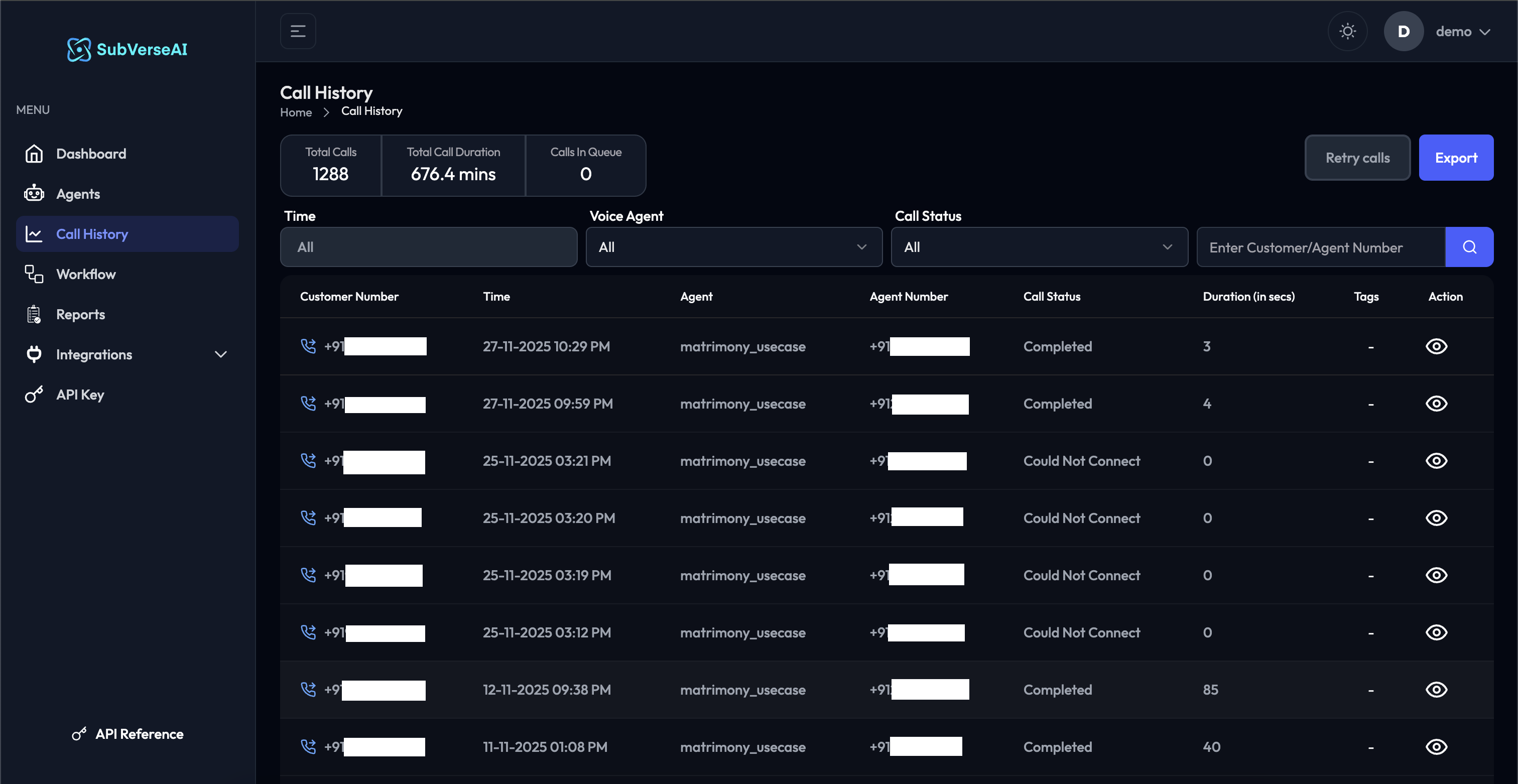
Key Metrics
The dashboard displays three critical metrics at the top: Total Calls- Total number of calls processed across all agents
- Includes all call statuses (completed, failed, in-progress)
- Updated in real-time as calls are made
- Cumulative time spent on all calls
- Displayed in minutes (e.g., 676.4 mins)
- Useful for capacity planning and cost analysis
- Number of calls currently waiting to be processed
- Real-time indicator of system load
- Helps identify peak periods and capacity needs
Call Records Table
Each call record in the table displays comprehensive information: Customer Number- Phone number of the caller or recipient
- Click to view complete customer interaction history
- Masked for privacy compliance when needed
- Date and timestamp of when the call was initiated
- Format: DD-MM-YYYY HH:MM AM/PM
- Sortable for chronological viewing
- Timezone-aware display based on your settings
- Name of the AI agent that handled the call
- Links to agent configuration page
- Useful for comparing performance across different agents
- Phone number or SIP address used by the agent
- Identifies which line or trunk was used
- Important for multi-line or multi-region setups
- Completed: Call finished successfully
- Could Not Connect: Failed to establish connection
- In Progress: Call currently active
- Failed: Call encountered an error
- Abandoned: Customer hung up early
- Length of the call in seconds
- Excludes connection/dialing time
- Zero (0) for failed connections
- Helps identify unusually short or long calls
- Custom labels for categorization
- Can be added manually or automatically via post-call analysis
- Useful for filtering and reporting
- Examples: “resolved”, “escalated”, “follow-up-needed”
- View Details (eye icon): Click to see complete call information
Filtering and Search
Use the powerful filtering options to narrow down your call list:Time Filter
Select from predefined ranges or custom dates:- All time
- Today
- Yesterday
- Last 7 days
- Last 30 days
- Custom date range
Voice Agent Filter
Filter by specific agent:- All: Show calls from all agents
- Select individual agent names to view their calls only
- Compare performance across different agents
Call Status Filter
Filter by call outcome:- All: Show all call statuses
- Completed: Only successful calls
- Could Not Connect: Failed connection attempts
- In Progress: Currently active calls
- Failed: Error encounters
Search Bar
Quick search functionality:- Search by customer number
- Search by agent number
- Real-time search results
- Supports partial matches
Bulk Actions
Retry Calls- Retry failed or disconnected calls
- Select multiple calls for bulk retry
- Useful for recovering from system outages
- Automatically uses the same agent configuration
- Export call data to CSV or Excel format
- Includes all visible columns and filtered data
- Respects current filter settings
- Useful for external analysis and reporting