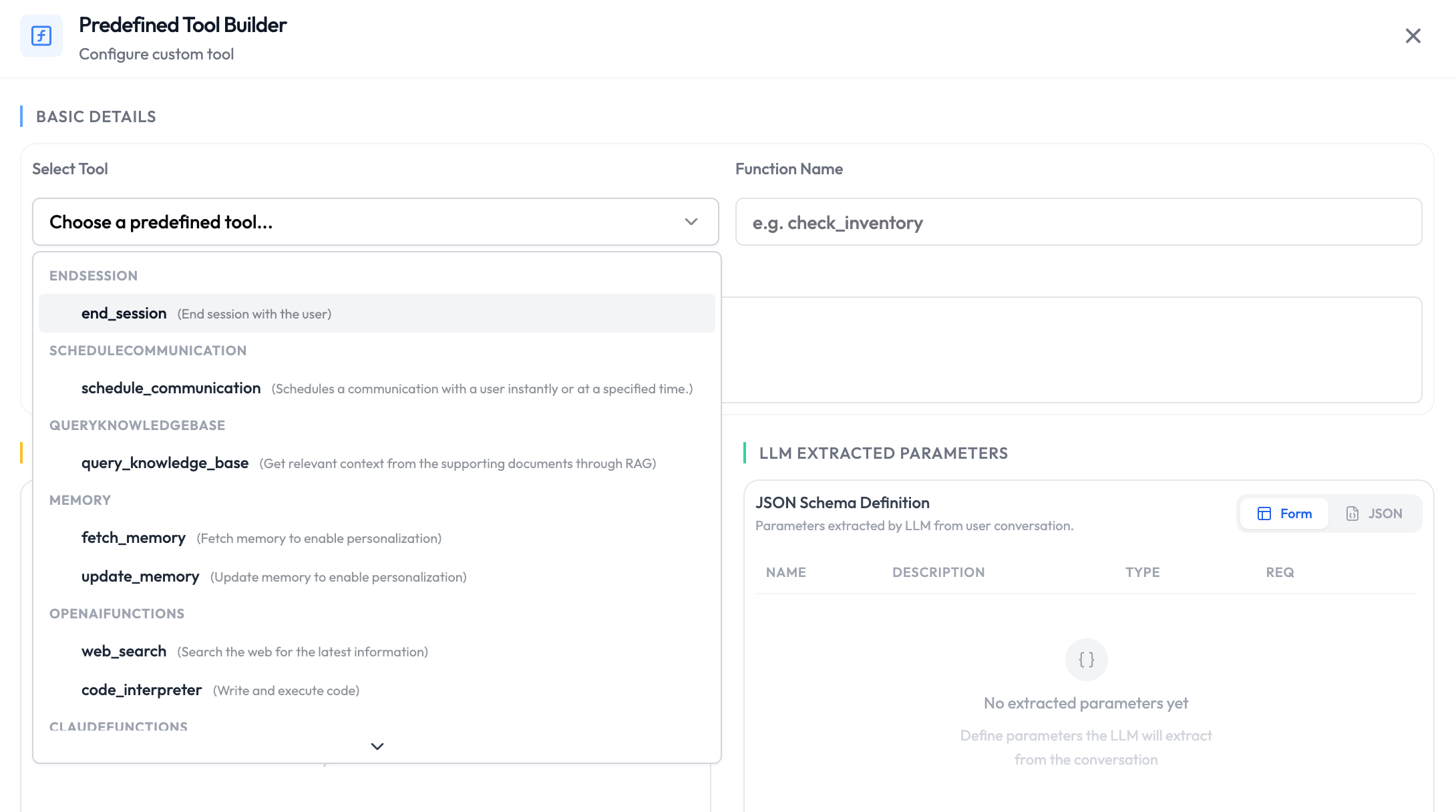
Default functions are pre-built actions provided by SubVerse AI and the underlying LLM provider. They are always available to the LLM during an active session — no webhook or custom code required. Simply enable the ones you need and instruct the agent when to use them.

Available Default Functions

Core Platform Functions

These functions are available regardless of which LLM you use.
FunctionDescription
end_sessionEnd the session when the conversation is complete.
schedule_communicationSchedule a follow-up call, message, or email for a future time.
query_knowledge_baseFetch relevant information from the agent’s connected knowledge base.
fetch_memoryRetrieve previously stored memory for this customer or session. Read more
update_memoryWrite new information to memory for use in future sessions. Read more

OpenAI LLM Functions

Available when your agent uses an OpenAI model.
FunctionDescription
web_searchSearch the web for up-to-date information.
code_interpreterExecute Python code in a sandboxed environment for calculations, data analysis, or file generation.

Claude LLM Functions

Available when your agent uses an Anthropic Claude model.
FunctionDescription
web_searchSearch the web for up-to-date information.
web_fetchRetrieve the contents of a specific URL.
code_executionRun code in a sandboxed environment.
bashExecute bash commands in a sandboxed environment.

Google Gemini LLM Functions

Available when your agent uses a Google Gemini model.
FunctionDescription
google_searchSearch Google for up-to-date information.
url_contextRetrieve and reason over the contents of a URL.
google_mapsLook up locations, directions, and place information.
code_executionRun code in a sandboxed environment.

When to Use Default Functions

Default functions cover the most common actions an agent needs during a session. You do not need to create or configure them — just enable the ones relevant to your use case and instruct the agent in its system prompt when to call them. Common patterns:
  • End the session automatically once the user’s query is resolved.
  • Search the web when the agent needs real-time or external information.
  • Store customer preferences in memory to personalise future sessions.
  • Query the knowledge base for product details or policy documents.
Be explicit in the agent’s system prompt about when to call each function. For example: “When the customer says goodbye or their issue is resolved, call end_session.” or “Use web_search only when the knowledge base does not contain a definitive answer.”

fetch_memory

fetch_memory is a pre-session function that retrieves previously stored memory and injects it into the agent’s context before the conversation begins. The retrieved memory is placed into a dynamic variable that you define, which you can then reference anywhere in the agent’s system prompt.

How It Works

When a session starts, fetch_memory looks up the memory stored under the given memoryId and makes it available as a dynamic variable named by paramName. From that point on, you can reference the memory in your system prompt using the standard double-curly-brace syntax — {{ paramName }}.

Parameters

ParameterTypeRequiredDescription
memoryIdstringYesID of the memory to retrieve. Accepts dynamic variables — use a session variable like {{ claimId }} or a nested tool body field like {{ body.userDetails.id }}.
paramNamestringYesName of the dynamic variable the retrieved memory will be injected into.
memoryId supports both top-level session variables ({{ claimId }}) and nested tool body paths ({{ body.userDetails.id }}). This makes it straightforward to scope memory to the specific customer or entity being passed in the request payload — no extra configuration needed.

Example

// Tool params
memoryId: {{ claimId }}
paramName: claimMemory

// Tool response
{
  "dynamicVariables": {
    "claimMemory": "Previous conversation memory for this claim..."
  }
}

// System prompt usage
Here is the previous claim memory which you can refer to if needed: {{ claimMemory }}
Memory is shared across all agents and customers in your workspace. Always use a customer-specific memoryId — such as the customer’s user ID or claim ID — to prevent one customer’s memory from being accessible to another.
If no memory exists for the given memoryId, the dynamic variable returns null. Handle this gracefully in your system prompt — for example: “If {{ claimMemory }} is empty, treat this as a new customer with no prior history.”

update_memory

update_memory is a post-session function that extracts key information from the conversation and saves it under a given memoryId. If memory already exists at that ID, the function merges the new conversation with the prior memory to produce an updated record — nothing is lost.

How It Works

After the session ends, the LLM reads the full conversation alongside your prompt instructions, extracts the relevant information, and writes it to the memoryId. If existing memory is found at that ID, it is combined with the new extraction so the stored record stays cumulative across sessions.

Parameters

ParameterTypeRequiredDescription
memoryIdstringYesID under which the memory will be stored. Accepts dynamic variables (e.g. {{ claimId }}).
promptstringYesInstructions telling the LLM what to extract and save from the conversation. This field is required — update_memory will not run without it.

Example

// Tool params
memoryId: {{ claimId }}
prompt: Store what has been discussed for this claim with dates and issues
Be specific in your prompt. A vague instruction like “summarise the conversation” produces vague memory that is less useful on retrieval. Instead, describe exactly what to capture — dates, decisions, open issues, customer preferences — so the stored memory is immediately actionable next session.

Availability

FunctionPre-SessionDuring-SessionPost-Session
end_sessionNoYesNo
schedule_communicationNoYesNo
query_knowledge_baseNoYesNo
fetch_memoryYesNoNo
update_memoryNoNoYes
LLM-native functionsNoYesNo

Next Steps

Agent Handoff

Route conversations to a specialized agent

Custom Functions

Add your own API calls for the LLM to execute