Conditions
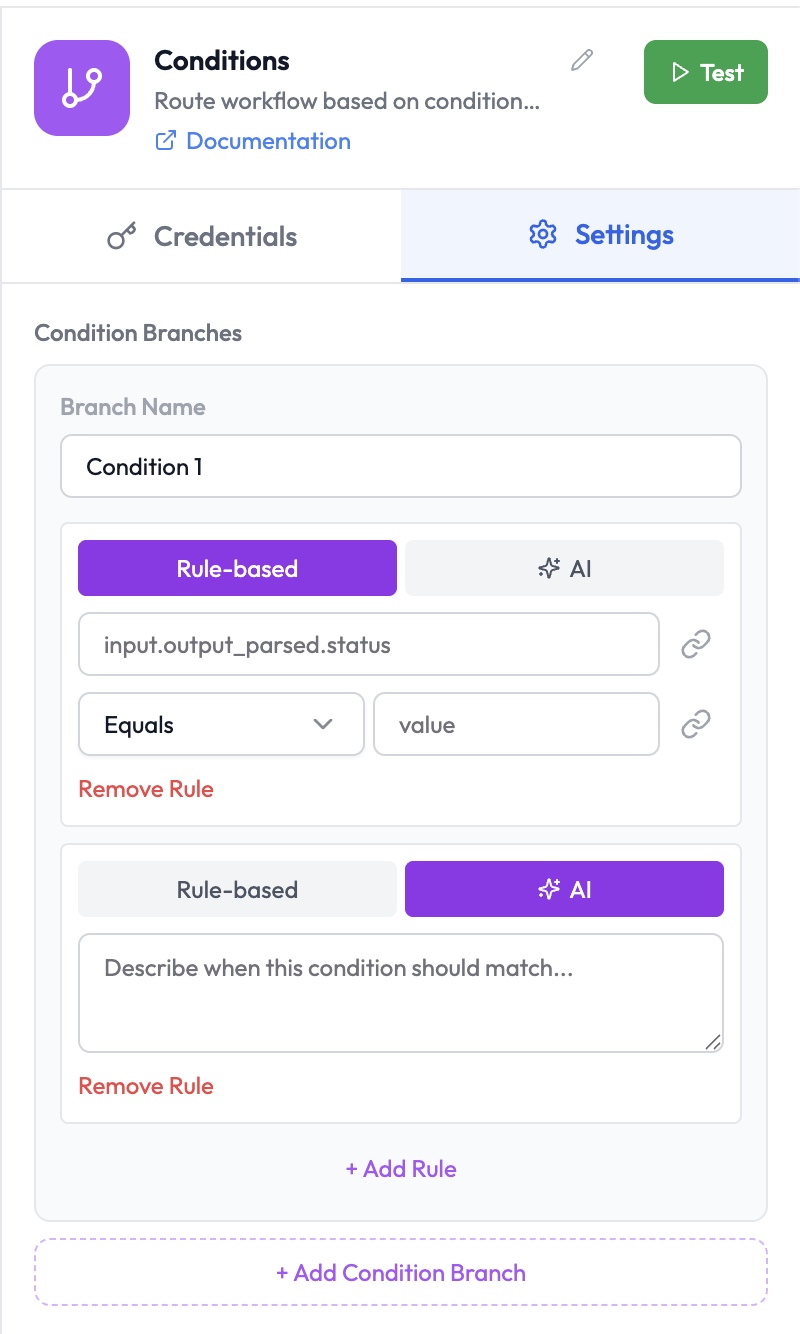
The Conditions node routes execution to different branches based on evaluated conditions. Each branch has an output connection, and data is routed to the first branch whose condition is true.
Use Cases
- Route an order to different fulfillment workflows based on order value
- Send different Slack messages depending on AI agent output
- Escalate to a human if an AI response confidence is low
- Branch on HTTP response status codes from an upstream node
Node Reference
Parameters
Each Conditions node has one or more Condition Branches. Each branch has a Branch Name and one or more rules.| Parameter | Type | Description |
|---|---|---|
| Branch Name | String | A label for this branch (e.g. Condition 1, High Value) |
| Rule Type | Toggle | Rule-based — define a field comparison; AI — describe the condition in plain language |
| + Add Rule | Button | Add an additional rule to this branch |
| + Add Condition Branch | Button | Add a new output branch to the node |
Rule Types
Rule-based
Define conditions manually using field comparisons:| Field | Description |
|---|---|
| Value 1 | Left-hand side — reference upstream data using dot notation (e.g. input.output_parsed.status) |
| Operation | Comparison operator (see below) |
| Value 2 | Right-hand side — static value or expression |
Available Operators
| Operator | Description |
|---|---|
Equal | Value 1 equals Value 2 |
Not Equal | Value 1 does not equal Value 2 |
Greater Than | Value 1 > Value 2 (numeric) |
Less Than | Value 1 < Value 2 (numeric) |
Greater Than or Equal | Value 1 ≥ Value 2 (numeric) |
Less Than or Equal | Value 1 ≤ Value 2 (numeric) |
Contains | String contains substring |
Does Not Contain | String does not contain substring |
Starts With | String starts with prefix |
Ends With | String ends with suffix |
Is Empty | Value is empty, null, or undefined |
Is Not Empty | Value has a non-empty value |
Regex Match | String matches a regular expression |
AI Mode
In AI mode, describe the condition in plain language. AgentVerse evaluates the upstream data against your description using an LLM.| Field | Description |
|---|---|
| Condition Description | Natural language description of the condition (e.g. “The customer is asking to speak to a manager”) |
Multiple Branches
Each condition creates a separate output branch. The node routes data to the first branch whose condition evaluates totrue. If no condition matches and a fallback branch is enabled, data is routed to the fallback.
| Branch | Condition |
|---|---|
| Branch 1 | {{ order.total }} >= 1000 |
| Branch 2 | {{ order.total }} >= 500 |
| Branch 3 (Fallback) | Everything else |
Output Data
Each branch receives the same input data that entered the Conditions node. No transformation is applied — conditions only control routing.Related Nodes
- For Loop — Iterate over an array conditionally
- Human in the Loop — Route edge cases for human review
- AI Agent — Use AI mode with an upstream LLM node for complex evaluations